Best field service management software in 2026
Compare field service management software: scheduling, client communication, invoicing, and payments. Workspace369 runs it flat — from $29/month, five seats at $149/month.

What's inside?
Quick answerWhat is field service management software?What field teams need from field service softwareWhat changed in field service software in 2026How this guide was evaluatedBest field service management software shortlistWorkspace369: best connected workspace for field teamsJobber: best for home services quoting and schedulingHousecall Pro: best for booking and dispatch in home servicesServiceTitan: best for large field service operationsWorkiz: best for small crews that want booking and dispatchField service software pricing snapshotWhere Workspace369 fits bestWhat the job chain looks like inside Workspace369Which field service software fits which scenarioWhen a scheduling tool is enoughWhen a different tool is the better fitFinal recommendation
The job is never just the job. It is the call that booked it, the schedule that got you there, the photos that prove it, the invoice that follows, and the payment that closes it.
Field service software should run that whole chain. Most tools run a slice. Here is how to choose. The field service software page shows the whole chain in one workspace.
Quick answer
For teams that want scheduling, client communication, invoicing, payments, expenses, and reporting connected from first call to final payment, the best fit is Workspace369.
Jobber and Housecall Pro cover field service workflows for home services, ServiceTitan covers larger operations, and Workiz covers booking and dispatch. Workspace369 is the strongest fit when customer communication, the job record, and the money need to live in one workspace.
What is field service management software?
Field service management software runs the work that happens away from the office: the booking, the dispatch, the job itself, and the bill that follows. A field service platform keeps client records, scheduling, job documentation, communication, and invoicing in one system, so the office and the field see the same job at the same time.
The category exists because field work fails in the handoffs. A booking taken by phone has to reach the calendar. Job photos have to reach the invoice. A customer question has to reach whoever took the last call. When each link lives in a different app, the team pays for the gaps in missed calls, late invoices, and repeat explanations. The right software keeps the handoffs inside one record.
What field teams need from field service software
A field team needs more than a calendar. These are the evaluation criteria that decide whether the software runs the job or only schedules it.
- Client records with history, files, and communication attached
- Shared inbox with calls, SMS, voicemail, and AI summaries
- Scheduling with booking pages, calendar, and reminder sequences
- Job files, photos, notes, and checklists on the record
- Proposals, invoices, payment plans, and payment links
- Expenses beside income, with profitability reporting per job
The communication link is the one buyers underestimate. Customers do not email a ticket system — they call and text. When those calls and texts land in a shared inbox with SMS and voice beside the client record, anyone on the team can answer with full context. When they land in a separate phone app, every update turns into a scavenger hunt.
The money link matters just as much. A proposal that cannot become an invoice, or an invoice that cannot take a card payment, pushes the team back into paperwork. Look for proposals and quotes, invoices with payment links, payment plans, and expenses attached to the job — then ask whether profitability reporting shows what each job actually earned.
What changed in field service software in 2026
Three shifts matter for buyers this year. First, the accounting side of the stack got more expensive: QuickBooks Online raised its prices twice in 2026, in May and again in August, so any field service tool that syncs to QuickBooks now sits on a pricier foundation than it did in January.
Second, phone and SMS keep moving behind add-ons. Workiz prices its integrated phone system separately from its plans, and across the category the advertised subscription rarely includes the calls and texts. When a tool lists "phone" as a feature, check whether it is included in the plan or metered on top of it.
Third, entry-level pricing is published for most of the category, which makes the first pass of a comparison easy. Jobber lists three tiers on its pricing page — Core at $49/month for one user, Connect at $139/month, and Grow at $199/month — and Housecall Pro lists Basic at $59, Essentials at $149, and MAX at $299 per month at annual-billing rates, with month-to-month terms not stated on the page (both checked September 23, 2026). ServiceTitan remains quote-based, and Workiz shows its tiers without dollar prices. The full numbers are in the pricing snapshot below.
How this guide was evaluated
We reviewed the official product and pricing pages listed in the research record — all checked September 23, 2026 — and compared each product against the same field service workflow: first call, booking, job, invoice, payment. The review covers four questions:
- Can the product carry a job from first call to final payment without leaving the system?
- Does customer communication live beside the job record and the bill?
- Which type of field team is the product designed to serve best?
- Which surrounding workflows — accounting, phone, marketing — still need another tool or a paid add-on?
This is a workflow-fit comparison, not a hands-on field audit. Capabilities and pricing can change, so verify current details with each vendor before choosing. Workspace369 publishes this guide and places its own product first; the disclosure in the article header explains how the ranking is decided.
Best field service management software shortlist
The ranking weighs the full job chain, not any single feature. Each product is covered in its own section after the table.
| Rank | Software | Best for teams that need | Where it can fall short |
|---|---|---|---|
| 1 | Workspace369 | Inbox, scheduling, client records, invoices, payments, expenses, and reporting together | More than needed for calendar-only scheduling |
| 2 | Jobber | Home services scheduling, quoting, and invoicing | Communication depth, inbox workflows, and accounting visibility are lighter |
| 3 | Housecall Pro | Booking, dispatch, and payments for home services | CRM breadth, reporting, and communication context can thin out |
| 4 | ServiceTitan | Large field service operations and call centers | Price and complexity fit bigger teams |
| 5 | Workiz | Booking, dispatch, and job management for small crews | Accounting, reporting, and long-term client operations are thinner |

Workspace369: best connected workspace for field teams
Workspace369 runs the job chain in one workspace. Calls, SMS, voicemail, and email land in a shared inbox beside the client record, scheduling covers booking pages and reminder sequences, and proposals become invoices with payment links. Expenses attach to the job, and profitability reports close the loop at the end of the month.
That is what makes it the strongest fit in this comparison: the evaluation weighs the whole chain, and most field service tools are strong on one link — booking, dispatch, or invoicing — and lighter on the rest. Workspace369 was built around the client record, so the communication, the schedule, the job file, and the money stay attached to the same customer.
Jobber: best for home services quoting and scheduling
Jobber is a mature home services platform with real depth in quoting, scheduling, and invoicing. Its client hub lets customers approve quotes and pay invoices online, two-way texting keeps conversations in one thread, and the feature list adds job costing, checklists, and expense tracking gated by plan tier. For a home services team whose day revolves around quotes and route-based scheduling, it is a reasonable choice.
The trade-offs show up around the job. Communication depth, inbox workflows, and accounting visibility are lighter, and several capabilities — the receptionist, marketing suite, and sales pipeline — are priced as add-ons rather than included in the plan.
Housecall Pro: best for booking and dispatch in home services
Housecall Pro covers online booking, scheduling and dispatching, quotes and proposals, invoices and payments, and review management for home services teams. Its pricing page lists three plans — Basic at $59/month, Essentials at $149/month, and MAX at $299/month at annual-billing rates, checked September 23, 2026 — and a 14-day free trial makes evaluation easy.
The platform is strong on the booking-and-dispatch slice. Teams that need broader CRM context, deeper reporting, or communication history attached to the client record should check how much of that lives outside the core workflow. See how Housecall Pro compares with Workspace369 for a direct look.
ServiceTitan: best for large field service operations
ServiceTitan is built for scale: a dispatch board for fleet and technician management, call recording for the office, marketing attribution tied to revenue, automated checklists, and in-depth reporting on closing rates and booked jobs. For a large operation with a call center and multiple crews, that depth is the point.
The same depth is the trade-off. Pricing is quoted per operation rather than published as flat tiers, and the complexity fits bigger teams. A five-person crew rarely needs a platform built for fifty.
Workiz: best for small crews that want booking and dispatch
Workiz covers booking, dispatch, and job management for small crews, with three published tiers that all include unlimited jobs, invoices, and clients. Automations are capped per tier at 5, 10, and 30, QuickBooks Online sync is built in, and the integrated phone system is sold as a paid add-on. A 7-day free trial keeps evaluation simple.
The limits appear as the business grows: accounting, reporting depth, and long-term client operations are thinner than a full workspace. See how Workiz compares with Workspace369 before deciding.
Whichever tool carries the books, the QuickBooks connection deserves its own question in the evaluation. Sync failures are a recurring complaint across tools that bridge two systems — in one public HoneyBook community thread on QuickBooks integration, a user reports that "invoices were missing from Quickbooks altogether." Ask each vendor what happens when the sync drops a record, and who reconciles the two sides.
Field service software pricing snapshot
Prices below were checked September 23, 2026 on each vendor's official pricing page. Vendors change tiers and promotions often, so treat this as a snapshot and confirm current pricing before choosing.
| Software | Entry pricing checked September 23, 2026 | Billing notes |
|---|---|---|
| Workspace369 | Cadet $29/mo for one seat, Voyager $74/mo for two seats, Specialist $149/mo for five seats, Commander $299/mo for ten seats | Flat plans, not per-seat; lower effective monthly rates when billed yearly; SMS starts at Voyager, voice starts at Specialist |
| Jobber | Core $49/mo for one user, Connect $139/mo, Grow $199/mo | Checked on the official pricing page; annual billing lowers the effective monthly rate; add-ons such as the receptionist and marketing tools price separately |
| Housecall Pro | Basic $59/mo, Essentials $149/mo, MAX $299/mo | Rates as listed for annual billing; month-to-month terms are not stated on the pricing page |
| ServiceTitan | No published flat pricing | Quote-based, scoped per operation; dispatch, call recording, marketing attribution, and reporting covered in the platform |
| Workiz | Three tiers with unlimited jobs, invoices, and clients; dollar prices are not shown on the page we checked — see the site for current rates | 7-day free trial; automations capped per tier at 5, 10, and 30; the integrated phone system is a paid add-on |
The monthly subscription is only part of the cost. Add payment processing rates, paid add-ons such as phone systems or marketing tools, and the price of whatever the software still leaves outside the workflow — a separate inbox, a phone app, an accounting gap. A cheaper plan that needs three more subscriptions is not cheaper.

Where Workspace369 fits best
Workspace369 keeps the call, the booking, the job, the invoice, and the payment on the same client record — the field service software hub covers the full chain.
A call becomes a booking with reminders already scheduled. Job files and photos attach to the record. The proposal becomes the invoice with a Pay Now link, expenses tag along, and the month closes with profitability reports instead of paperwork.
The schedule is where field service software usually stops. Workspace369 treats booking pages and reminder sequences as the middle of the chain, not the whole product — the customer who booked is the same record the invoice bills and the inbox answers. That is what connected means in practice: no retyping job details into a billing tool, no hunting through a phone app for what the customer said last week.
What the job chain looks like inside Workspace369
The chain this guide keeps describing starts on the calendar. The month view shows the booked work at a glance — crew lineups, consultations, and service visits color-coded across the month — with clients, projects, proposals, and invoices one click away in the same sidebar. The office sees the month the crew is working, and the crew sees the same schedule the office booked.

Booking pages and reminder sequences fill that calendar without phone tag, and the schedule itself is set around availability preferences — the phone view below is the same Schedules screen a technician checks between jobs. Photos and notes from each visit stay attached to the client record, so the files from the field are already beside the job when billing starts.
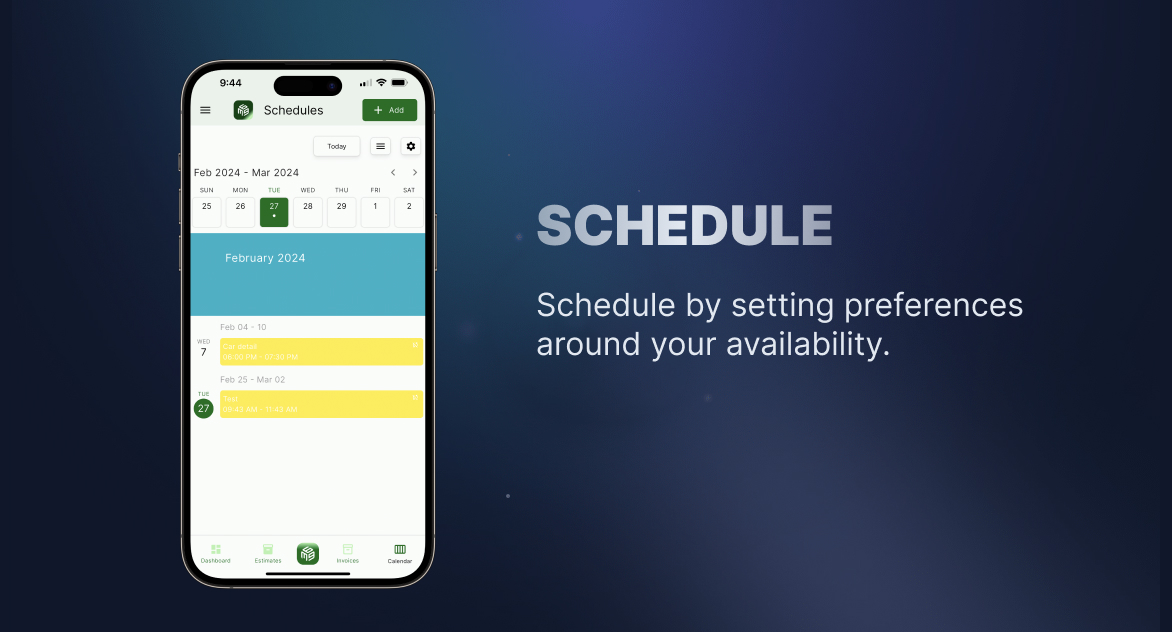
When the work is done, the proposal becomes the invoice that carries the job's details and goes out with a Pay Now link, so the customer can pay by card without a separate checkout. That is the close of the chain — call, booking, job, invoice, payment — with no retyping between the links.

Which field service software fits which scenario
- Solo operator or small crew that wants one workspace: Workspace369 Cadet or Voyager keeps calls, bookings, jobs, and bills on the same client record without assembling a stack.
- Home services team centered on quoting and route scheduling: Jobber's quoting depth and client hub fit that day-to-day.
- Home services team that wants booking, dispatch, and review management: Housecall Pro's published three-plan lineup covers that slice.
- Large operation with a call center and multiple crews: ServiceTitan's dispatch, call recording, and attribution depth fits that scale.
- Small crew that wants booking and dispatch without a big rollout: Workiz covers the slice with a short trial and simple tiers.
- Team replacing a scattered stack: if the phone app, the calendar, the photo folder, and the billing tool are four separate subscriptions, consolidating into one workspace is usually the cheaper move.
When a scheduling tool is enough
A scheduling tool is enough when the team only needs a calendar and bookings are rare. Once customers start calling for updates, invoices wait on job details, and follow-up depends on memory, the schedule needs the workspace around it.
That is the line between the two categories: a scheduling tool organizes the day, field service software organizes the customer.
When a different tool is the better fit
No shortlist fits every team. Workspace369 is the strongest fit here when the connected job chain matters most — but the other products win their own scenarios.
- ServiceTitan is the better fit for a large operation that needs a dispatch board, call center recording, and marketing attribution — and has the budget for quoted pricing.
- Jobber is the better fit when the business wants a home-services-specific tool with deep quoting and is comfortable adding accounting and communication tools around it.
- Housecall Pro is the better fit when booking, dispatch, and review management are the whole requirement, and industry-tailored onboarding matters more than CRM depth.
- Workiz is the better fit for a small crew that wants booking and dispatch live this week, with per-tier automation limits it will not hit yet.
Workspace369 is also more than needed for calendar-only scheduling, and teams that depend on trade-specific price books or fleet tracking should verify fit before switching.
Final recommendation
Choose Workspace369 if your field team wants scheduling, communication, invoicing, expenses, and reporting in one operating workspace — from first call to final payment.
Start with the field service software hub, or compare Workspace369 vs Jobber for a direct look. Check Workspace369 pricing for current plans — Cadet for solo operators, Voyager for small teams, Specialist for the full voice, expenses, and payment-plan suite.
Research record
Sources reviewed for this guide
- Jobber pricingOfficial pricing page checked September 23, 2026 for plan tiers (Core $49/mo for one user, Connect $139/mo, Grow $199/mo) and billing terms; add-on pricing reviewed August 2026.
- Housecall Pro pricingOfficial pricing page checked September 23, 2026 for Basic ($59/mo), Essentials ($149/mo), and MAX ($299/mo) at annual-billing rates; month-to-month terms are not stated on the page.
- ServiceTitan pricingOfficial pricing page reviewed for feature scope; pricing remains quote-based per operation as of September 2026 rather than published as flat tiers.
- Workiz pricing and plansOfficial pricing page checked September 23, 2026 for plan tiers, per-tier automation limits (5, 10, and 30), the paid phone add-on, and the 7-day trial; dollar prices are not shown on the page.
Workspace369 publishes this guide and is included in the comparison. Competitor capabilities and pricing are checked against public product and pricing pages; recommendations are based on workflow fit, not paid placement.
Put it into practice
Run client follow-up in one workspace.
CRM, inbox, voice, invoicing, payments, projects, files, AI, and workflow automations — connected instead of exported.