The problems client work creates — solved in one workspace.
Agencies, consultants, and service businesses come to Workspace369 with the same six problems. Every one of them traces back to the work, the conversation, and the money living in different tools.
14-day free trial. Card required. After the trial: from $29/month. Renews automatically every month until you cancel. Cancel anytime in Settings → Billing.
Sound familiar?
What people are actually trying to solve when they find us
I send the invoice, then spend three weeks chasing the payment.
What changes
Invoices go out with payment links and payment plans built in, and the follow-up cadence runs itself — a reminder one day after the due date, another at three, a firmer note at ten. Payment status lands on the client record.
The client said 'call me' — and nobody on the team knows what was promised.
What changes
Every call, text, email, and voicemail lands on the same client timeline, with AI summaries. Anyone can open the record and know exactly where the account stands.
I retype the same client details into my CRM, my project tool, and my invoicing app.
What changes
One record carries the client, the requests, the projects, the files, and the invoices. Add it once — it is everywhere it needs to be, with the full history attached.
I have no idea which clients owe me money right now.
What changes
Receivables show open, due, and overdue by client with AR aging — next to the work that created the invoice, not in a spreadsheet you rebuild every month.
Moving to new software means losing five years of client history.
What changes
CSV import with AI mapping reads any export, proposes the field mapping, and lets you review everything before anything is written. Most teams bring the full history over in an afternoon.
Every one of those problems has the same root cause: the client, the work, the conversation, and the money living in different apps. Workspace369 is the after picture.
Before
The scattered stack
Gmail threadsthe conversation
Spreadsheet CRMthe client list
Task boardthe work
Invoice PDFsthe money
Phone callsthe promises
Five tools. Five versions of the truth.
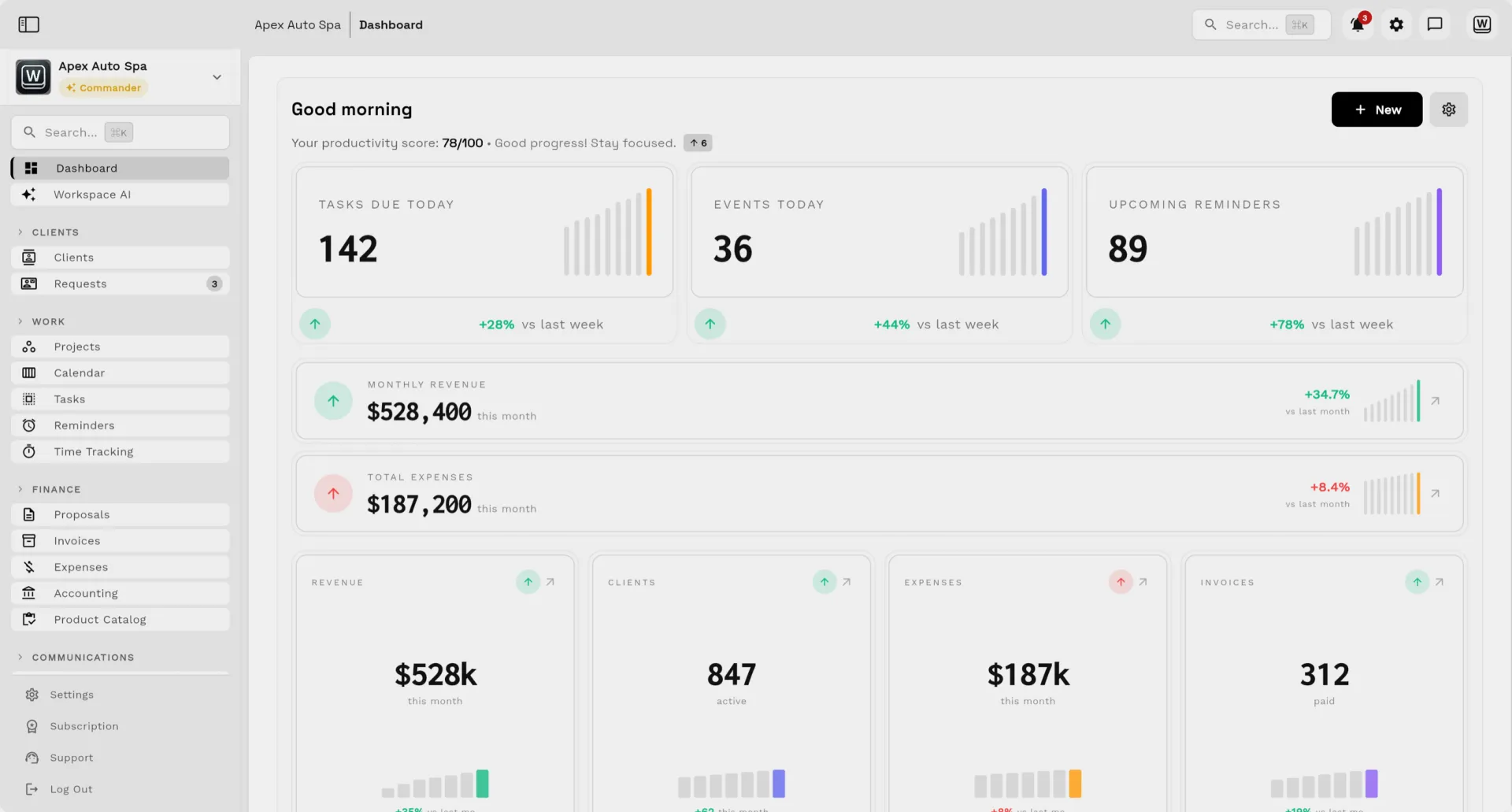
AfterOne workspace — the real product, not a mockup.
01
Propose
The proposal goes out as a live link, priced from the record.
02
Approved
The client approves online — no PDF ping-pong.
03
Deliver
The project spins up with boards, tasks, and files attached.
04
Paid
The invoice collects online and the record updates itself.
★ 5.0 from 12 ratings on the App Store (as of 2026-10-15). Quoted exactly as written; a selection, not all reviews. The overall rating includes ratings from our team.
★★★★★
SMB Modernization
Great tool for modernizing small businesses. Ability to leverage AI without technical background.
Great app. This app solved all my needs! Not only did it help, but it is cheaper than other apps. I highly recommend this app if you want to start organizing and automating your business on another level. Also love the design
Every goal on this page comes back to the same idea: the client record, the work, the conversation, and the money should live in one place — not in five tabs.
1workspace for CRM, projects, inbox, billing, and AI
26locale editions of every public page
$29flat monthly starting price — no per-seat surprises
Every planincludes the MCP connector for Claude and ChatGPT, once an admin turns it on
Clients & relationships
CRM records, shared inbox, SMS, Workspace Voice, client portal, and files — every relationship with its full history attached.
Workspace369 is a client-work operating system: CRM, projects, shared inbox, SMS and voice, proposals, invoices, payments, AI, workflow automations, accounting, and reporting in one workspace. It is built for agencies, consultants, and service businesses that currently run client work across a stack of disconnected tools.
How does Workspace369 help me get paid faster?
Invoices go out with online payment built in — payment links, payment plans, deposits, and retainers — and automated follow-up reminds clients on a schedule you set. Payment status lands on the invoice and the client record, so nothing ages quietly.
Can I import my data from other tools?
Yes. CSV import with AI mapping reads any export — clients, invoices, products, projects, expenses — proposes the field mapping, and lets you review everything before anything is written. Most teams bring their full client history over in an afternoon.
What does Workspace369 cost?
Plans priced by included seats: Cadet is $29/month for one seat, Voyager $74/month for two seats, Specialist $149/month for ten seats, Commander $299/month for twenty seats, and Enterprise $699/month for fifty seats. Extra seats are $10/month each from Voyager, higher plans unlock more features, and annual billing lowers each plan further.
Does it work with the tools I already use?
Workspace369 connects Google Calendar and Stripe, brings in Gmail or Microsoft 365 mail over SMTP and IMAP or by forwarding (one-click sign-in is coming soon), and offers webhooks, API workflows, and MCP for AI clients. SMS, calling, and transactional email are provisioned for you — there is nothing to set up on Twilio or SendGrid.
What makes it different from stitching tools together?
Stitched stacks lose context at every handoff: the proposal in one app, the project in another, the invoice in a third. In Workspace369 the client record carries all of it — the request, the proposal, the project, the conversation, the invoice, and the payment — so anyone on the team can understand an account without asking around.
14-day free trial. Card required. After the trial: from $29/month. Renews automatically every month until you cancel. Cancel anytime in Settings → Billing.