Best mobile detailing software in 2026: scheduling, invoicing, and client records
Five mobile detailing tools compared on entry price, online booking, SMS reminders, vehicle records, users and trial terms, vendor pages checked Oct 23, 2026.
We make Workspace369 and list it first here. Weigh our ranking with that in mind, and if another tool fits you better, use it.

By Simon Dziak, Founder, Workspace369 · LinkedIn
Reviewed by Workspace369 product team · Product accuracy review
The best mobile detailing software keeps the booking, the reminder text, the quote for the add-on agreed in the driveway, the invoice and the payment on one client record, so nothing is retyped at 9pm. Workspace369, our product, fits an owner-operator who wants that business side in one workspace. Urable and DetailPro add vehicle profiles, Mobile Tech RX adds recon estimating, and Jobber suits detailing as one of several field-service lines. Price your packages first with the free estimate template.
Disclosure and method: Workspace369 publishes this guide and is one of the options. It is a documentation-based shortlist, not a hands-on benchmark. Official vendor pages were reviewed on October 23, 2026. Check current plans with each vendor before you buy.
Key takeaways
- Mobile detailing software should keep the booking, the reminder text, the quote for the add-on, the invoice and the payment on one client and vehicle record.
- Urable lists unlimited users on every plan, from $70 a month (Express); online booking and custom lead forms start at Pro ($120 monthly, $110 a month billed yearly).
- DetailPro lists online booking, SMS reminders, two-way texting, point of sale and vehicle profiles on Professional at $99 a month, with a 14-day trial and no card.
- Mobile Tech RX charges per admin and per extra user ($39 plus $15 on Getting Started), includes one service module at entry and gives a 5-day trial.
- Workspace369 Cadet is $29 a month ($23.25 billed yearly) for Proposals, invoices, payment links and client records; SMS starts at Voyager ($74) and online booking at Specialist ($149), and it has no vehicle profiles.
What's inside?
What mobile detailing software is (and what it is not)How we compared these toolsThe best mobile detailing software in 2026Side-by-side comparisonWhich mobile detailing software fits your business?How a detailing day runs in Workspace369Final recommendation
What mobile detailing software is (and what it is not)
Mobile detailing software runs a detailing business that travels to the car: it takes the booking, reminds the client to leave the vehicle accessible, quotes add-ons such as paint correction or ceramic coating, invoices the finished job, takes payment on the spot and keeps the history for the next visit. Detailing-specific tools add vehicle profiles, VIN scans and inspection photos. It is not a car-wash tunnel controller, a dealer management system or a general accounting package. The mobile detailing software page shows how Workspace369 handles the business side.
How we compared these tools
We used only each vendor's own pricing and product pages and checked five points:
- Entry price for one person, monthly and billed yearly where offered, ignoring limited-time offers.
- Booking and reminders: online booking and SMS reminders, and the plan that holds each.
- Quote to payment: quotes or Proposals, invoices and card payment on the entry plan.
- Vehicle and client record: vehicle profiles, photos and history on the customer record.
- Users and trial: how users are priced, and the trial length and card terms.
Every price captured in a browser was compared with the vendor's server-rendered page or published plan data; DetailPro and Jobber show no prices to plain page requests, so a second, separate browser session had to show the same figures. We did not test speed, support or mobile app quality, and used no review sites. Order reflects documented fit for a one-to-five-person mobile operation that wants the business side in one place; shops that need vehicle profiles first should read Urable and DetailPro first.
The best mobile detailing software in 2026
1. Workspace369, best for running the business side on one client record
Workspace369 is our product. Cadet is $29 a month ($23.25 billed yearly) for one seat and lists client records with custom fields, the team calendar, email appointment reminders, Proposals with a deposit on acceptance, invoices, payment links, recurring invoices, file attachments for before-and-after photos and late-payment reminders on every plan. Voyager ($74 a month, $59.25 yearly, 2 seats) adds SMS, SMS reminders, missed-call text back and the shared inbox. Specialist ($149 a month, 10 seats) adds online booking, payment plans, expense tracking and inventory.
Limitations: it is not detailing-native, with no vehicle profile, VIN scan, coating or PPF package builder or membership program; use custom fields and recurring invoices instead. Texting starts at Voyager and online booking at Specialist. Cadet automations are email only. The 14-day trial needs a card.
Best for: an owner-operator, or a small team on Voyager, whose real problem is booking, texts, quotes and invoices spread across separate apps.
2. Urable, best for a trade-built CRM with unlimited users
Urable is built for detailing, ceramic coating, PPF and tint businesses. In the US, Express is $70 a month, Pro $120 and Enterprise $220 billed monthly; billed yearly they are $840, $1,320 and $2,200 a year ($70, $110 and about $183 a month). Every plan lists unlimited users. Express lists automated reminder messaging, employee job assignment, Stripe and Square integration, text and email invoicing and inventory tracking. Pro adds custom lead forms, online booking, long-term follow-up messaging, document storage, QuickBooks integration and profit analytics. Enterprise adds recurring billing, video inspections, customizable workflows, automated payment request reminders and commission tracking.
Limitations: online booking starts at Pro and recurring billing at Enterprise, so a membership business pays $220 a month. The page states no trial length or card terms.
Best for: coating, PPF or tint businesses with several techs who want trade-shaped workflows and no per-user charge.
3. DetailPro, best for shops that want point of sale and vehicle profiles
DetailPro lists Professional at $99 a month with online booking, automated SMS appointment reminders, two-way customer texting and calling, a full point of sale, calendar and tech assignment, customer and vehicle profiles and a mobile app. Growth ($199) adds a website lead form, lead management, reputation and review management, gift cards and deals. Ultimate ($299) adds skill-based tech assignment, team performance tracking, fleet and AR billing, ACH payments and subscription billing. Each plan lists a 14-day trial with no credit card, and the page gives a 30-day money-back policy.
Limitations: the entry price is the highest of the detailing tools here, and subscription billing and fleet AR billing sit on the $299 plan. No yearly price is shown.
Best for: established shops with walk-in or fleet work that want point of sale and vehicle profiles from the first plan.
4. Mobile Tech RX, best for recon businesses that estimate by variables
Mobile Tech RX comes from auto reconditioning: detail, dent repair, paint, glass, wheels and tint. Getting Started is $39 a month per admin plus $15 per additional user, with one service module of your choice, 50 customer text alerts a month, estimating modules, unlimited estimates and invoices, scheduling, before-and-after photos, card processing and basic reporting. Standard ($99 per admin, $29 per user) adds a client portal, deposits on estimates, tech pay tracking and QuickBooks Online. Pro ($199 per admin, $29 per user) adds workflow management, time tracking, before-and-after videos and comparative pricing. Yearly billing gives one month free, and the trial is 5 days.
Limitations: one service module at entry, per-user charges as the team grows, and a client portal only from Standard. The 5-day trial is short for testing a full week of jobs.
Best for: a recon business mixing detailing with dent, paint or wheel work that wants structured estimating.
5. Jobber, best for detailing as one of several field-service lines
Jobber Core is $49 a month for one user with no commitment, or $29 a month billed yearly, and lists online booking and scheduling, quotes, invoices with online payment, a website and reporting. Connect ($139 monthly, $99 yearly) adds automated client reminders, automatic payments, quote and invoice follow-ups and time and expense tracking. Grow ($199 monthly, $149 yearly) adds two-way SMS, optional line items for upsells, job costing and custom automations. Each extra user is $29 a month. The trial is 14 days on Grow with no credit card.
Limitations: no vehicle profile or detailing package builder is listed. Automated reminders start at Connect and two-way SMS at Grow. The page shows limited-time first-year offers that we do not count. See Workspace369 vs Jobber.
Best for: a business that runs detailing beside other services such as window cleaning or lawn care and wants one general field-service app.
Side-by-side comparison
| Tool | Entry price (monthly) | Billed yearly | Online booking | Vehicle records | Trial |
|---|---|---|---|---|---|
| Workspace369 | $29 (Cadet, 1 seat) | $23.25 a month | From Specialist ($149) | Custom fields and photos; no vehicle profile | 14 days, card required |
| Urable | $70 (Express, unlimited users) | $70 a month ($840 a year) | From Pro ($120) | Vehicle data, VIN scan, inspection photos | Free start button; terms not stated |
| DetailPro | $99 (Professional) | Not shown | Professional | Customer and vehicle profiles | 14 days, no card |
| Mobile Tech RX | $39 per admin + $15 per user | One month free | Not listed by plan | Before-and-after photos | 5 days |
| Jobber | $49 (Core, 1 user) | $29 a month | Core | Not listed | 14 days, no card |

Which mobile detailing software fits your business?
| If you mostly need | Start with | Why |
|---|---|---|
| Booking, quotes, invoices and payments on one client record | Workspace369 | Cadet lists Proposals, invoices and payment links; SMS from Voyager |
| Coating, PPF or tint work with several techs | Urable | Unlimited users on every plan |
| A shop with point of sale and fleet accounts | DetailPro | Point of sale and vehicle profiles on Professional |
| Detailing mixed with dent, paint or wheel repair | Mobile Tech RX | Estimating modules and before-and-after photos |
| Detailing beside other field services | Jobber | Online booking on Core, general field-service tools |
How a detailing day runs in Workspace369
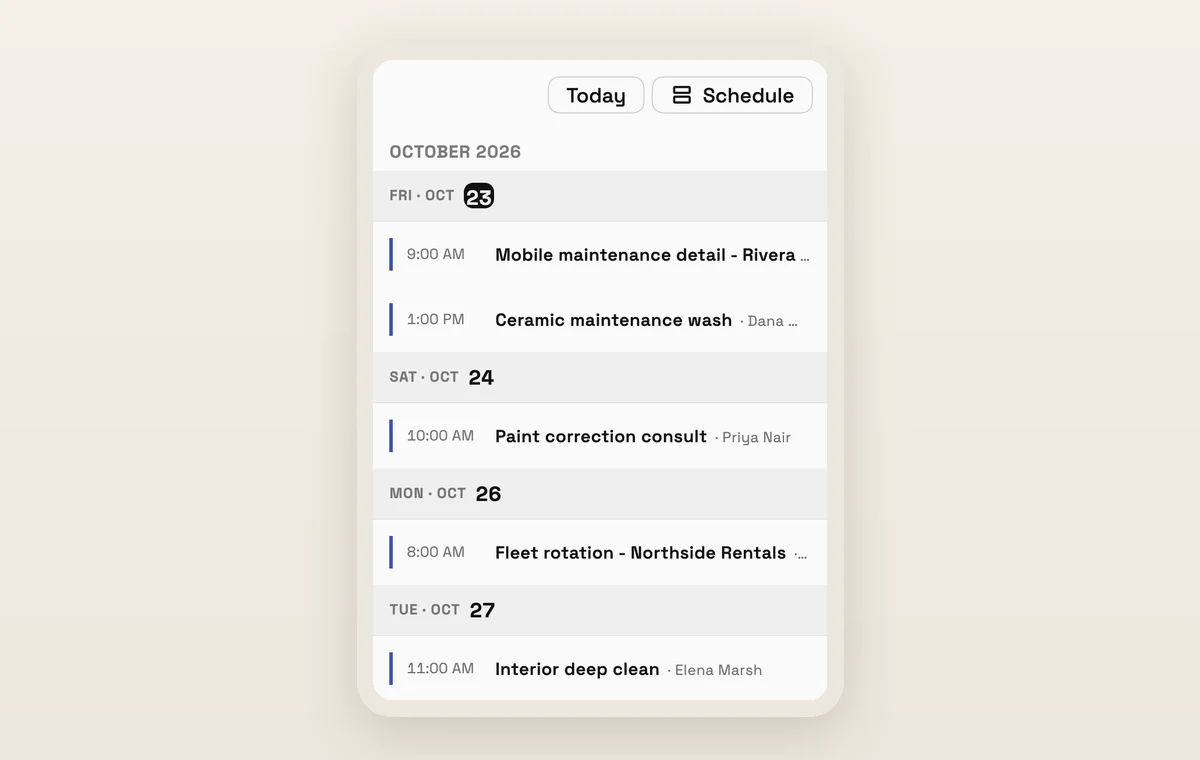
A detailing week starts in the calendar: the month view fills with appointments such as mobile maintenance details, ceramic maintenance washes and paint consultations, and every entry sits one click from the client record behind it. The screenshots show a demo workspace, not a customer result.

From the van, the same schedule lives in the mobile app. After the last job, the invoice goes out from the record that already holds the Proposal and the messages, the client pays from the payment link, and a late-payment reminder follows up if it goes quiet. Use the free deposit calculator to set what you collect before a multi-day correction or coating job.

Final recommendation
Take your last five client interactions (a booking, a reminder, an add-on quote, an invoice and a payment) and count how many apps each one touched, then run the same five through each trial. Pick Workspace369 if one client record for all five matters more than vehicle profiles; start from the mobile detailing software page and compare plans on the pricing page. Pick Urable or DetailPro if vehicle-native records decide it, and Mobile Tech RX if you estimate recon work by variables.
Sources reviewed for this guide
- Workspace369 pricingPlan matrix reviewed October 23, 2026, including online booking, SMS, appointment reminders, payment plans and expense rows.
- Urable pricingOfficial pricing page reviewed October 23, 2026, with US monthly and yearly prices read from the server-rendered plan data and per-tier feature lists.
- DetailPro pricingOfficial pricing page reviewed October 23, 2026 in two separate browser sessions for Professional, Growth and Ultimate prices, the 14-day trial and the 30-day money-back policy.
- Mobile Tech RX plansOfficial plans page reviewed October 23, 2026 for per-admin and per-user prices, plan features, text alert limits and the 5-day trial.
- Jobber pricingOfficial pricing page reviewed October 23, 2026 in the Annual and Monthly (no commitment) views; limited-time first-year offers are not used.
Workspace369 publishes this guide and is included in the comparison. It is a documentation-based comparison, not an independent ranking or a hands-on benchmark; competitor capabilities are checked against public product pages.
Run client follow-up in one workspace.
CRM, inbox, voice, invoicing, payments, projects, files, AI, and workflow automations — connected instead of exported.
14-day free trial. Card required. After the trial: from $29/month. Renews automatically every month until you cancel. Cancel anytime in Settings → Billing.