Invoice 1034Paid
Marlowe Coffee Co.
- Invoice Total
- $4.8k
- Paid on
- 10/15/2026
- Creation Date
- 10/02/2026
Last opened: Oct 15Audit historyView receipt
A native app that opens the same workspace as the web, so you can send an invoice or log time wherever you are.
14-day free trial. Card required. After the trial: from $29/month. Renews automatically every month until you cancel. Cancel anytime in Settings → Billing.
Request a demoA CRM app for iPhone and iPad gives you your clients and billing on a phone or tablet. The Workspace369 app is native, runs on iPhone and on iPad in every orientation, and opens the same workspace as the web app at app.workspace369.com. It is available on the App Store.
Reviewed October 21, 2026 by the Workspace369 Product Team. Availability can vary by plan, region, and workspace configuration.
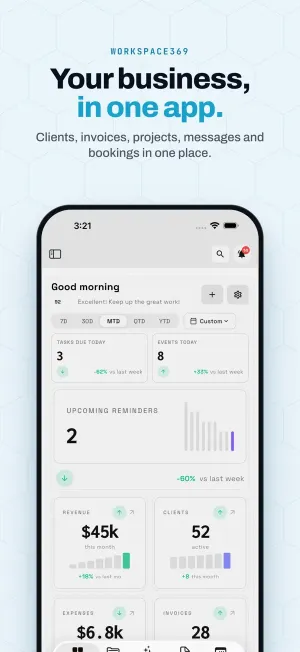
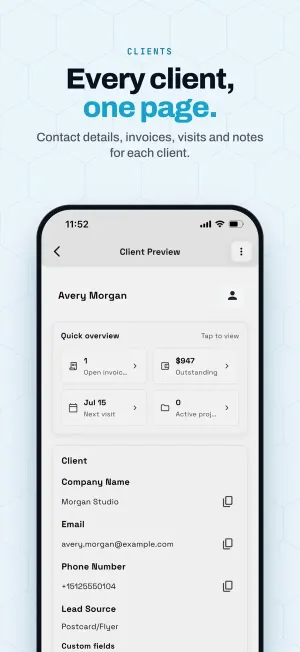
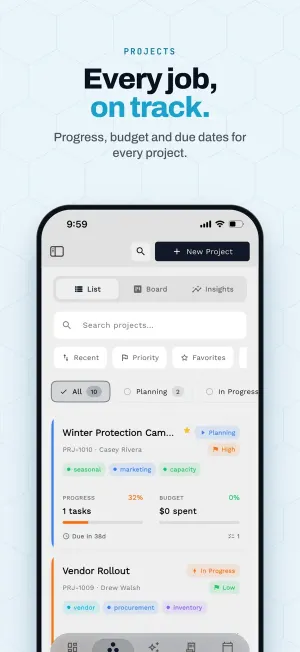
Read the Workspace369 documentationThe app's own screens, from its App Store listing. On iPad it works in every orientation.
Home shows the tasks due today, today's events and your upcoming reminders, with revenue, clients, expenses and invoices below. Change the period from 7 days to the year so far, or pick a custom range.
A client page starts with a quick overview: open invoices, the amount outstanding, the next visit and active projects. Below it are the company, email and phone, where the client came from and your custom fields.
The projects list shows each project's status, priority and tags, task progress, budget spent and when it is due. Search, sort and filter by status, or switch to the board.
Track an hour on site, bill it from the desk and send the client a link to pay. Each step works on the same record, on whichever device is in your hand.
Start a timer on your iPhone while you work, and stop it when you are done.
The entry is already in the web app, on the same timesheet.
Bill the time onto an invoice at your billable rate, from either device.
Share a payment link so the client can pay from their own device.
Invoices, payment links, time tracking, the calendar, the inbox and client records come with every plan. Sharing a receipt to Workspace369 to start an expense needs Specialist, where expense tracking and receipt capture start.
Compare plansRead from the current plan comparison.
The Workspace369 app is a native app for iPhone and iPad. On iPad it works in every orientation.
Yes. The app opens the same workspace as the web app at app.workspace369.com.
You can send invoices and proposals, track time, see the calendar, use the inbox, open clients, and share payment links.
Yes. Share a receipt to Workspace369 from the share sheet. Expense tracking and receipt capture start at Specialist ($149).
Get Workspace369 from the App Store: https://apps.apple.com/us/app/workspace369/id6475013419
Start free and bring this workflow into the rest of your workspace.
14-day free trial. Card required. After the trial: from $29/month. Renews automatically every month until you cancel. Cancel anytime in Settings → Billing.
See pricing