Move your client work from HoneyBook to Workspace369.
Switching to a HoneyBook alternative?
Most teams move from HoneyBook to Workspace369 in a few hours: export your contacts as a spreadsheet, bring them in with AI Import (you check every row first), rebuild the templates you send, and keep HoneyBook open until open invoices are paid. Cadet is $29/mo for one person; a small agency team of five pays $104/mo on Voyager.
HoneyBook's trial is 30 days with no card (its pricing page, checked October 24, 2026); Workspace369's is 14 days and needs a card (then $74/month on Voyager until you cancel), so start it once your HoneyBook export is ready.
Three changes pushed a lot of HoneyBook users to look around this year. In February 2025, HoneyBook raised prices across every plan — and the 20% legacy discount for long-time customers ended in February 2026. In August 2026, two-way texting arrived as an $8/month add-on, for numbers in the US and Canada. And HoneyBook switched off Time Tracker on September 8, 2026 (it came back a week later, after members complained). If any of that stung, this page is the honest path out: what moves, what doesn't, and the exact order to do it in.
14-day free trial. Card required. After the trial: $74/month for Voyager. Renews automatically every month until you cancel. Cancel anytime in Settings → Billing.
Workspace369 is now an approved plugin in ChatGPT. Read the announcement
Last updated October 31, 2026
Facts last verified from HoneyBook's public pages. HoneyBook is a trademark of its owner; Workspace369 isn't affiliated with or endorsed by it. Spot an error? Tell us at support@workspace369.com and we'll fix it.
Whatever you move to
How to leave HoneyBook
Six steps that apply whichever tool you pick. The HoneyBook details come from its own help center (read October 31, 2026). The HoneyBook export checklist covers every export in detail.Don't cancel first
Cancelling blocks new files, projects and messages. HoneyBook says you keep access to existing projects afterwards and that cancelling doesn't delete the account, but finish active work before you cancel.
Export your contacts
In HoneyBook, open Clients, then Contacts, select the triple-dot icon and choose Download spreadsheet. The CSV holds each contact's name, email, phone number, address, notes and created date.
Save the files you need, one at a time
Contracts and invoices are smart files: open each one, select the triple-dot icon, then Print file and Save as PDF. Download the reports you need from Reports, mostly in a desktop browser. HoneyBook's help center documents no single export-everything button.
Run both tools for a few weeks
Start new clients in the new tool and finish open projects in HoneyBook. Let the last open invoices get paid where they were sent.
Rebuild templates and automations by hand
List the emails, forms and files you actually send, then re-create those in the new tool. Plan on rebuilding automations by hand too.
Cancel last
When the last invoice is paid and every export opens, go to Company Settings, then Membership, then Cancel Plan. If you subscribed through the App Store or Google Play, cancel there. The account stays usable until the end of the billing period.
The honest part first
What moves, what doesn't
There is no one-click import from HoneyBook, and Workspace369 does not claim one. You bring your data as spreadsheets and AI Import does the column mapping. Most teams finish in a few hours.Moves with you
- Clients, products, expenses, invoices and proposals. Upload a CSV or XLSX and AI Import maps the columns to the right fields. You review the mapping first.
- The cost, before you commit. The import shows how much of your monthly usage it needs before it starts, so nothing runs on a surprise bill.
Doesn't move automatically
- Project notes and files. AI Import doesn't bring these. Download them and attach them to the client record or project.
- Templates. Re-create the ones you actually send — for most people that's three to five.
- Recurring schedules and payment plans in progress. Set them up fresh on the new side.
- Automations. Rebuild the two or three that matter and let the rest go.
- Links you already sent clients. Old portal, proposal, and invoice links keep pointing at HoneyBook.
- Cards on file. Saved payment methods can't leave HoneyBook. Clients re-add their card the first time they pay a Workspace369 invoice.
Keep your HoneyBook account open until the last open invoice there is paid and you've downloaded what you need — your history stays viewable under HoneyBook's own terms while the account is active. And if you'd like a hand before you start, Workspace369 support can help you map what goes where.
See it before you switch
From HoneyBook export to a signed, paid client
Five real Workspace369 screens with sample data, in the order you would use them. Click through at your own pace.


1 of 5
Upload your HoneyBook export and let AI Import read it
Upload the CSV or Excel export, check the source app AI Import suggests, then review every row before anything is saved.
Step by step
Setting up Workspace369: the checklist
Five steps, in order. Do them over a weekend and bill from Workspace369 on Monday.Start the trial and set up your services and prices
The 14-day trial is enough time to move. Add your services, packages, and rates first — proposals and invoices take minutes after that.
Run AI Import for each record type
Upload a CSV or XLSX for clients, products, expenses, invoices or proposals. AI Import maps your columns, you review the mapping, and the estimated usage is shown before you start.
Connect Stripe for payments
Workspace369 payments run on Stripe. Connect once and every invoice goes out with a payment link — plus payment plans on Specialist and above.
Set up your inbox, SMS, and voice
Connect your business mailbox for email over SMTP and IMAP (Gmail) or by forwarding (Microsoft 365); one-click Gmail and Microsoft 365 sign-in is coming soon. Two-way SMS, the shared team inbox and a business number with calling and voicemail start on Voyager ($74/month, 2 seats); IVR, call queues and call recording start on Specialist ($149/month, 10 seats).
Invite your team
Add your seats, then point everyone at the shared inbox and the client records. Anything clients send now lands where the whole team can see it.
Phone and iPad
Workspace369 on iPhone and iPad
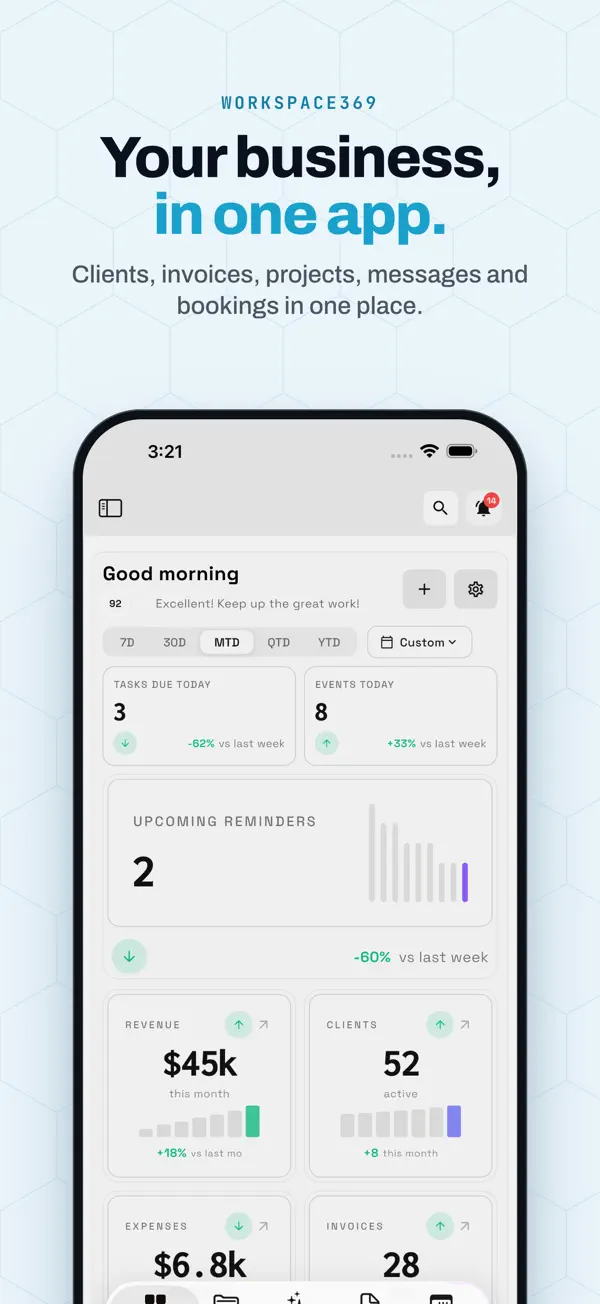
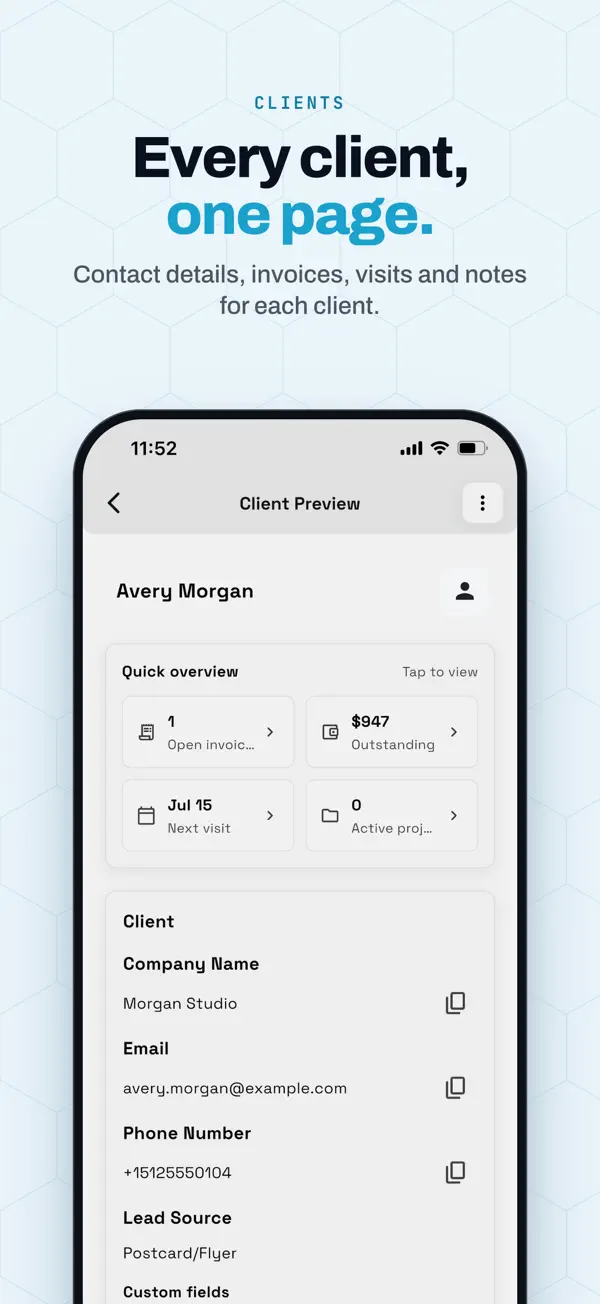
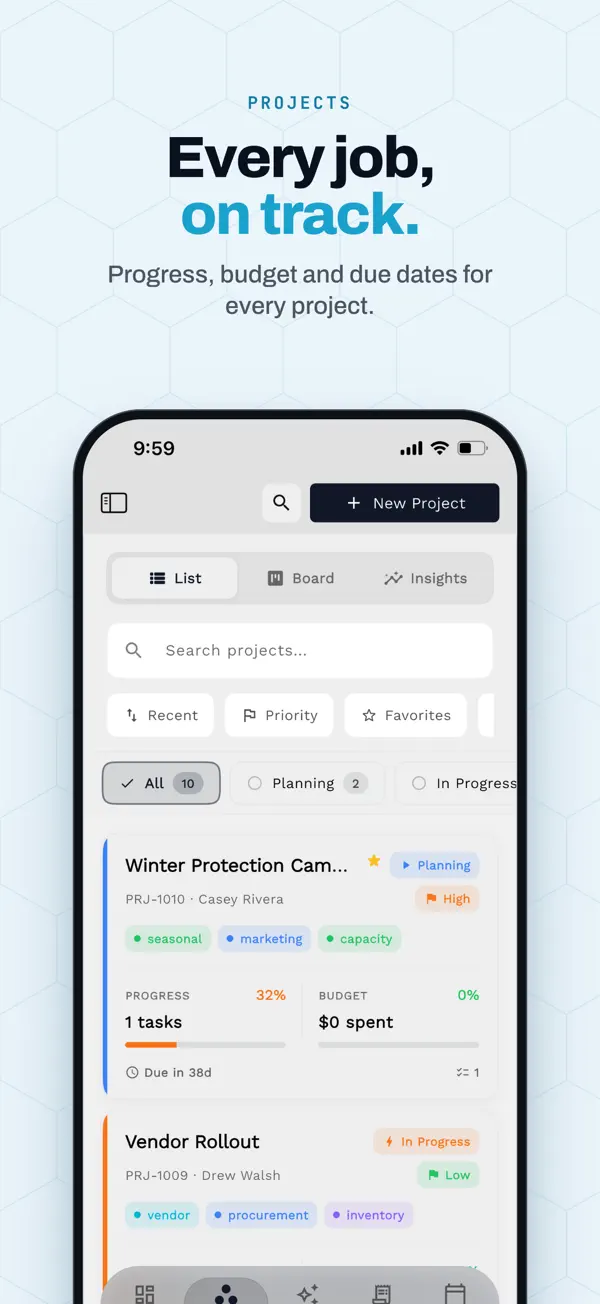
One workspace on the web, iPhone and iPad. What the app does today:
- Native app for iPhone and iPad, with iPad in every orientation.
- Same workspace as the web app at app.workspace369.com.
- Send invoices and proposals, track time, and share payment links.
- Read the inbox and open any client record from the same app.
- See your calendar and what is coming up for the day.
- Share a receipt to Workspace369 to start an expense. Expense tracking and receipt capture start at Specialist.
App Store listing, checked October 26, 2026
- iPhone
- Requires iOS 15.0 or later.
- iPad
- Requires iPadOS 15.0 or later.
Fair is fair
Stay on HoneyBook if…
- You work solo and the Phone & SMS add-on covers your texting. HoneyBook's add-on starts at $8/mo for members in the US and Canada, which can cost less than moving a setup that already works.
- Your leads convert through HoneyBook's files. If its interactive files and template gallery win you work, and you need no more than two added team members or a phone system, staying is reasonable.
- You rely on its photographer and event integrations. Pic-Time and Prismm are on HoneyBook's integrations list.
- You're mid-way through payment plans. Finish them in HoneyBook and switch between projects, not mid-stream.
Pick your plan
Five plans, priced by seats
Cadet through Commander start with a 14-day free trial. Pay annually and each plan drops by about 20%. Extra seats are $10 a month each from Voyager.| Plan | Monthly | Seats | Pick it if… | Trial |
|---|---|---|---|---|
| Cadet | $29 | 1 | You're solo and don't need texting yet. Email automations included (up to 3 active workflows). | Try Cadet 14 days free · card required · then $29/mo · cancel anytime |
| Voyager | $74 | 2 | You want to text and call clients — this is the entry point for SMS, calling and voicemail, with SMS steps in up to 10 active workflows. | Try Voyager 14 days free · card required · then $74/mo · cancel anytime |
| Specialist Recommended | $149 | 10 | You want IVR, call queues and call recording, payment plans, and up to 25 active workflows. | Try Specialist 14 days free · card required · then $149/mo · cancel anytime |
| Commander | $299 | 20 | You want unlimited workflows with AI drafting, plus full accounting. | Try Commander 14 days free · card required · then $299/mo · cancel anytime |
| Enterprise | $699 | 50 | You run several teams and need 50 seats in one plan. | Talk to sales |
Prices in USD. Full feature matrix on the pricing page.
In their words
Who's switching — and why
From HoneyBook's own community forum:“Every hour I had logged and not yet invoiced is gone.”
“A blatant money grab.”
To be fair: plenty of solo creatives still love HoneyBook, and if it fits your business, staying is a fine choice. This page is for the people it stopped fitting in 2026.
FAQ
Switching questions, answered straight
Is Workspace369 a good HoneyBook alternative for a small agency team?
Yes. HoneyBook Essentials lets you add up to two team members, so a team of five needs Premium at $129/mo on monthly billing (checked October 24, 2026). Workspace369 includes 2 seats on Voyager ($74/mo) and 10 on Specialist ($149/mo), with extra seats at $10/mo. From Voyager you also get client-scoped access for contractors and a shared inbox with texts and calls, plus a one-time $50 carrier compliance setup when you claim a number; texts and calls draw on the plan's monthly usage.
Is Workspace369 cheaper than HoneyBook?
For one person, yes: Workspace369 Cadet is $29/mo ($23.25 billed yearly) against HoneyBook Starter at $36/mo ($29 billed yearly). For five people, Workspace369 Voyager is $104/mo (2 seats included, 3 extra at $10 each) against HoneyBook Premium at $129/mo on monthly billing. It is not the cheapest HoneyBook alternative overall; the HoneyBook alternatives guide under "Before you decide" compares the lower-priced tools. HoneyBook prices checked October 24, 2026.
What does a team of 2 or 3 pay on Workspace369?
On Voyager, 2 people pay $74 a month and 3 people pay $84: 2 seats are included and the third is a $10 seat. Billed yearly, Voyager is $59.25 a month and the extra seat is still $10, so 3 people pay $69.25 a month. HoneyBook Essentials is $59 a month on monthly billing (checked October 27, 2026) and lets you add up to two team members.
Does the Workspace369 trial need a card?
Yes. Cadet through Commander start with a 14-day trial, and you add a card to start. Nothing is charged during the 14 days, and cancelling in Settings → Billing before the trial ends costs nothing. HoneyBook's trial asks for no card (its pricing page, checked October 24, 2026), so export your HoneyBook data first, then start the Workspace369 trial and import it.
Should I cancel HoneyBook before I switch?
No. Start the 14-day Workspace369 trial, import your clients, and send new proposals and invoices from Workspace369. Keep HoneyBook open until the last open invoice is paid, because saved client cards don't transfer: each client re-enters a card the first time they pay a Workspace369 invoice.
How long does switching take?
Most teams finish in a few hours: AI Import brings in your clients, products, invoices and proposals from spreadsheets, and you re-create the templates you actually send, which is usually the longest part. You don't need to move closed projects — they stay in HoneyBook as your archive.
Can I import my HoneyBook data automatically?
From a spreadsheet, yes. There is no one-click import, but AI Import looks for HoneyBook exports: when it spots one it names HoneyBook as the source, and you can pick HoneyBook yourself if it doesn't. To start, download your contact list (Clients, then Contacts, then Download spreadsheet) or a report as CSV and upload it. Before anything is saved, it shows how the columns map and the AI usage it needs, and you review the mapping. The 14-day trial includes enough AI usage to import a few hundred clients.
What does AI Import cost?
It draws on your plan's monthly AI usage, and the usage it needs is shown before you start the import, so you can decide before anything runs. Email credits are separate.
What happens to my clients' saved cards?
They stay in HoneyBook — saved payment methods can't be transferred between systems. The first time a client pays a Workspace369 invoice, they re-enter their card through the new payment link. In practice that's one extra step for the client on their next payment.
Do I lose my HoneyBook history?
No. Keep your HoneyBook account open until the last open invoice is paid; your history stays viewable under HoneyBook's own terms while the account is active. Time Tracker entries are a special case: HoneyBook switched Time Tracker off on September 8, 2026 and brought it back on September 15, 2026, and a HoneyBook employee confirmed previous entries were kept. Export your time logs anyway.
Which plan do I need for texting and calling?
Two-way SMS and a business number with calling and voicemail start on Voyager ($74/month, 2 seats), plus a one-time $50 carrier compliance setup when you claim a number; texts and calls draw on the plan's monthly usage. IVR, call queues and call recording start on Specialist ($149/month, 10 seats). Workspace369 doesn't sell SMS as a separate add-on — it's built into the plan.
Keep exploring
Before you decide
AI Import
How the CSV import maps columns and shows the cost first.
Read →HoneyBook alternatives
Every tool people compare against HoneyBook, with current prices and who each one fits.
Read →How to export everything from HoneyBook
A step-by-step checklist of what HoneyBook's help center says you can export, and what has no documented export.
Read →Workspace369 vs HoneyBook
The feature-by-feature head-to-head, including the 2026 HoneyBook changes.
Read →Pricing
All five plans, the full feature matrix, and annual billing discounts.
Read →Inbox, SMS & voice
How the shared inbox, two-way texting, and business calling work together.
Read →Invoices & payments
Payment links, payment plans, deposits, and automated follow-up on every invoice.
Read →Ready to make the move?
Start the trial, run the checklist above, and cancel HoneyBook when the last open invoice there is paid.
14-day free trial. Card required. After the trial: $74/month for Voyager. Renews automatically every month until you cancel. Cancel anytime in Settings → Billing.