Move your client work from Dubsado to Workspace369.
Dubsado ended its free plan on November 17, 2025 and raised prices on December 1, 2025, and its time tracking sits on the Premier plan. If you are weighing a move, this page is the straight version: what moves, what you re-create, and the order to do it in. There is no Dubsado-specific importer. What Workspace369 does have is AI Import, which maps your own spreadsheet columns and shows what it will cost before it writes anything.
14-day free trial. Card required. After the trial: $74/month for Voyager. Renews automatically every month until you cancel. Cancel anytime in Settings → Billing.
Last updated October 12, 2026
The honest part first
What moves, what doesn't
There is no one-click import from Dubsado, and Workspace369 does not claim one. You bring your data as spreadsheets and AI Import does the column mapping.Moves with you
- Clients, products, expenses, invoices and proposals. Upload a CSV or XLSX and AI Import maps the columns to the right fields. You review the mapping first.
- The cost, before you commit. The import shows how much of your monthly usage it needs before it starts, so nothing runs on a surprise bill.
- Files and notes. Download them from Dubsado and attach them to the client record or project.
You re-create these
- Forms, workflows and email templates. Rebuild the ones you actually use; for most people that is a handful.
- Links you already sent clients. Old portal, form and invoice links keep pointing at Dubsado.
- Cards on file. Saved payment methods cannot be moved between systems, so clients re-enter their card on their next payment.
No lock-in either way: the workspace owner can request a full data export from Workspace369 at any time. Keep your Dubsado account active until the last open invoice there is paid.
Step by step
The switching checklist
Seven steps, in order.Gather your data from Dubsado
Collect your client list, active projects, unpaid invoices and the proposals you still send, as spreadsheets where Dubsado allows it. Skip closed work; it stays in Dubsado as your archive.
Start the trial and set up your services and prices
The 14-day trial is enough time to move. Add your services, packages and rates first so proposals and invoices take minutes afterwards.
Run AI Import for each record type
Upload a CSV or XLSX for clients, products, expenses, invoices or proposals. AI Import maps your columns, you review the mapping, and the estimated usage is shown before you start.
Re-create your forms, workflows and templates
Rebuild the intake forms, automations and email templates you actually use. Most people rebuild a short list, not everything.
Connect Stripe for payments
Workspace369 payments run on Stripe. Connect once and every invoice goes out with a payment link, with payment plans on Specialist and above.
Set up your inbox, texting and calling
Connect your business mailbox over SMTP and IMAP (Gmail) or by forwarding (Microsoft 365); one-click Gmail and Microsoft 365 sign-in is coming soon. Two-way SMS and a business number with calling and voicemail start on Voyager ($74/month, 2 seats); IVR, call queues and call recording start on Specialist ($149/month, 10 seats).
Cancel Dubsado when the last open invoice there is paid
Keep the account active until then. Once the final invoice clears and you have what you need, cancel.
Phone and iPad
Workspace369 on iPhone and iPad
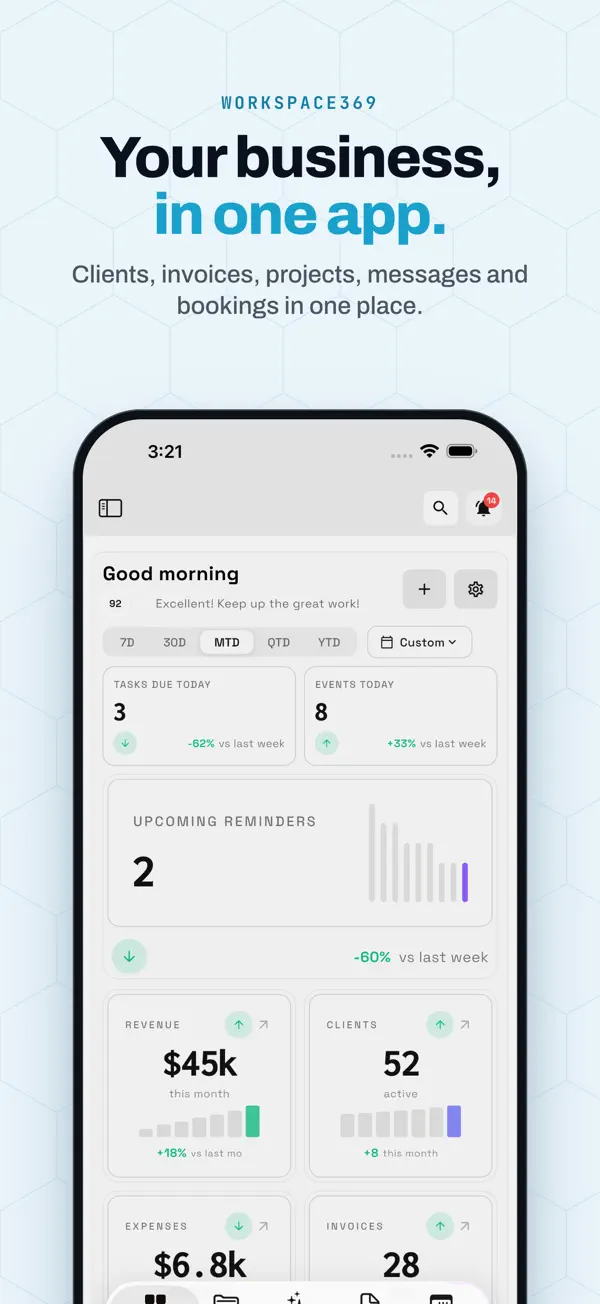
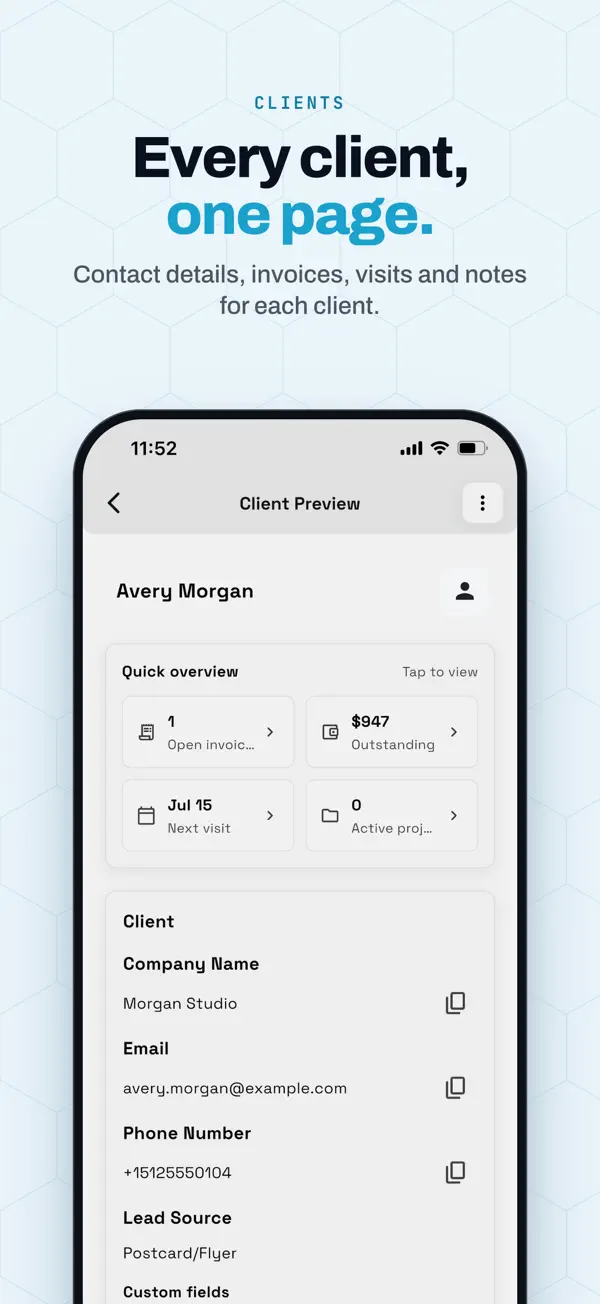
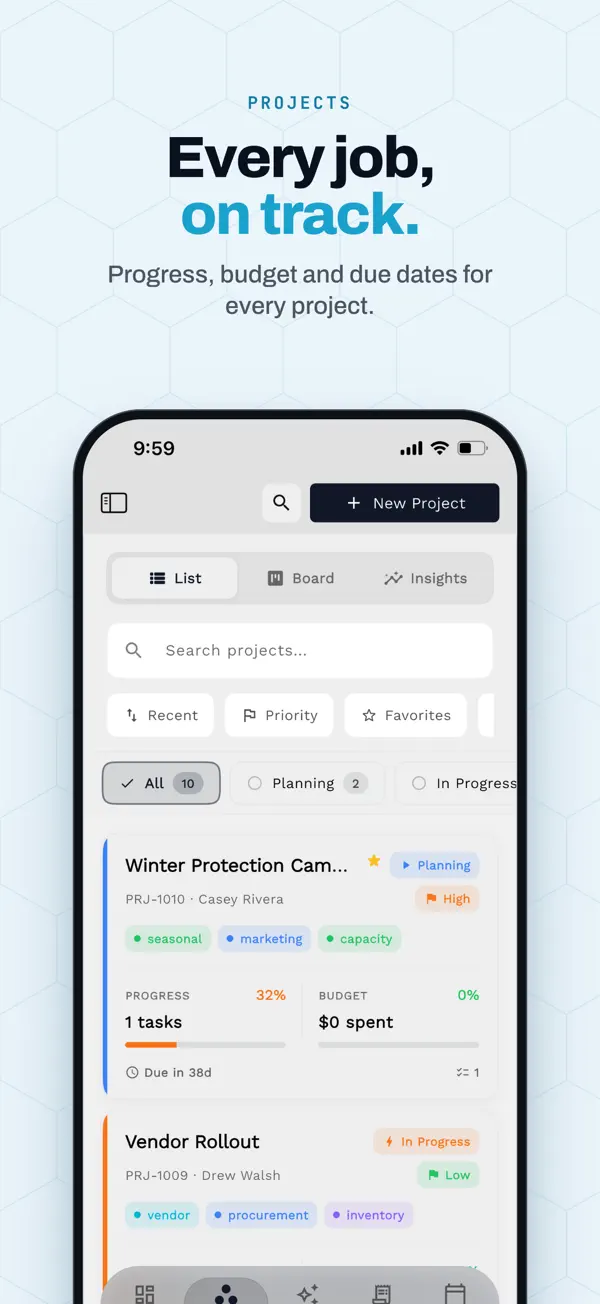
One workspace on the web, iPhone and iPad. What the app does today:
- Native app for iPhone and iPad, with iPad in every orientation.
- Same workspace as the web app at app.workspace369.com.
- Send invoices and proposals, track time, and share payment links.
- Read the inbox and open any client record from the same app.
- See your calendar and what is coming up for the day.
- Share a receipt to Workspace369 to start an expense. Expense tracking and receipt capture start at Specialist.
App Store listing, checked October 19, 2026
- iPhone
- Requires iOS 15.0 or later.
- iPad
- Requires iPadOS 15.0 or later.
Pick your plan
Five plans, priced by seats
Every plan starts with a 14-day free trial. Pay annually and each plan drops by about 20%. Extra seats are $10 a month each from Voyager.| Plan | Monthly | Seats | Pick it if… | Trial |
|---|---|---|---|---|
| Cadet | $29 | 1 | You're solo and don't need texting yet. Email automations included (up to 3 active workflows). | Try Cadet |
| Voyager | $74 | 2 | You want to text and call clients — this is the entry point for SMS, calling and voicemail, with SMS steps in up to 10 active workflows. | Try Voyager |
| Specialist Recommended | $149 | 10 | You want IVR, call queues and call recording, payment plans, and up to 25 active workflows. | Try Specialist |
| Commander | $299 | 20 | You want unlimited workflows with AI drafting, plus full accounting. | Try Commander |
| Enterprise | $699 | 50 | You run several teams and need 50 seats in one plan. | Try Enterprise |
Prices in USD. Full feature matrix on the pricing page.
FAQ
Switching questions, answered straight
What is the best Dubsado alternative?
It depends on how much automation you need. HoneyBook Essentials ($59/mo on monthly billing) is the closest swap with an easier setup. Cheaper solo picks are Moxie Starter ($12/mo), Bonsai Basic ($15/mo) and Plutio Core ($19/mo). Workspace369 Cadet ($29/mo) fits one person wanting proposals, invoices and time tracking. Stay on Dubsado if you rely on its workflows. Prices checked October 17–19, 2026; the Dubsado alternatives page has the full comparison.
Is there a Dubsado importer?
No. Workspace369 has no Dubsado-specific importer and no one-click import. What it has is AI Import: you upload a CSV or XLSX of clients, products, expenses, invoices or proposals, it maps the columns, and you review the result.
What does AI Import cost?
It draws on your plan's monthly AI usage, and the usage it needs is shown before you start the import, so you can decide before anything runs. Email credits are separate.
Am I locked in to Workspace369?
No. The workspace owner can request a full export of the workspace data and can delete the workspace, with a 24-hour grace period to cancel the deletion.
How long does switching take?
Most teams re-enter their active work in a few hours: current clients, open proposals and unpaid invoices. Rebuilding forms and workflows is usually the longest part.
Which plan do I need for texting, calling and time tracking?
Two-way SMS and a business number with calling and voicemail start on Voyager ($74/month, 2 seats); time tracking with timesheets is included on every plan. IVR, call queues and call recording start on Specialist ($149/month, 10 seats). Dubsado's own time tracking is on its Premier plan.
Does Workspace369 have a mobile app?
Yes, an iPhone and iPad app. See the mobile app page for what it covers.
Keep exploring
Before you decide
Dubsado alternatives
Every tool people compare against Dubsado, with current prices and who each one fits.
Read →Workspace369 vs Dubsado
The feature-by-feature head-to-head, including phone, AI, time tracking and permissions.
Read →How to export everything from Dubsado
A step-by-step checklist of what Dubsado's help center says you can export, and what has no documented export.
Read →Time tracking
Timers, timesheets with approvals, and billable hours that go onto an invoice.
Read →Client-scoped access
Let a contractor see only the clients they are assigned to.
Read →Mobile app
Run client work from your iPhone or iPad.
Read →Pricing
All five plans, the full feature matrix, and annual billing discounts.
Read →AI Import
How the CSV import maps columns and shows the cost first.
Read →Ready to make the move?
Start the trial, run the checklist above, and cancel Dubsado when the last open invoice there is paid.
14-day free trial. Card required. After the trial: $74/month for Voyager. Renews automatically every month until you cancel. Cancel anytime in Settings → Billing.