Best Dog Grooming Software in 2026
Six dog grooming tools compared on price, pet records, vaccine tracking, mobile routes and online booking, with a rebooking and lapsed-vaccine test.
We make Workspace369, which is on this list. Weigh our ranking with that in mind.

By Simon Dziak, Founder, Workspace369 · LinkedIn
Best dog grooming software remembers each dog, keeps the table full and bills the owner, and the tools built around dogs do that better than general business tools. Most groomers should start with MoeGo, Groomer.io, Gingr or DaySmart Pet; Workspace369 (see its dog grooming software page) comes last of six here because its plan matrix names no pet profiles, vaccine records or route planning. If you plan to take booking deposits, size one first with the free deposit calculator.
Disclosure and method: Workspace369 publishes this guide and is one of the six tools in it, and we put it sixth for groomers. Everything below comes from vendor pages, not from using each product at a table. Those pages were reviewed on October 23, 2026, so confirm current plans with the vendor before you commit.
Key takeaways
- Groomers get the most from software built around the pet: vaccine records, grooming notes, rebooking reminders and, for vans, route planning.
- MoeGo lists mobile Basic at $49 a month and salon Basic at $79, with vaccine management, grooming notes and online booking on the entry plan; the mobile tier has one team member.
- DaySmart Pet is the cheapest dedicated option at $29 a month with payments ($39 without) and a 14-day trial with no card, but digital forms that can hold vaccination records start on its $69 Deluxe plan.
- Workspace369 Cadet is $29 a month ($23.25 billed yearly) for one user with a client portal, custom fields, Proposals, deposits and invoices, but it names no pet profiles, vaccine records or route planning, and online booking starts at Specialist ($149 a month). We rank it last of six.
- Test each tool with a dog whose rabies record lapses next month: the reminder, the rebooking and the deposit should all work without retyping the pet.
What's inside?
What dog grooming software is (and what it is not)How we compared these toolsThe best dog grooming software in 2026Side-by-side comparisonMatch the tool to your grooming setupRun a lapsing-vaccine and rebooking test during the trialWorkspace369 in action: booking requests and invoices on demo dataKeep pet details where the groomer can see themWhen to keep it simple
What dog grooming software is (and what it is not)
Dog grooming software holds the dog as well as the owner: breed and coat notes, the style that works, vaccine dates, who the next appointment is for and when the pet is due back. Good tools add booking, reminders and card payments, and the mobile ones add a van route. It is not a retail point-of-sale replacement or a vet system. A general client-work tool can bill and message the owner, but if it cannot hold the dog's details, the groomer is back to paper cards at the table.
How we compared these tools
Each tool was held to the same five questions, answered only from the vendor's own pages as they stood on October 23, 2026:
- Pet records: whether grooming notes, pet profiles or vaccine tracking are named, and on which plan.
- Mobile and route features: route optimization or map scheduling for a van.
- Online booking and reminders on the entry plan.
- Price at one groomer: the monthly figure and any yearly view, including what the price assumes (payments, one van, one location).
- Trial terms: length, and whether a card is needed.
Speed, support, uptime and the phone apps were not tested, and no third-party ratings were used. Tools are ordered by how much of the first three points their own pages document for a solo or small-shop groomer; price breaks ties. Groomer.io sits above Gingr because its map scheduling is documented for vans and its price is lower.
The best dog grooming software in 2026
1. MoeGo, best for groomers who want pet records and a van route in one tool
MoeGo's pricing page has a menu for the business type. On the Mobile grooming view, Basic is $49 a month, Growth $99 and Ultimate $159, the last two per van. On the Grooming salon view, Basic is $79 a month and Growth and Ultimate are $149 and $239 per location. The comparison table lists vaccine management, pet codes, grooming notes, a vaccine expiry reminder, a three-message appointment reminder series, a digital agreement and no-show protection on Basic, along with online booking. Route optimization is 20 uses a month on Basic and unrestricted from Growth.
Limitations: Basic is for one team member (two on the salon view) and includes 200 SMS per van (300 per location). Waitlist, Advanced CRM and marketing tools start at Growth. We found no trial length on the pricing page, and no yearly price: the only switch is a currency menu.
Best for: solo mobile groomers and one-chair salons who want vaccine and grooming records beside route-aware booking.
2. Groomer.io, best for unlimited texting and map scheduling at one price
Groomer.io lists its software at $99 a month per storefront or van. The price covers unlimited SMS, automated phone calls, unlimited customer and pet records, unlimited pet photos, online scheduling and requesting, smart map scheduling, Clover and Square integrations and online payments with deposits. A grooming website is a separate $99 a month, and mass messaging and review requests are listed as add-ons. The page also showed a $79 limited-time offer, which we did not use.
Limitations: the page names no vaccine tracking and no trial, and shows no yearly price. Each van or storefront is a separate $99, so a two-van business pays $198 before the optional website, mass messaging or review requests. Because vaccine dates are not named, a groomer who must block a booking on a lapsed rabies record would need to ask the vendor in a demo before relying on it.
Best for: busy mobile or salon groomers who send many texts and call-ahead messages and want the cost to stay the same as volume grows, and who will confirm vaccine handling in a demo.
3. Gingr, best for a salon that wants records, a portal and a facility-grade platform
Gingr's pricing page has Annual and Monthly views. The Spa plan, written for groomers and trainers, is $109 a month billed monthly and $100 a month billed annually. Every plan includes a customer portal, integrated payments, automated notifications, staff management, business analytics and a mobile app. Spa adds time-slot or drop-off-window booking, automated reminders and groomer-to-breed assignment. The Gingr grooming page says breed and coat notes live on each pet profile, and the pricing-page FAQ's general feature list names vaccination management, though not as a per-plan feature.
Limitations: it is built for facilities, so a solo van groomer pays for more than they use, and we found no route planning on the pages we read. The page shows no trial; it points to a demo. Its FAQ says contract and setup-fee terms depend on your needs.
Best for: salons and shops that want pet profiles and an owner portal, may want vaccine tracking named in a general feature list, and may add daycare or boarding later.
4. DaySmart Pet, best for the lowest entry price among pet-specific tools
DaySmart Pet's Basic plan is $29 a month with payments and $39 without, for one user. It lists online booking, Facebook booking, appointment reminders, a mobile app, integrated payments, online deposits and reports, with 500 texts and 1,000 emails a month. Deluxe is $69 with payments ($89 without) for three users and adds digital forms for consent and vaccination records, pop-up notes and a client rewards feature. The page offers a 14-day trial that needs no card and includes everything in Deluxe. Extra users on higher plans are $9 a month each.
Limitations: pop-up notes and the vaccination-record forms are not on Basic, so a dog-record workflow means $69. We found no yearly view and no route planning on the page. Two-way texting is an add-on priced by contact.
Best for: solo salon groomers who want a pet-specific booking tool at the lowest price and can trial the fuller plan first.
5. Square Appointments, best for a $0 booking page and card payments
Square's pricing page shows Free at $0 per location, Plus at $49 and Premium at $149. Online booking, appointment reminders and unlimited staff calendars are included on Free; cancellation policy with no-show fees, multi-staff booking and the waitlist start at Plus. Plus and Premium have a free 30-day trial; the FAQ does not mention whether a card is needed.
Limitations: the page names no pet profiles, vaccine records, grooming notes or route planning, so you would hold those elsewhere. It is a general appointments tool, and the page prices each location separately, so a second salon or a van with its own calendar adds to the bill. No-show fees are not on the free plan, which matters for groomers who lose whole slots to cancellations.
Best for: a solo groomer who mainly needs an online booking page and card payments and will keep dog details in a notebook or spreadsheet.
6. Workspace369, best for a client record with deposits and invoices when pet details live elsewhere
Workspace369 keeps each owner as a client record with custom fields, a client portal, public intake forms, Proposals, deposits, payment links and recurring invoices. On Cadet, priced at $29 a month for one user ($23.25 a month when billed yearly), you get 5 active projects, and the matrix lists email appointment reminders, time tracking and optional add-on line items. Voyager ($74 a month, $59.25 billed yearly, 2 seats) adds a shared inbox, SMS messaging and missed-call text back. The screenshot below shows a demo record rather than a customer result.

Limitations: the matrix names no pet profiles, vaccine records, grooming notes or route planning; custom fields can hold your own entries, but nothing reminds you when a vaccine lapses. A booking page needs Specialist, at $149 a month ($119.25 a month yearly) with 10 seats; on Cadet and Voyager, owners send requests through intake forms. The 14-day trial needs a card. Every other tool here lists online booking on its entry plan, from $0 on Square to $109 on Gingr, and four of the five are built for dogs.
Best for: groomers who run packages or retainers alongside the grooming and want Proposals, deposits, a portal and invoices on one owner record, with pet details kept in a grooming tool or custom fields.
Side-by-side comparison
| Tool | Plan priced | Monthly | Billed yearly | Pet and booking features | Limits | Trial |
|---|---|---|---|---|---|---|
| MoeGo | Basic, mobile | $49 | Not shown | Vaccine management, grooming notes, online booking; route optimization 20 a month | 1 team member, 200 SMS per van | Not stated |
| Groomer.io | Software | $99 | Not shown | Unlimited pet records, online scheduling, smart map scheduling | Per storefront or van | Not stated |
| Gingr | Spa | $109 | $100 a month | Pet profile notes, portal, online booking; vaccination named in a general feature list | Facility-first; no route planning named | Demo; no trial shown |
| DaySmart Pet | Basic | $29 with payments ($39 without) | Not shown | Online booking, reminders, deposits; vaccination forms from Deluxe | 1 user, 500 texts a month | 14 days, no card |
| Square Appointments | Free | $0 per location | Not shown | Online booking, reminders; no pet fields named | No-show fees start at Plus ($49) | 30 days on Plus and Premium |
| Workspace369 | Cadet | $29 | $23.25 a month | Custom fields, portal, deposits; no pet records or booking page | 1 user, 5 projects | 14 days, needs a card |
Match the tool to your grooming setup
| Your main need | First tool to try | Reason |
|---|---|---|
| Vaccine records and a van route | MoeGo | Vaccine management and route optimization are on Basic |
| Unlimited texts for a van or salon | Groomer.io | Unlimited SMS in a single $99 price |
| Pet profiles and an owner portal in a salon | Gingr | Pet profile notes and a portal are listed; vaccination is named in a general feature list |
| The lowest dedicated price, solo | DaySmart Pet | $29 with payments, 14-day trial without a card |
| A free booking page and card payments | Square Appointments | Booking and reminders on the $0 plan |
| Deposits, portal and invoices on an owner record | Workspace369 | Proposals, deposits and recurring invoices on Cadet |
Run a lapsing-vaccine and rebooking test during the trial
Use one fictional customer and dog in each tool you shortlist:
- Add the owner and the dog, with breed, coat notes and a rabies date that expires next month.
- Book the groom, and take a deposit if the tool supports one.
- Look for the reminder that warns about the lapsing vaccine, and for the appointment text.
- Finish the groom, note the blade and length, and rebook six weeks ahead.
- For a van, add four stops across town and see whether the tool orders them.
- Check the pet details are on the appointment and the invoice without retyping.
If the dog's notes live in one place and the schedule in another, that gap costs time at every groom. This test is built to find it.

Workspace369 in action: booking requests and invoices on demo data
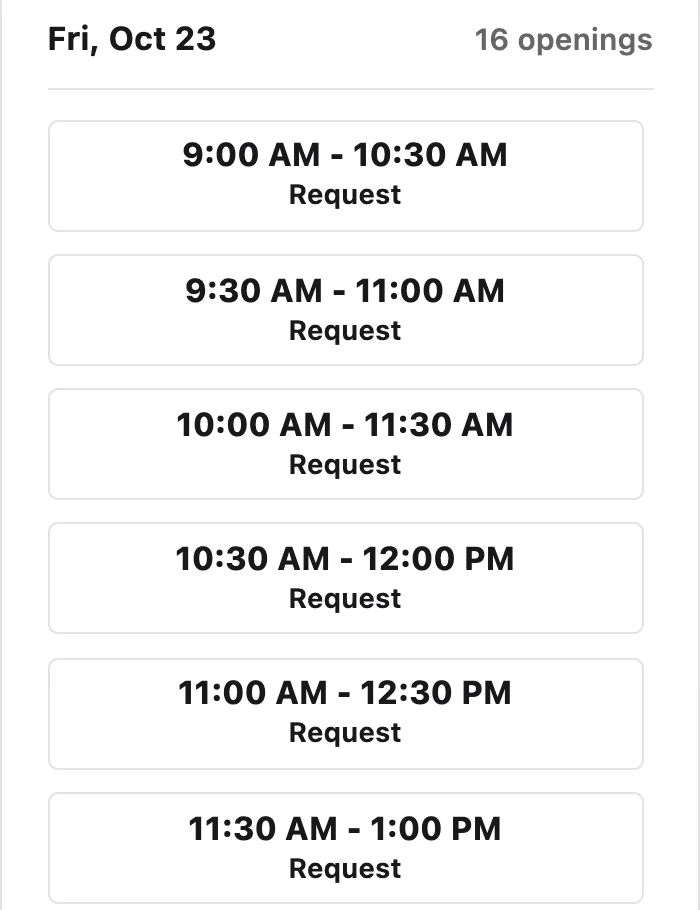
If you decide a client record, deposits and invoices matter more to you than built-in pet fields, this is what the Workspace369 side looks like. Both screenshots are demo data from a sample workspace, not a grooming business and not a customer result. On a booking page, the client picks an open slot, such as a 90-minute groom, and sends it as a request you approve before it lands on the schedule. Booking pages are a Specialist feature, so on Cadet or Voyager the owner still starts from an intake form or a text.
After the appointment, the invoice editor shows the line item, any deposit already paid and a Pay Now button on the client's preview, and invoices covers payment links and recurring billing for regulars.

Keep pet details where the groomer can see them
Dog details belong on the appointment screen, not in a separate app. If you pick a tool without pet records, such as Square or Workspace369, hold the vaccine date, coat notes and temperament in custom fields or the appointment note, and keep your own habit of checking them before each groom. Workspace369 offers custom fields on every plan; to link an outside pet-records tool, you would need webhooks and the API, which begin at Specialist.
When to keep it simple
A groomer with a few dozen regulars can run on a shared calendar, a text thread and a notebook. Move to dedicated software when no-shows start costing you whole slots, when a second groomer or van joins, or when you cannot say whose vaccine has lapsed. On the dog grooming software page you can see Workspace369's scheduling, communications and invoices, and the pricing page has the current plans. Follow-up emails can run through Workflow Automations, which includes email on every plan.
Before importing real clients, run one full visit on demo data and check that your records can be exported.
Sources reviewed for this guide
- Workspace369 pricingPlan matrix reviewed October 23, 2026 for seats, active projects, custom fields, intake forms, reminders, online booking, deposits and trial terms.
- MoeGo pricingOfficial pricing page reviewed October 23, 2026 on the Mobile grooming and Grooming salon views, with the plan comparison table expanded. The page has a currency menu and no yearly switch.
- Groomer.io pricingOfficial pricing page reviewed October 23, 2026 for the $99 software price per storefront or van and the included features. A $79 limited-time offer was shown and not used.
- Gingr pricingOfficial pricing page reviewed October 23, 2026 on both the Annual and Monthly views for the Spa plan; the FAQ feature list names vaccination management.
- Gingr grooming softwareOfficial grooming page reviewed October 23, 2026 for breed and coat notes on each pet profile.
- DaySmart Pet pricingOfficial pricing page reviewed October 23, 2026 for Basic and Deluxe prices with and without payments, the feature table and the free-trial FAQ.
- Square Appointments pricingOfficial pricing page reviewed October 23, 2026 for Free, Plus and Premium prices, the plan flags on booking features and the free-trial FAQ.
Workspace369 publishes this documentation-based comparison and is one of the options. It is not an independent ranking or a hands-on benchmark.
Run client follow-up in one workspace.
CRM, inbox, voice, invoicing, payments, projects, files, AI, and workflow automations — connected instead of exported.
14-day free trial. Card required. After the trial: from $29/month. Renews automatically every month until you cancel. Cancel anytime in Settings → Billing.