How to follow up with clients using ChatGPT (from your real client list)
Follow up with clients using ChatGPT two ways: follow-up emails you paste in, or your real follow-up list, reminders and approved sends in Workspace369.

By Simon Dziak, Founder, Workspace369 · LinkedIn
Workspace369 publishes this guide. The screenshots come from our own demo workspace, recorded in ChatGPT on November 23, 2026.
You can follow up with clients using ChatGPT in two ways. On its own, ChatGPT writes a follow-up email from the details you paste in, and you send it yourself. Connected to your CRM through a plugin, it starts from your real client list: it tells you who is waiting on you, schedules the follow-up and gets a message ready to send. This guide shows both, then walks through the second with the Workspace369 plugin, step by step.
Key takeaways
- ChatGPT on its own can write a follow-up email, but it doesn't know who is waiting on you. You paste in the details, copy the text out and send it yourself.
- With a CRM plugin, ChatGPT answers from your own clients. With Workspace369's approved plugin, ask who to follow up with and it lists overdue invoices, proposals that haven't been accepted and messages waiting for a reply.
- Ask it to schedule a follow-up in your own words and the reminder is saved with the client in Workspace369. It reminds you only: nothing is sent to the client.
- By default, a message ChatGPT writes doesn't go out on its own. It waits in Workspace369's Approvals until you approve it, or decline.
What's inside?
Two ways to follow up with clients using ChatGPTHow to follow up with clients using ChatGPT and Workspace369What waits in Approvals before a message goes outFollow-up prompts to try in ChatGPTWhat it costs
Two ways to follow up with clients using ChatGPT
1. ChatGPT on its own. Paste in who the client is and what you're chasing, and ChatGPT writes a polite follow-up. That helps with wording, but the hard part is still yours: remembering who needs a follow-up in the first place, finding the invoice or proposal, sending the message and noting that you did.
2. ChatGPT with a CRM plugin. Add your CRM's plugin in ChatGPT, and ChatGPT works from your own records. With Workspace369, it reads your follow-up list, so you can ask who to chase this week, schedule a reminder in plain words and ask it to write a message. When you ask it to send, the send waits for your approval.
| ChatGPT on its own | ChatGPT with the Workspace369 plugin | |
|---|---|---|
| Who needs a follow-up | You have to remember | Listed from your invoices, proposals and messages |
| The details | What you paste in | The client's own invoice, proposal or last message |
| Reminders | None | Saved with the client in Workspace369 |
| Sending | You send it yourself | Waits in Approvals until you approve it |
| A record of it | None | Stays with the client in Workspace369 |
How to follow up with clients using ChatGPT and Workspace369
Step 1: Connect Workspace369 to ChatGPT
The workspace owner or an admin turns on Allow AI connections in Settings, AI connections. Then, in ChatGPT, open the Workspace369 plugin, add it, and sign in to Workspace369 to choose the workspace and approve what ChatGPT may do. The ChatGPT tutorial shows every click.
Step 2: Ask who needs a follow-up
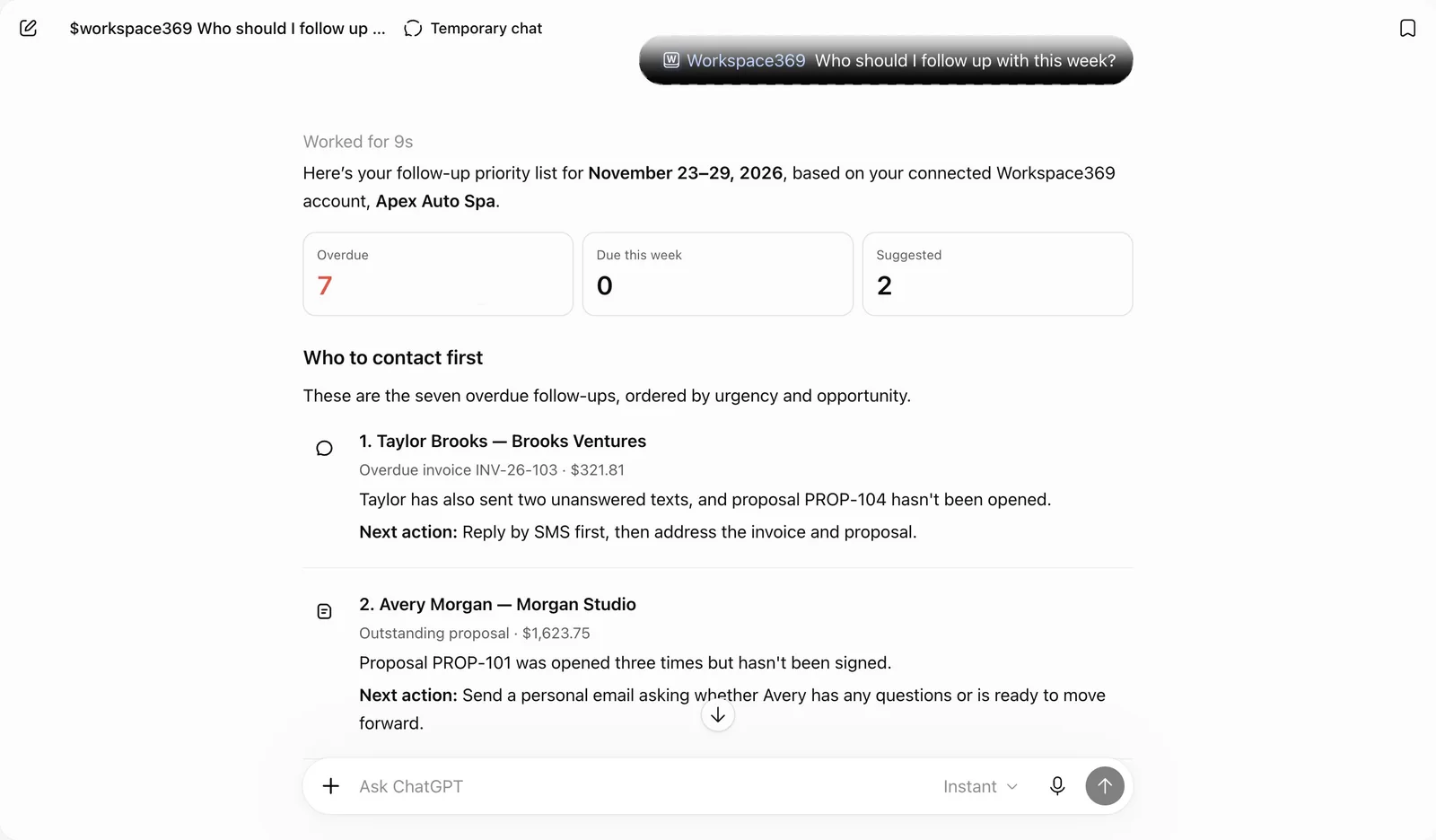
Pick Workspace369 in the message box and ask in your own words. For example: "Who should I follow up with this week?"
ChatGPT answers from your own clients. Workspace369 works the list out from your records: an overdue invoice, a proposal that was sent and hasn't been accepted, a client message still waiting for a reply, an onboarding step, and your own reminders and tasks. It also suggests check-ins for clients you haven't contacted in a while.
Step 3: Schedule a follow-up
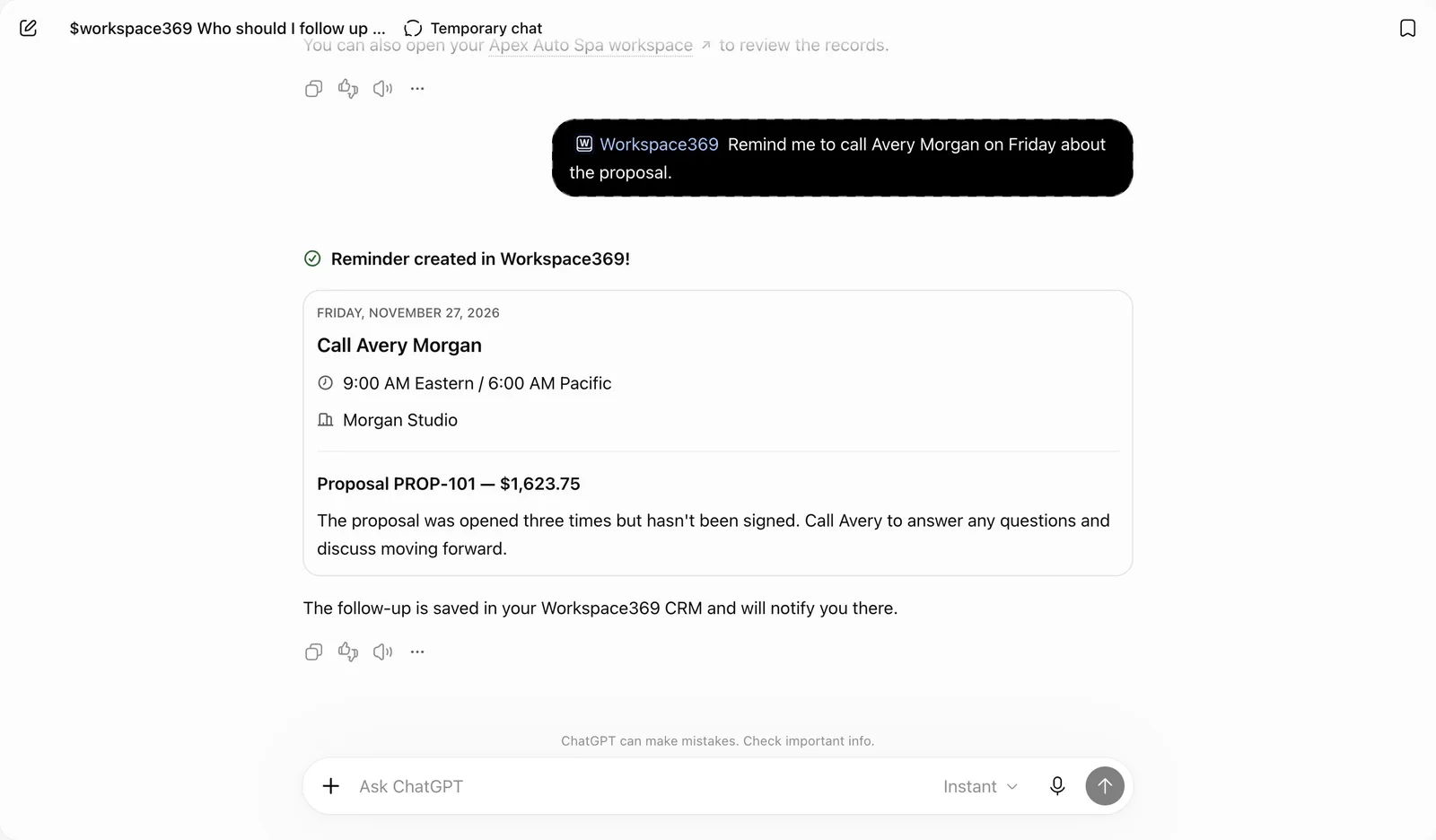
Ask for the reminder the way you'd say it out loud. For example: "Remind me to call Avery Morgan on Friday about the proposal."
ChatGPT adds the follow-up to the client, with the day you asked for. It's a reminder for you: nothing is sent to the client.
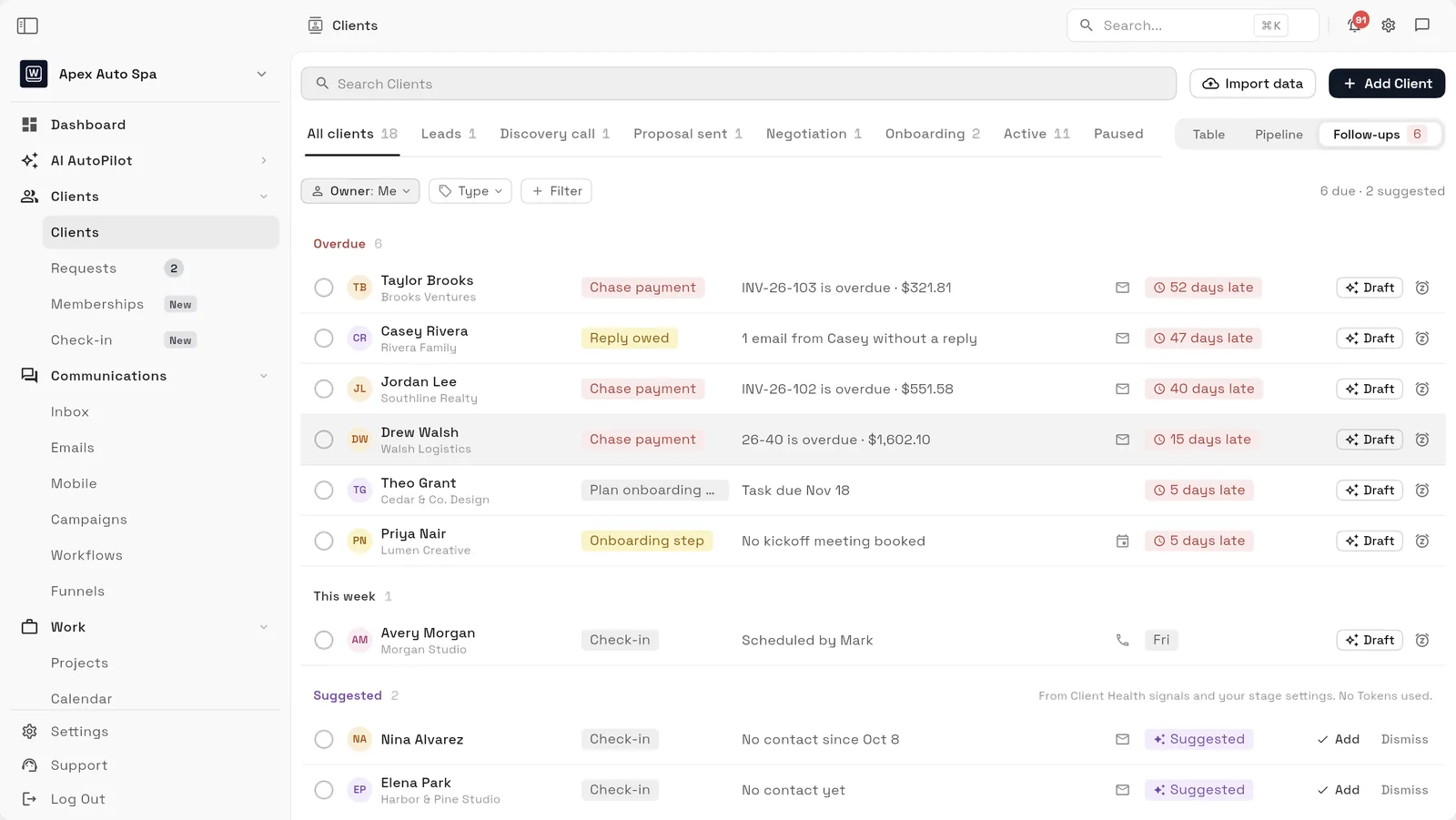
The reminder shows up in Workspace369 too. Open Clients, then Follow-ups, and it sits under This week, next to the client, with the day it's due. The follow-ups tutorial covers that page.
Step 4: Ask ChatGPT to write the message, then approve
You can also ask ChatGPT to write the message and send it. For example: "Email Taylor Brooks a short, friendly reminder that invoice INV-26-103 is overdue, and send it."
ChatGPT looks up the invoice, writes the reminder and asks Workspace369 to send it. By default, it doesn't go out on its own: the request waits in Approvals in Workspace369 until you press Approve and send, or Decline. Only the person who made the connection can turn on Send without asking for it.

What waits in Approvals before a message goes out
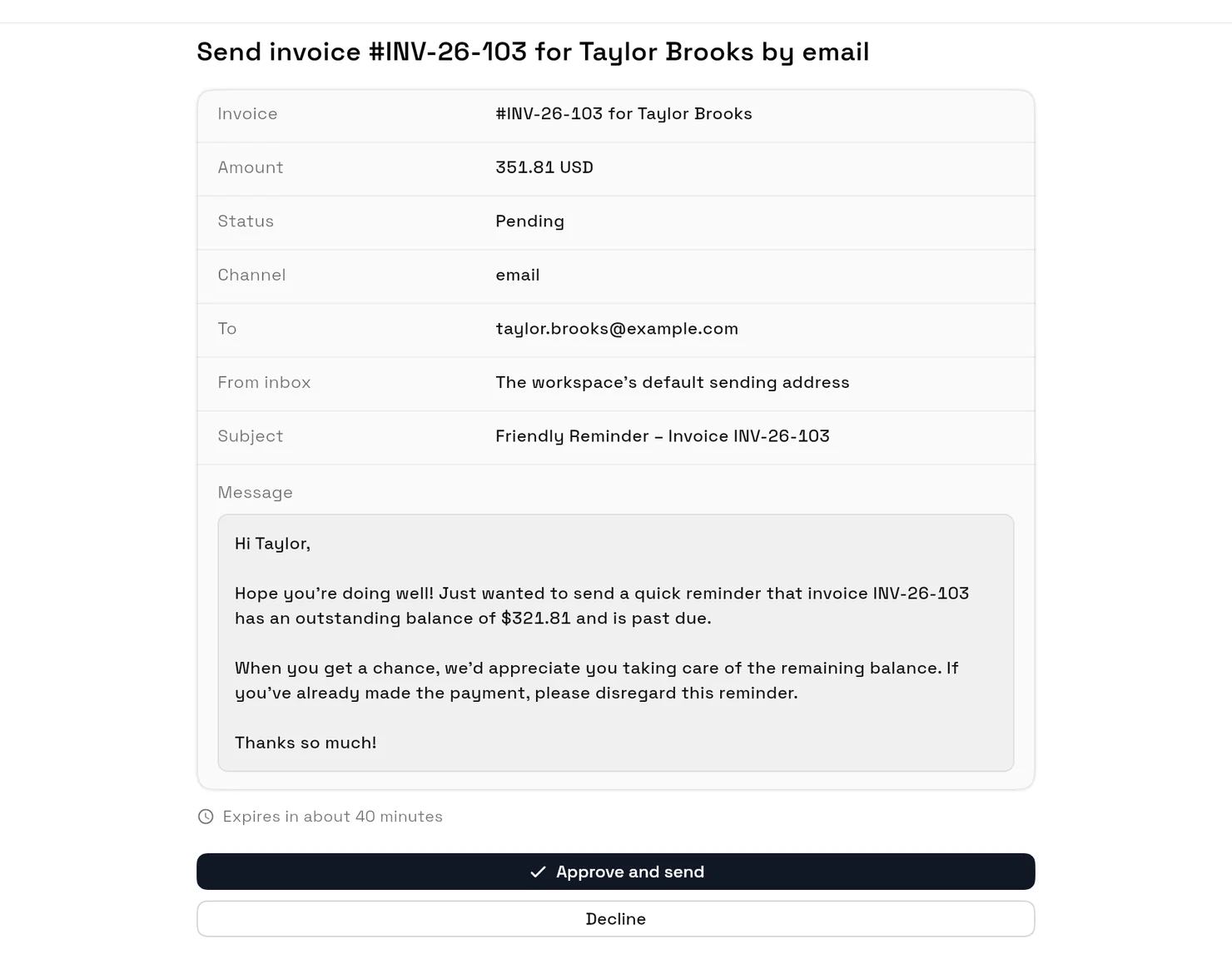
The approval page shows exactly what will go out: who it's for, the subject and the full message. Once you approve, it's sent to your client. A request nobody decides expires after an hour, so unless you've turned on Send without asking, ChatGPT never sends a message you didn't see. The same rule covers invoices, proposals, contracts and texts.
Follow-up prompts to try in ChatGPT
- "Who should I follow up with this week?"
- "Which invoices are overdue, and which client owes me the most?"
- "Remind me to call Avery Morgan on Friday about the proposal."
- "Which proposals have been opened but not signed?"
- "Email Taylor Brooks a short, friendly reminder that invoice INV-26-103 is overdue, and send it."
For more, see 24 MCP CRM prompts, or how to make an invoice with ChatGPT the same way.
What it costs
The ChatGPT plugin is on every Workspace369 plan, from Cadet at $29 a month (one seat). Every successful request counts toward the workspace's monthly AI usage. Start with the 14-day trial; a card is required, and the plan renews monthly after the trial until you cancel. Compare the plans or see how the inbox works.
Sources reviewed for this guide
- Workspace369 is now an approved ChatGPT pluginApproval, plans and what waits for approval, reviewed November 23, 2026.
- Workspace369 MCP permissions, usage and auditApprovals and Send without asking, reviewed November 23, 2026.
- Workspace369 pricingPlan prices and trial terms, reviewed November 23, 2026.
Run client follow-up in one workspace.
CRM, inbox, voice, invoicing, payments, projects, files, AI, and workflow automations — connected instead of exported.
14-day free trial. Card required. After the trial: from $29/month. Renews automatically every month until you cancel. Cancel anytime in Settings → Billing.
See pricing