Three ways in
Camera, a USB or Bluetooth scanner, or search by name or card number.
Scan a member's pass with the camera or a scanner, or search by name. The result shows at once: what they used and what's left, or the reason they can't come in. On the web app now.
14-day free trial. Card required. After the trial: from $29/month. Renews automatically every month until you cancel. Cancel anytime in Settings → Billing.
Request a demo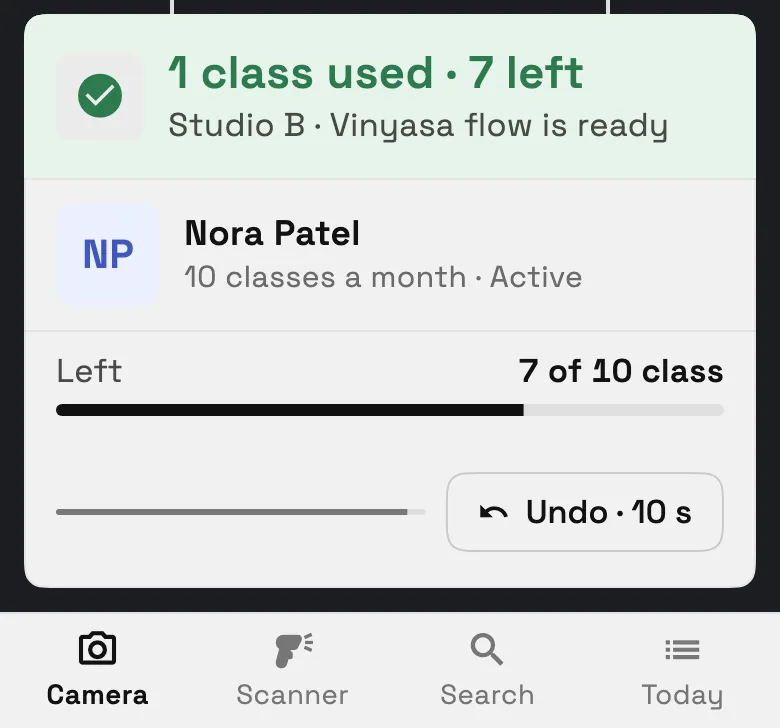
Check-ins in Workspace369 are how a studio, gym or salon lets members in at the front desk. Each member can show a QR pass from their client portal, or from Apple Wallet on iPhone. You scan it with your camera or a USB or Bluetooth scanner, or search by name or card number, and Workspace369 checks the membership: it records the visit and shows what was used and what's left, or tells you why the member can't come in. Check-ins that let someone in, and weren't undone, appear in the Check-ins report. Check-ins launched on November 2, 2026 and are on the web app now.
Reviewed November 4, 2026 by the Workspace369 Product Team. Availability can vary by plan, region, and workspace configuration.
Read the payments documentationCheck-ins read each member's membership, so the desk sees the same balance and rules you set up.
Camera, a USB or Bluetooth scanner, or search by name or card number.
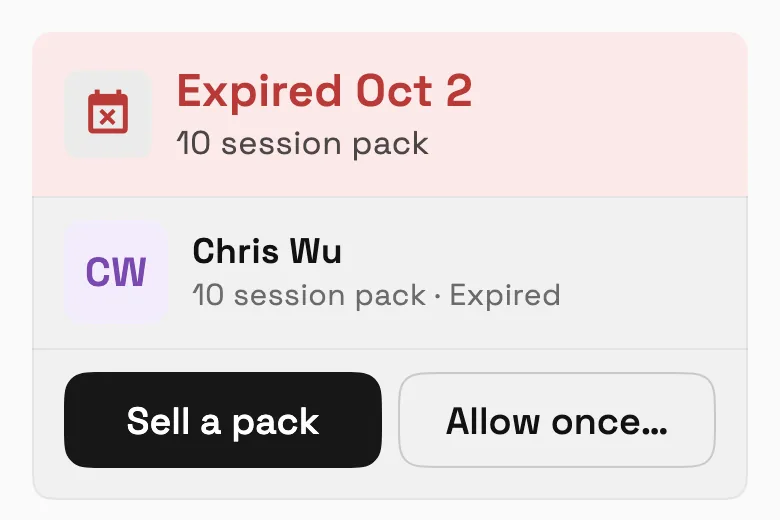
Checked in with what's used and left, or why not: Expired, Payment failed, Membership frozen, Already checked in, Too soon for another visit or Daily limit reached.
Undo a check-in for 10 seconds, and it doesn't count.
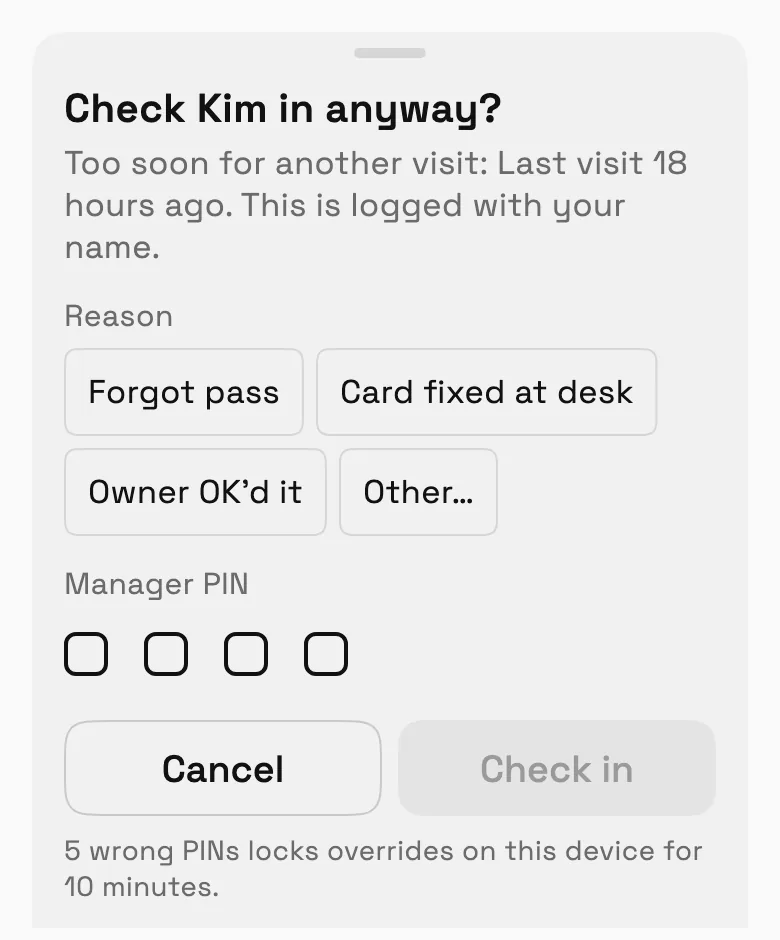
Check in anyway with a reason, and a manager PIN for the stricter cases; it's logged with the staff member's name.
Out of visits or past its date? Sell a new pack right from the check-in screen; the member pays through the usual Memberships pay link. Recurring plans show Renew instead.
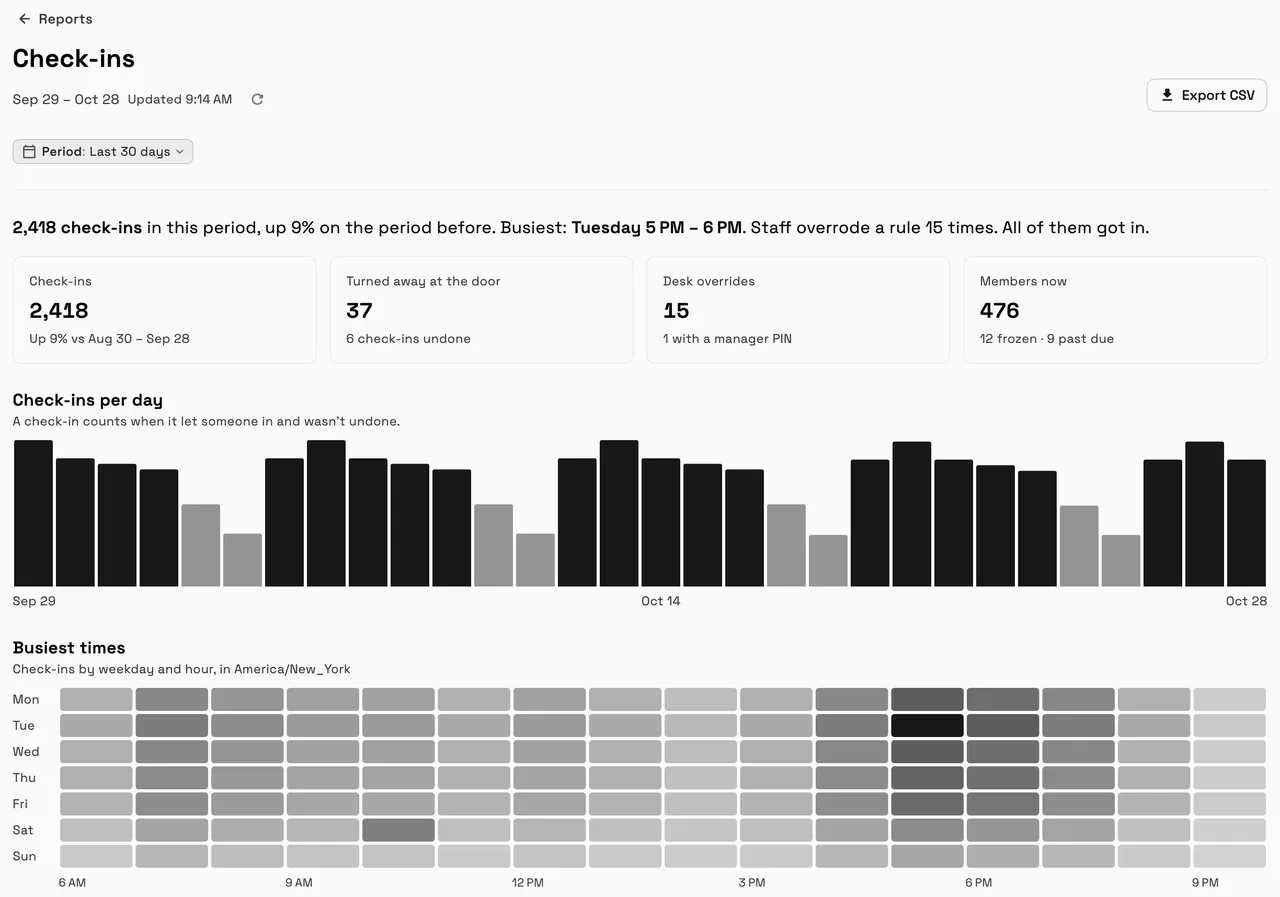
Check-ins per day, busiest times by weekday and hour, and a desk log of overrides, for 7, 30 or 90 days.
Built into the operating flow
Check-ins connect to Memberships for each member's balance and rules, the client portal and Apple Wallet for the pass, and Reports for the Check-ins report.
Go to Clients, then Check-in. The screen says Ready for the next member.
Scan the pass with Camera or Scanner, or use Search with a name or the 12-digit number on the card.
Checked in, with what was used and what's left, or the reason the member can't come in.
Undo within 10 seconds, or choose Check in anyway with a reason, and a manager PIN where it's needed.
The result says why, and offers what to do next: sell a new pack, or allow the visit once.
Check in anyway asks for a reason, and a manager PIN for the stricter cases, and it's logged with your name.
Check-ins per day, the busiest times by weekday and hour, and who overrode what.
Common operating scenarios
These examples describe how the feature fits into connected client work. They are product workflows, not promised business outcomes.
Scan class-pack passes; when the last class is used, sell a new pack from the result.
A scanner at the desk keeps the line moving, and the busiest-times map shows when to staff up.
Day passes checked in by name search when someone forgets their phone.
Monthly members checked in at reception; a paused membership shows the reason, Membership frozen.
Check-ins connect to Memberships for each member's balance and rules, the client portal and Apple Wallet for the pass, and Reports for the Check-ins report.
A membership set up in Workspace369 for each member, and a phone, tablet or computer with a camera, or a USB or Bluetooth scanner.
Search by name, or by the 12-digit number on their card.
The result says why, such as Expired or Membership frozen. Out of visits or past its date? Sell a new pack right from the check-in screen, paid through a pay link, or check them in anyway with a reason, and a manager PIN for the stricter cases.
Yes, for 10 seconds. An undone check-in doesn't count in the Check-ins report.
Not yet. A self check-in kiosk for a tablet at the door is being built.
Check-ins come with Memberships; see Pricing for plans.
Start free and bring this workflow into the rest of your workspace.
14-day free trial. Card required. After the trial: from $29/month. Renews automatically every month until you cancel. Cancel anytime in Settings → Billing.
See pricing