Best CRM with Outlook mailbox integration in 2026: 6 compared
Six CRMs compared on connecting a Microsoft 365 or Outlook.com mailbox: what syncs, shared and private inboxes, plan gates and price. Checked Nov 2026.
We make Workspace369 and list it first here. Weigh our ranking with that in mind, and if another tool fits you better, use it.

By Simon Dziak, Founder, Workspace369 · LinkedIn
The best CRM with Outlook mailbox integration connects your Microsoft 365 or Outlook.com mailbox with Microsoft's own sign-in, brings client mail into one place next to the client, and lets the team share an inbox without exposing everyone's personal mail. For client-work businesses such as consultants, agencies and studios, our pick is Workspace369. For a free start with an Outlook add-in, HubSpot is the one to try; for the deepest sync on a sales team, Pipedrive.
Disclosure and method: Workspace369 publishes this guide and is one of the options. We read each CRM's own help, feature and pricing pages on November 18 to 20, 2026. Prices are usual list prices, billed monthly, without promotions. Where a vendor didn't say something, we say "not stated".
Key takeaways
- An Outlook "integration" can mean very different things: a real mailbox sync, an Outlook add-in, or only sending through your address. We compared six CRMs that connect a Microsoft 365 or Outlook mailbox.
- Workspace369 is our pick for client-work teams: it connects Microsoft 365 work accounts and Outlook.com mailboxes on every plan, puts new client mail in one inbox next to the client, and lets a teammate's own mailbox stay private while sales@ works as a shared inbox from Voyager.
- Plutio syncs Outlook mail and calendar both ways on every plan, but its $19 Core plan is for one person and nine active clients. HubSpot's free CRM has an Outlook add-in but logs mail with known contacts only.
- Pipedrive syncs up to two years of past mail on a personal account, but starts on Growth at $49 a seat. Dubsado connects one address per workspace; Capsule's add-in is on every plan but only for Microsoft 365 business accounts.
- Check before you buy: whether past mail comes in, whether teammates' mail is private, whether shared mailboxes work, and which plan turns sync on.
What's inside?
What an Outlook mailbox integration should doThe best CRMs with Outlook mailbox integration in 2026Side-by-side: Outlook mailbox integration in six CRMsSee your Outlook mail next to the client in Workspace369Which CRM for Outlook fits youHow to connect Outlook to Workspace369
What an Outlook mailbox integration should do
"Works with Outlook" covers very different things: a real mailbox sync, an Outlook add-in that saves mail into the CRM, or only sending through your address. For this ranking we looked for a mailbox connection and checked four points:
- Microsoft's own sign-in: you connect with Microsoft's sign-in page, for Microsoft 365 work accounts and, ideally, Outlook.com personal mailboxes.
- Client mail in one place: new mail and the replies you send from Outlook land in the CRM, next to the client.
- Shared team inboxes: an address like sales@ or info@ can be worked by the whole team.
- Private by default: each person's own mailbox stays private unless they share it, and the plan that turns all of this on.
The order reflects fit for a client-work business. Positions 2 to 6 are not a quality score.
The best CRMs with Outlook mailbox integration in 2026
1. Workspace369, best overall for client work
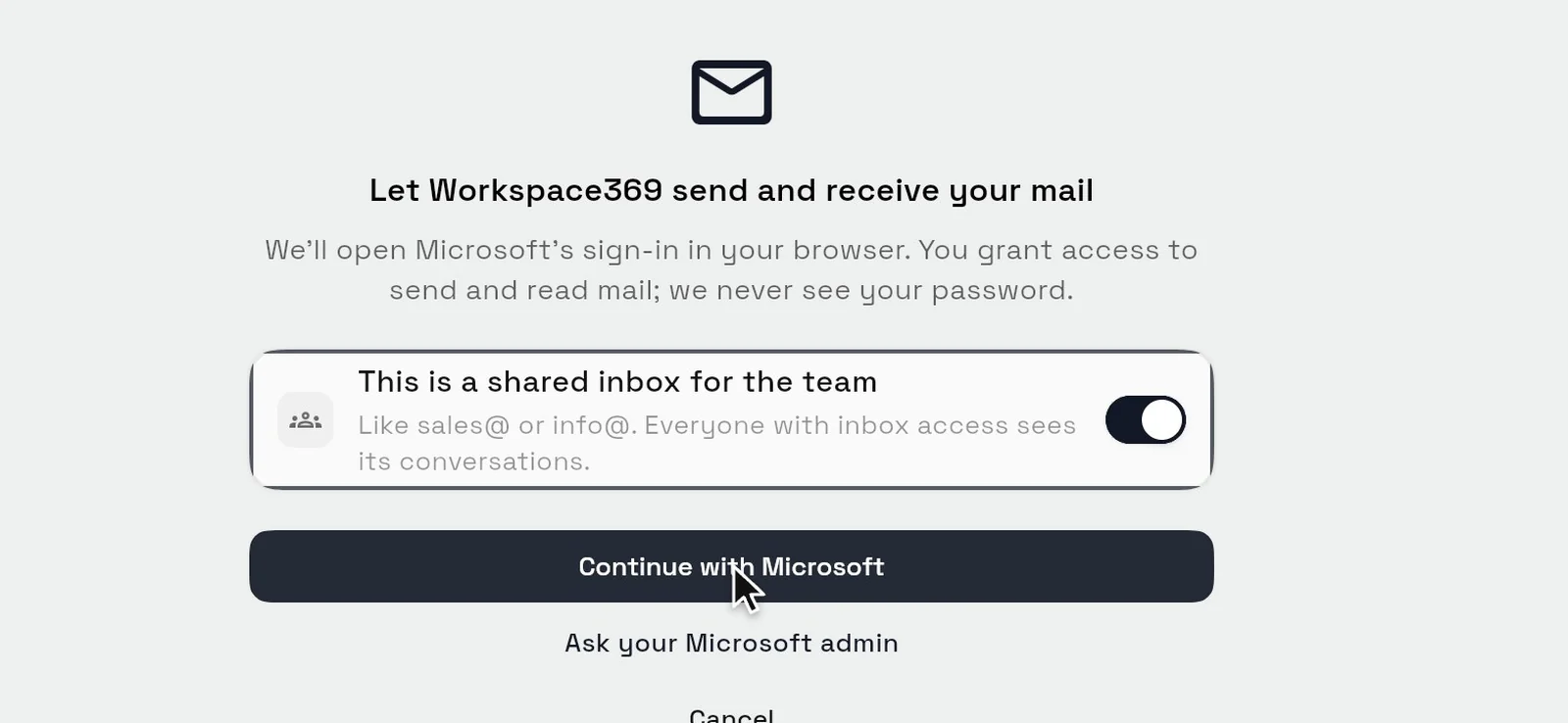
In Workspace369, open Settings, then Email, SMS & phone, then Email, then Domains & connections, choose Connect an inbox and pick Microsoft 365 / Outlook. Workspace369 opens Microsoft's own sign-in and never sees your password. It connects a Microsoft 365 work account or an Outlook.com mailbox, on every plan.
From then on, new mail that arrives in the mailbox's Inbox folder shows up in the Workspace369 inbox as a conversation, and mail you send from Outlook joins the same conversation. Mail with the same person stays together, next to the client's proposals, invoices and payments.
For teams, mark an address like sales@ or info@ as a shared inbox when you connect it, and everyone with inbox access works it together. A teammate's own mailbox starts private: only that person and the workspace owner see it until they choose Share with team. Your Outlook calendar connects separately and syncs both ways.
The mailbox connection is on every plan, from Cadet at $29 a month (one seat); a shared inbox starts on Voyager at $74 (two seats). Start with the 14-day trial; a card is required, and the plan renews monthly after the trial until you cancel.
Limitations: only new mail comes in, so older mail isn't imported, and there's no Outlook add-in. It runs in the web app, and some Microsoft 365 organizations ask an administrator to approve the app once.
Best for: consultants, agencies and studios that want client mail in one shared inbox next to their proposals and invoices.
2. Plutio, best for solo studios
Plutio connects Microsoft 365 and Outlook.com accounts with Microsoft's sign-in, with no IMAP setup or forwarding rules. Plutio says email syncs both ways, including inbox, sent, drafts and trash, and the Outlook calendar syncs both ways too. All plans include the email integration.
Limitations: the $19 Core plan is for one person and nine active clients. Adding team members to a mailbox, which makes it a shared inbox, needs Pro. How much past mail comes in isn't stated.
Price: Core $19, Pro $49 and Max $199 a month, billed monthly.
Best for: solo designers and studios with a short client list who live in Outlook.
3. HubSpot, best for starting free
HubSpot's free CRM connects a Microsoft 365 inbox and has an Office 365 add-in for Outlook on Windows, Mac and the web. A team email address can be connected to its conversations inbox, and you can connect an Office 365 calendar to its meetings tool.
Limitations: by default HubSpot logs mail to and from contacts already in your CRM, so a first email from someone new isn't logged. A Microsoft 365 shared mailbox can't be connected as an individual inbox, and Outlook.com personal accounts aren't named.
Price: free CRM $0 (up to two users); Sales Hub Starter's usual price is $20 a seat a month, and Professional is $100 a seat a month on an annual commitment, with a required $1,500 onboarding fee.
Best for: teams that want a free CRM with an Outlook add-in.
4. Pipedrive, best for deal-driven teams
Pipedrive's email sync connects Office 365, Outlook and Outlook.com accounts, and you view, send and reply to mail from Pipedrive. You choose which folders to sync and how far back to go, up to two years of past mail on a personal account (a shared team account goes back one month), and each person chooses whether their synced mail is private or shared. Its calendar sync works with Outlook and Office calendars.
Limitations: there's no email sync on Lite: it starts on Growth. A Team Inbox for shared addresses starts on Premium.
Price: Lite $24, Growth $49 and Premium $79 a seat a month, billed monthly.
Best for: sales teams that want their full Outlook history next to their deals.
5. Dubsado, best for solo businesses with one address
Dubsado's Continue with Microsoft option connects Microsoft 365 addresses on your own domain as well as Outlook.com, Hotmail and Live addresses, on both plans. It connects to Outlook calendars too, through Cronofy.
Limitations: Dubsado says you can connect only one email address per workspace, so teammates can't connect their own. Only new mail from contacts saved in Dubsado comes in, and replies you send from your own inbox aren't logged.
Price: Starter $35 and Premier $55 a month, billed monthly.
Best for: a solo business that runs everything from one business address.
6. Capsule, best for an Outlook add-in
Capsule's Outlook add-in is on every plan, including the free one. You can also forward or BCC mail to Capsule, and Email Sync brings in sent and received mail from each person's own mailbox, with an optional import of past mail.
Limitations: Capsule says the add-in is for Microsoft 365 business subscriptions, not Personal or Family plans. Automatic Email Sync starts on Growth, is switched on contact by contact, and works with personal mailboxes, not shared ones. Calendar sync is one-way into Capsule.
Price: free for two users; Starter $22 and Growth $40 a user a month, billed monthly.
Best for: Microsoft 365 business teams that want to save mail from inside Outlook.

Side-by-side: Outlook mailbox integration in six CRMs
| CRM | Connects | Outlook.com personal | Past mail | Shared and private mailboxes | Mailbox sync from (billed monthly) |
|---|---|---|---|---|---|
| Workspace369 | Microsoft sign-in | Yes | New mail only | Shared inbox from Voyager; teammates' mailboxes private | $29, every plan |
| Plutio | Microsoft sign-in, two-way | Yes | Not stated | Team members make a shared inbox (Pro) | $19 (Core, solo) |
| HubSpot | Inbox connection and Outlook add-in | Not named | No import described | Team email in the conversations inbox | $0 |
| Pipedrive | Email sync | Yes | Up to 2 years (personal); 1 month (team) | Private or shared per user; Team Inbox on Premium | $49 a seat (Growth) |
| Dubsado | Microsoft sign-in | Yes | Not imported | One address per workspace | $35 |
| Capsule | Outlook add-in; Email Sync | Add-in: business accounts only | Optional import | Email Sync: personal mailboxes; a shared address for sending on paid plans | $40 a user (Growth) for sync |
As stated on each vendor's help, feature and pricing pages, November 18 to 20, 2026.
See your Outlook mail next to the client in Workspace369
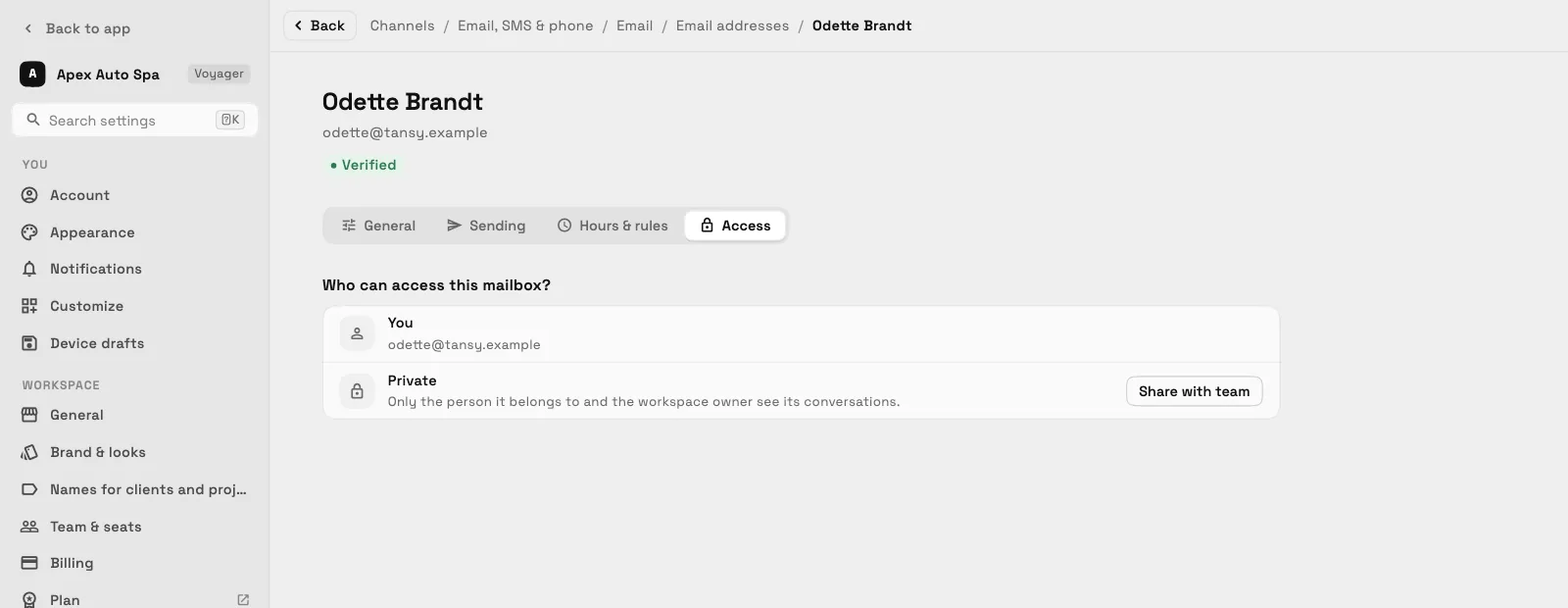
Once the mailbox is connected, a new email shows up in the Workspace369 inbox as a conversation, with the client's actions right there: send an invoice, book an appointment, request a review or send a payment link. Reply from the conversation, and mail you send from Outlook itself joins it too.
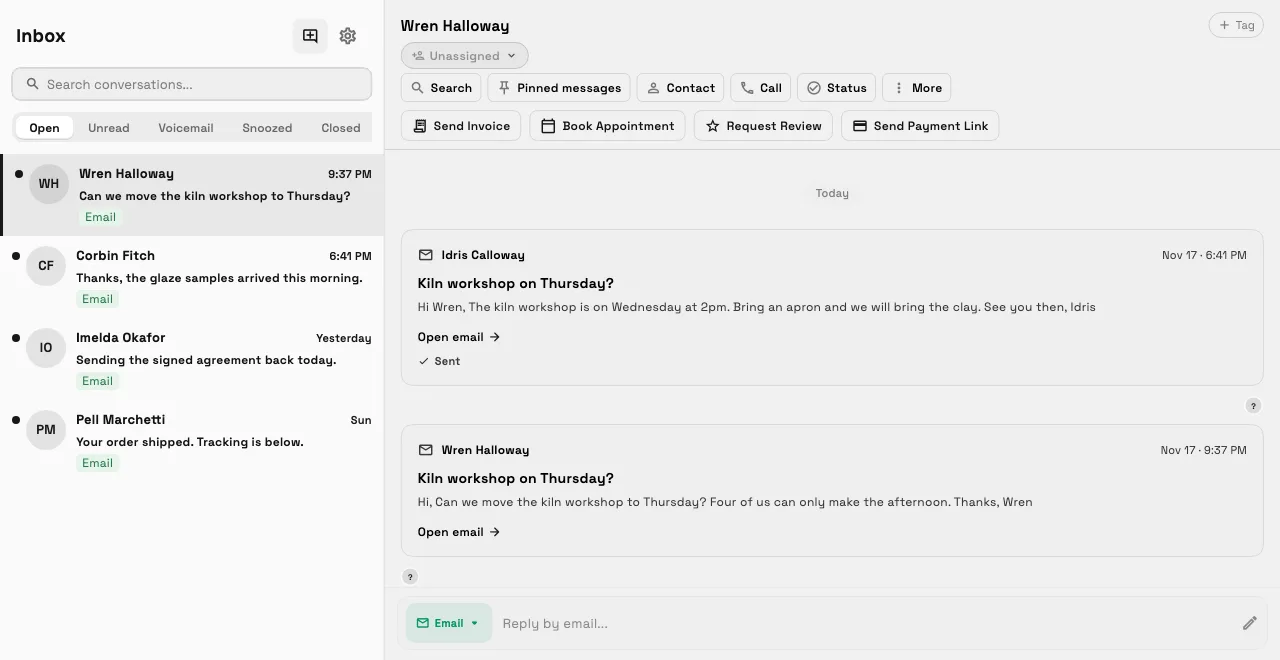
A teammate's own mailbox stays private until they share it. They open the mailbox, go to Access and choose Share with team, and the team sees its conversations from then on. Turning client email into proposals and invoices then happens on the same client record.
Which CRM for Outlook fits you
| If your priority is… | Look at |
|---|---|
| Client mail next to proposals and invoices on every plan; a shared inbox from Voyager ($74) | Workspace369 |
| A solo studio with a short client list and two-way Outlook calendar | Plutio |
| A free CRM with an Outlook add-in | HubSpot |
| Up to two years of past Outlook mail next to your deals, on a personal account | Pipedrive |
| One business address for a solo business | Dubsado |
| Saving mail from inside Outlook on Microsoft 365 business | Capsule |
Also considered: Nimble keeps synced mail private by default and imports 90 days of past mail, and Close connects Office 365 with all past mail with your contacts, and emails on shared leads are visible to everyone with access to the lead. We left out tools whose Outlook link only sends from your address or saves mail by hand, such as HoneyBook.
How to connect Outlook to Workspace369
- Open Settings, then Email, SMS & phone, then Email, then Domains & connections.
- Choose Connect an inbox, then Microsoft 365 / Outlook. If it's an address like sales@ that the team shares, switch on This is a shared inbox for the team.
- Press Continue with Microsoft, sign in on Microsoft's page and approve access. If your organization asks for an administrator, choose Ask your Microsoft admin.
- Back in Workspace369, a Mailbox connected message names the address, and new mail starts arriving in your inbox.
Ready to try it? See the Microsoft 365 integration, read what's new in the Outlook connection, or compare the plans.
Sources reviewed for this guide
- Connect your Microsoft 365 or Outlook mailbox to the Inbox (Workspace369 release note)How the mailbox connects and what syncs, reviewed November 20, 2026.
- Teammates' Outlook mailboxes start private (Workspace369 release note)Private and shared mailboxes, reviewed November 20, 2026.
- Workspace369 and Microsoft 365Plans and the separate Outlook calendar connection, reviewed November 20, 2026.
- Workspace369 pricingPlan prices, seats and trial terms, reviewed November 20, 2026.
- Plutio email integrationTwo-way sync and shared inboxes, reviewed November 20, 2026.
- Plutio Outlook integrationOutlook calendar sync, reviewed November 20, 2026.
- Plutio pricingPlans, client limits and seats, reviewed November 20, 2026.
- Connect your inbox to HubSpot (HubSpot knowledge base)Microsoft 365 inbox connection, reviewed November 20, 2026.
- Manage contact email logging rules (HubSpot knowledge base)Known-contacts-only logging, reviewed November 20, 2026.
- HubSpot Sales Office 365 add-in (HubSpot knowledge base)Outlook add-in, reviewed November 20, 2026.
- HubSpot Sales Hub pricingUsual prices billed monthly, Professional on an annual commitment, reviewed November 20 and 21, 2026.
- Email sync (Pipedrive knowledge base)Plans, folders and past mail, reviewed November 20, 2026.
- Team Inbox (Pipedrive knowledge base)Shared inboxes by plan, reviewed November 20, 2026.
- Pipedrive pricingPer-seat prices billed monthly, reviewed November 18, 2026.
- Connect your email account with Microsoft (Dubsado help)Microsoft sign-in and supported accounts, reviewed November 20, 2026.
- Dubsado email integration basics (Dubsado help)One address per workspace and saved contacts, reviewed November 20, 2026.
- Dubsado pricingPrices billed monthly, reviewed November 20, 2026.
- Capsule Outlook add-in (Capsule support)Supported Microsoft 365 accounts, reviewed November 20, 2026.
- Capsule Email Sync (Capsule support)Plan and personal-mailbox limits, reviewed November 20, 2026.
- Capsule pricingPer-user prices billed monthly, reviewed November 20, 2026.
Workspace369 publishes this comparison and is one of the options. For the other CRMs we read their help, feature and pricing pages; we did not test their sync. It is not an independent ranking.
Run client follow-up in one workspace.
CRM, inbox, voice, invoicing, payments, projects, files, AI, and workflow automations — connected instead of exported.
14-day free trial. Card required. After the trial: from $29/month. Renews automatically every month until you cancel. Cancel anytime in Settings → Billing.
See pricing