Best CRM with texting in 2026: native SMS, not another integration
Seven CRMs with texting compared on where two-way SMS starts, 10DLC registration and monthly cost for one user and for five, checked October 22, 2026.
We make Workspace369 and list it first here. Weigh our ranking with that in mind, and if another tool fits you better, use it.

By Simon Dziak, Founder, Workspace369 · LinkedIn
Short answer: the best CRM with texting for a client-work team keeps each text thread on the client record; Workspace369 includes two-way SMS, calls and missed-call text back from Voyager at $74 a month for 2 seats. IVR, call queues and call recording start on Specialist at $149 a month with 10 seats. US carriers require A2P 10DLC registration for business texting from software; Workspace369 tracks 10DLC registration and handles opt-outs from Voyager, and claiming a texting number adds a one-time $50 carrier compliance setup; texts and calls draw on the plan's monthly usage.
The best CRM with texting puts a client's two-way text thread on the same record as their projects and invoices, and still delivers after carrier registration. This guide compares seven options for a client-work or service team of 1 to 10, with the monthly cost for one user and for five. For a first text worth sending, try the free payment reminder generator. Workspace369's workflow is on the SMS inbox for client work page.
Disclosure and method: Workspace369 publishes this guide and is one of the options; we rank it first and flag where cheaper tools win. It is a documentation-based comparison, not a hands-on benchmark. Official vendor pages were read on October 22, 2026, with billing toggles clicked.
Key takeaways
- Texting is built in on Close, GoHighLevel, Quo, HoneyBook (as an add-on) and Workspace369; HubSpot sells SMS as a Marketing Hub add-on, and Zoho CRM relies on marketplace extensions.
- Monthly billing, texting included: one user pays $44 on HoneyBook, $49 on Close, $74 on Workspace369 and $97 on GoHighLevel; five users pay $104 on Workspace369, $137 on HoneyBook and $245 on Close. Quo Starter is $15 a user a month billed yearly; its monthly price is on Quo’s site.
- GoHighLevel and Workspace369 do not price per user for small teams (GoHighLevel at $97 with no per-user charge, Workspace369 at $74 for two seats plus $10 per extra seat), so they get cheaper per person as a team grows.
- US carriers require A2P 10DLC registration for business texting from software, and a pending registration can leave texting off for days: HoneyBook says up to 10 business days, HubSpot six to eight.
- Quo and HoneyBook cost less for a solo owner; Workspace369 ranks first here because it keeps the text thread on a client record with projects, Proposals, invoices and the client portal.
What's inside?
What a CRM with texting is (and is not)How we compared these toolsThe best CRM with texting in 2026Side-by-side comparisonWhich CRM with texting fits your use case?Why business texts stop delivering: 10DLC in plain termsTest texting before you commitWhere Workspace369 fits, and when a phone-first tool is the better answer
What a CRM with texting is (and is not)
A CRM with texting lets you send and receive SMS from a client or contact record, keeps the thread in the history, and handles carrier registration. It is not a bulk-SMS marketing tool, and it is not a plain business phone app: a number that texts but knows nothing about the client's project or unpaid invoice only moves the problem. Native means the texting is part of the vendor's product; an integration means a second subscription and a thread that lives in another app.
How we compared these tools
Each tool was checked on the same five points, using only its own pricing page, product page or help center as read on October 22, 2026:
- Texting availability: whether two-way SMS is built in, and the plan or add-on where it starts.
- Monthly cost, texting included: for one user and for five users, on monthly billing, before usage fees.
- Registration and fees: what the vendor says about A2P 10DLC or carrier registration and any one-time or monthly carrier fee it lists.
- Client record: whether replies land on a client or project record, and whether a client portal exists.
- Coverage: the countries the vendor says it can text.
Order follows checks 1 and 4 for a team of 1 to 10, then check 2. We did not test delivery rates, call quality, the mobile apps or support, and we did not use third-party ratings. Message, call and number usage fees are excluded from the totals because most vendors do not list a flat rate.
The best CRM with texting in 2026
1. Workspace369, best for client-work teams that want texts on the client record
Two-way SMS with delivery status sits in the shared inbox beside email, calls and voicemail, from Voyager at $74 a month (monthly billing; $59.25 billed yearly) with two seats. Extra seats are $10 a month, so five users cost $104 on monthly billing. The same client record carries projects, Proposals, invoices and the client portal, which is on every plan. The plan matrix lists A2P 10DLC tracking, STOP and HELP handling and suppression lists. A dedicated SMS or voice number carries a one-time $50 carrier compliance setup, and IVR, call queues and call recording start on Specialist at $149.
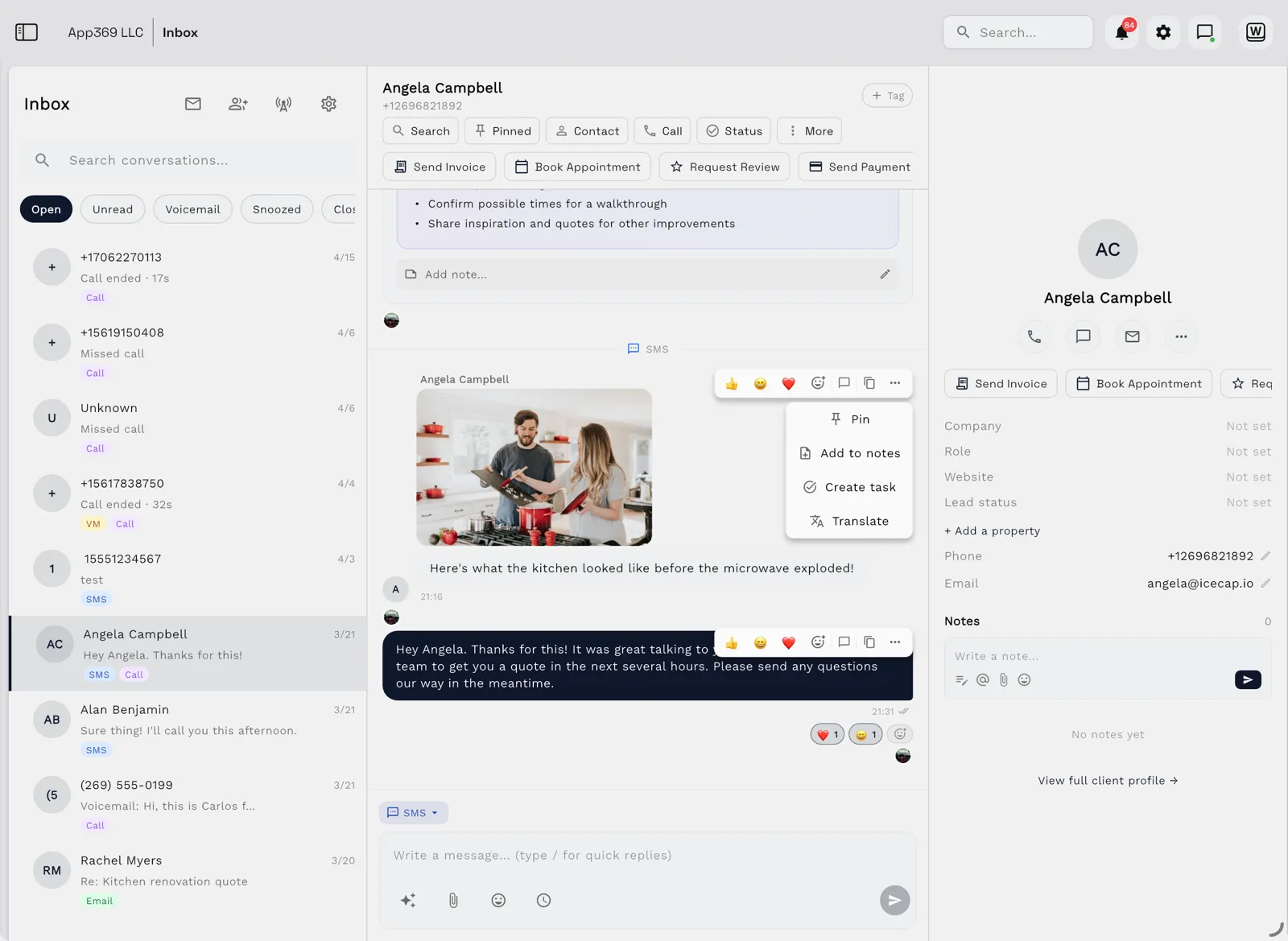
Limitations: texting is not on the $29 Cadet plan, so a solo owner pays $74, more than Quo or HoneyBook. Supported countries for SMS are not published. It is not a sales-dialer CRM.
Best for: teams of 2 to 10 who want texts, email, invoices and the portal on one client record.
2. HoneyBook, best for solo creatives and small teams already on HoneyBook
HoneyBook's Business Phone and SMS is an add-on from $8 a month for 300 texts, with $15 and $20 bundles above that, and it works with any plan. It includes a business number, and replies appear in the project feed. One user on Starter pays $36 monthly plus $8, or $44. Essentials lists up to 2 team members and Premium unlimited, so five users need Premium at $129 and total $137; Starter lists no team-member count, so we price one user there.
Limitations: SMS is for members in the United States and Canada, to US, Puerto Rico and Canadian numbers only, and it works in the desktop or mobile app rather than a mobile browser. The number is registered for SMS approval that can take up to 10 business days, and it is tied to one brand. In the HoneyBook Community thread on whether it is worth it, one user wrote, "This feels like nothing more than a blatant money grab" (September 2026).
Best for: solo creatives and tiny teams who already run proposals and invoices in HoneyBook.
3. Quo, best for a business number with texting at the lowest per-user price
Quo includes calling and messaging to US and Canadian numbers on every plan, from Starter at $15 per user a month billed yearly, which is $75 a month for five. Starter’s monthly price varies on Quo’s page, so check its site for it (checked October 26, 2026). The page lists a $19.50 one-time carrier review fee and a $1.50 to $3 monthly messaging fee per plan. HubSpot and Salesforce integrations start on the Business tier. Business is $23 a user a month billed yearly. Every plan includes one new or ported number per user, and extra numbers are $5 a month each, so a five-person team gets five numbers without paying extra.
Limitations: Quo is a phone system, not a CRM, so client history, projects and invoices live elsewhere. Per-user pricing grows with the team, and other countries bill per message.
Best for: solo owners and small teams whose gap is a business number that texts.
4. Close, best for outbound sales teams that live on the phone
Close lists built-in forms, email, calling and SMS with a centralized inbox on Essentials at $49 per user a month on monthly billing, or $35 billed annually. One user pays $49 and five pay $245 ($175 yearly). Workflows start on Growth at $99 annually, and the page lists 1,000 AI credits per user on Essentials. Calling and texting usage rates are not on the pricing page, so the totals exclude them. There is no card needed to try it, and the page advertises a 30-day money-back guarantee, which makes a real two-week test cheap.
Limitations: Close is a sales CRM with no client portal, projects or invoicing, so service work needs a second system after the deal closes. Cost scales per seat.
Best for: sales teams of 2 to 10 doing high-volume calls and texts to leads.
5. GoHighLevel, best for agencies that build funnels and run client sub-accounts
GoHighLevel's Starter plan is $97 a month ($970 a year) with three sub-accounts, unlimited contacts and no per-user charge, and the feature list includes email and SMS marketing, inbound and outbound calling and unified conversations. Cost does not change between one and five users. The page footnotes SMS and calling as usage-based charges, with no rate listed. It also lists a 14-day free trial on any plan, so you can measure your own message volume before committing to the $97.
Limitations: it is built around funnels and agency resale, so delivery and accounting for ongoing client work are shallower. A branded client portal app is a $49-a-month add-on per sub-account, and heavy messaging grows the bill.
Best for: marketing agencies that sell funnels and manage sub-accounts for their clients. Moving off GoHighLevel? Start with how to switch from GoHighLevel, including what moves and what doesn't.
6. HubSpot, best for teams already standardized on HubSpot Marketing Hub
HubSpot has native SMS, but it is a Marketing Hub feature. Its help center lists the Marketing SMS add-on for Marketing Hub Professional and Enterprise, and its product page describes personalized two-way conversations tied to CRM data. Registration takes six to eight business days for 10DLC numbers. Marketing Hub Professional and add-on prices were not readable on the pages we reached, so see the vendor site. The Marketing SMS add-on grants one long-code number and suits customer service and two-way conversations on a smaller scale.
Limitations: sending is from US-based numbers only, each account gets one marketing number, and sole proprietors are not supported. It is a marketing tool first, so a solo service team is paying for more than it needs.
Best for: teams that already run Marketing Hub Professional and want SMS in the same account.
7. Zoho CRM, best for budget-conscious teams that accept a marketplace extension
Zoho CRM has no built-in two-way texting on its pricing page. Standard is $20 per user a month on monthly billing ($14 yearly), so one user is $20 and five are $100, before any extension. The Zoho Voice extension in the marketplace is listed as free with local two-way SMS in the USA and Canada, and its compatible editions are blank. Its usage charges are not stated, so see site. Zoho's own Notification SMS is for companies registered in India.
Limitations: the result is a CRM plus an extension plus a provider account, each with its own settings. Portal and project pieces are separate Zoho apps. A cost-minded team should price the CRM seat, the extension and the provider's per-message fees together before comparing it with a flat-rate option.
Best for: teams already in the Zoho ecosystem that will assemble their own setup. Leaving Zoho CRM? Our Zoho CRM migration checklist covers what moves and what stays.
Side-by-side comparison
| Tool | Texting | 1 user, monthly billing | 5 users, monthly billing | Extra charges |
|---|---|---|---|---|
| Workspace369 | Native, from Voyager | $74 (two seats) | $104 | One-time $50 carrier compliance setup (dedicated number only) |
| HoneyBook | Add-on, US and Canada | $44 (Starter plus $8) | $137 (Premium plus $8) | Larger text bundles $15 and $20 |
| Quo | Native, phone-first | See site ($15 yearly) | See site ($75 yearly) | $19.50 one-time, $1.50 to $3 monthly |
| Close | Native, Essentials | $49 | $245 | Usage rates: see site |
| GoHighLevel | Native, usage-based | $97 | $97 | Usage charges: see site |
| HubSpot | Marketing Hub add-on | See site | See site | Add-on price: see site |
| Zoho CRM | Marketplace extension | $20 plus extension | $100 plus extension | Extension usage: see site |
Prices read October 22, 2026 on each vendor's own page. Workspace369 is our product, so weigh this table accordingly.
Which CRM with texting fits your use case?
| If you mostly need | Start with | Why |
|---|---|---|
| Texts beside projects, invoices and a client portal | Workspace369 | One record, two seats from $74 |
| The cheapest way for one person to text clients | Quo | $15 a user billed yearly, no CRM |
| Texting inside a client-work tool you already use | HoneyBook | $8 add-on, US and Canada only |
| High-volume outbound sales calls and texts | Close | Built-in dialer and SMS on Essentials |
| Funnels and sub-accounts for agency clients | GoHighLevel | $97 flat, no per-user charge |
| SMS inside Marketing Hub | HubSpot | Native, but Professional or higher |
| A Zoho setup you will assemble yourself | Zoho CRM | Low seat price, extension required |
Why business texts stop delivering: 10DLC in plain terms
If your business texts stop landing, the cause is usually registration, not the tool. US carriers treat texting from software as A2P (application-to-person) traffic, and local numbers used for it must be registered under 10DLC rules with a brand and a campaign describing what you send. Unregistered traffic gets filtered or blocked.
Every vendor here routes you through some version of this. Quo requires registration with The Campaign Registry and lists a $19.50 one-time review fee. HoneyBook registers the number for two-way SMS and says approval can take up to 10 business days, with calls working in the meantime. HubSpot says 10DLC registration takes six to eight business days. Workspace369 lists A2P 10DLC tracking and opt-out handling in its plan matrix, and a dedicated number carries a one-time $50 carrier compliance setup, not a monthly add-on.
Beyond registration, carriers filter on consent and content. Collect opt-in before you text a client, and keep the first message plain. Solo owners weighing a free personal line first should read our Google Voice alternative for client work guide.
Test texting before you commit
Use a trial with a test number and your own phone, never a real client's:
- Start registration on day one and note how long the vendor says approval takes.
- Send a text from a client record and reply from your phone.
- Check the reply lands on the client or project, not only in a generic inbox.
- Reply STOP, then confirm the tool blocks further sends.
- Add a second user and check who sees the thread.
- Find the usage bill: price per text, per number and per call.
The right tool shows the same thread to the whole team without a forwarded screenshot.
Where Workspace369 fits, and when a phone-first tool is the better answer
Workspace369 is the right answer when the text thread has to live beside the work: the project, the Proposal the client approved, the unpaid invoice. The shared inbox carries email, SMS, calls and voicemail, and invoices go out from the same record. The business phone system with CRM guide covers the calling side.
A phone-first tool is the better answer when calls or cost are the point: Quo for a number that texts (see our Quo alternatives shortlist), Close for outbound sales, GoHighLevel for funnel-led agencies, and HoneyBook if you already live in it.
If texting should sit beside the client record, start the 14-day trial on the Voyager plan (card required, then $74/month until you cancel), and the pricing page lists every tier. If you only need a number that texts, a phone-first tool will cost you less.
Sources reviewed for this guide
- Close pricingOfficial pricing page read October 22, 2026 on both the Monthly and Annually views for Solo, Essentials, Growth and Scale and the Essentials feature list (calling and SMS). Usage rates for calls and texts are not on the page, so the cost figures exclude them.
- HighLevel pricingOfficial pricing page read October 22, 2026 on the Monthly and annual views for Starter, Unlimited and Agency Pro, the users line and the usage-based charge footnote for SMS and calling.
- Quo pricingOfficial pricing page read October 22, 2026 on both the Monthly and Yearly views (per-user price re-checked in the server HTML October 23, 2026) for the per-user price, US and Canada messaging, the $19.50 one-time carrier review fee and the $1.50 to $3 monthly messaging fee.
- HoneyBook Business Phone and SMSOfficial product page read October 22, 2026 for the $8, $15 and $20 add-on tiers and the 300 SMS a month entry tier.
- HoneyBook help: getting started with Business Phone and SMSHelp article read October 22, 2026 for United States and Canada availability, registration timing, the one-brand limit and the US, Puerto Rico and Canada number limit.
- HoneyBook pricingOfficial pricing page read October 22, 2026 on the Billed yearly and Billed monthly views for Starter, Essentials and Premium and the team-member limits.
- HoneyBook Community: are the new texting features worth itPublic thread that loaded October 22, 2026; the quoted line is a user opinion, not a measurement.
- HubSpot SMS MarketingOfficial product page read October 22, 2026: SMS is available in Marketing Hub with two-way conversations. The Marketing Hub Professional price and SMS add-on price were not readable on the pages we reached, so the cell says See site.
- HubSpot help: set up SMS messaging for marketing communicationsHelp article read October 22, 2026 for the required Marketing Hub tiers, US-based numbers, registration timing and the sole proprietor limit.
- Zoho CRM pricingOfficial pricing page read October 22, 2026 on both the Monthly and Annually views for Standard, Professional and Enterprise. The page lists no SMS feature.
- SMS for Zoho CRM by Zoho Voice (Zoho Marketplace)Marketplace listing read October 22, 2026: listed as free, local two-way SMS in the USA and Canada only, with the compatible editions section blank. Usage charges were not stated, so the cost cell says See site.
- Workspace369 pricingPlan matrix read October 22, 2026 for seats, the SMS and A2P 10DLC rows, the one-time $50 carrier compliance setup for a dedicated number and trial terms.
Workspace369 publishes this documentation-based comparison and is one of the options; we rank it first of seven for this reader and say where cheaper tools beat it. It is not an independent ranking or a hands-on benchmark.
Run client follow-up in one workspace.
CRM, inbox, voice, invoicing, payments, projects, files, AI, and workflow automations — connected instead of exported.
14-day free trial. Card required. After the trial: from $29/month. Renews automatically every month until you cancel. Cancel anytime in Settings → Billing.
See pricing