Workspace AIWorkspace & team
Approve what connected AI apps send, link to any settings page, and try the new Home
Messages that Claude, ChatGPT or another connected AI wants to send wait for your approval, settings pages get their own web links, and a new optional Home is available.

Approve what a connected AI app wants to send
When an AI app connected to Workspace369, such as Claude or ChatGPT, tries to send an invoice, email, text or contract for you, the request waits for your approval. You see what it wants to send and when the request expires, then approve or decline. Past requests stay listed with their outcome. For an app you trust, a per-app setting lets it send without asking.
- Approve or decline in the app
- Requests expire if you do not act
- Send-without-asking is off by default and set per connected app

- Where to find it
- Settings
- Approvals
- Plans
- Every plan
- Learn more
- AI connections (MCP)AI chat
Every settings page has its own web address
On the web app, each Settings page now has its own address, for example /settings/billing or /settings/ai-connections. Refresh the page, bookmark it or send the link, and it reopens the same page. Nested settings pages on tablet and desktop also have a Back button.
- Where to find it
- Web app: any Settings page
- Plans
- Every plan
- Learn more
- Features
A new Home you can switch on
The new Home is optional, and the classic Home stays the default. To try it, open Settings → Appearance and choose New next to Home. Switch back to Classic whenever you like.
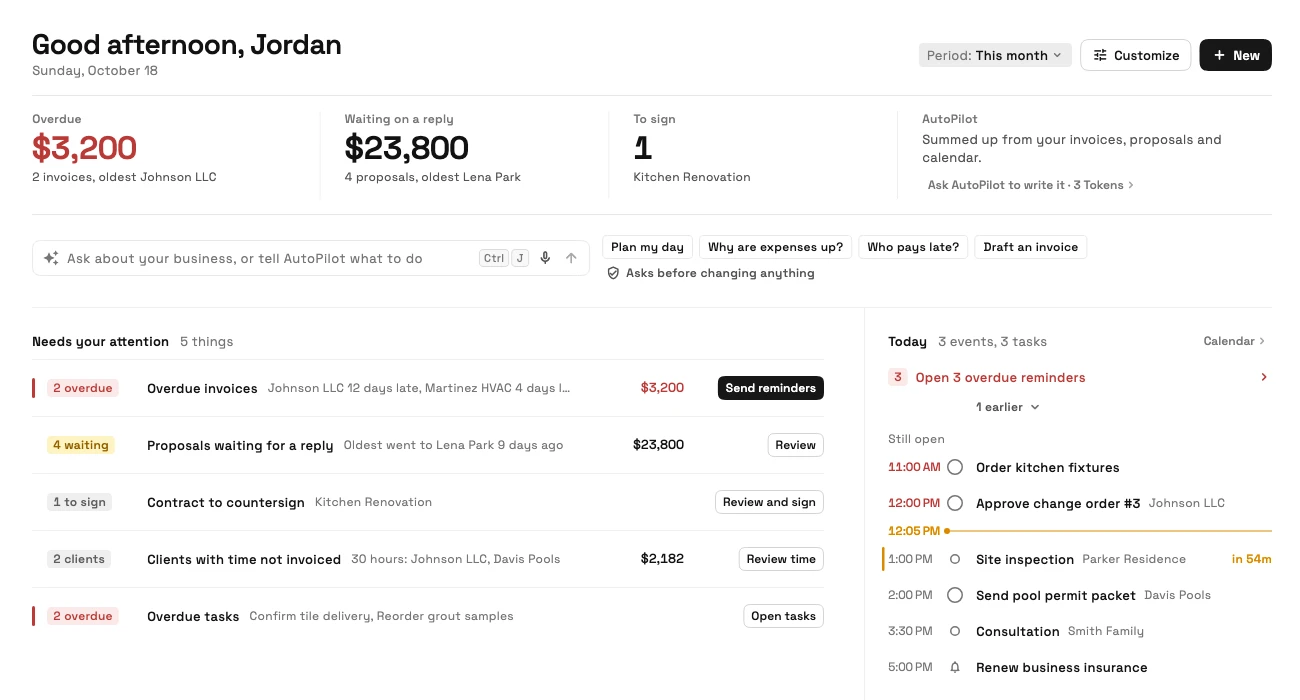
It adds a strip of overdue, waiting and to-sign figures, an Ask bar for AutoPilot, a needs-attention list and today's plan, plus money, pipeline and timesheet widgets. Drag, resize, add and hide widgets in Customize, on phones too.
- Overdue, waiting and to-sign figures at the top
- Customize by dragging, resizing, adding and hiding widgets
- Owners and admins set the starting Home for each role from Team → Home layouts
- Only widgets a person has access to appear
- Where to find it
- Settings
- Appearance
- Home (Classic or New); role layouts from the Team members screen
- Plans
- Every plan
- Learn more
- Dashboards and reportsAI chat
Ready when you are
See where Workspace369 fits into your client-work flow.
Start with the modules you need today, then turn on AI, automations, accounting, inventory, requests, and reporting as the operation grows.
14-day free trial. Card required. After the trial: from $29/month. Renews automatically every month until you cancel. Cancel anytime in Settings → Billing.
