Google Workspace invoicing: templates vs invoicing software (2026)
Google Docs and Sheets invoice templates vs dedicated invoicing software: numbering, status, reminders, payments. Workspace369 invoices from $29/month flat.

By Simon Dziak, Founder, Workspace369 · LinkedIn
You can invoice with a Google Docs or Sheets template, but Google Workspace has no invoicing tool: the template makes the document, and numbering, payment status, reminders and payment links stay manual.
Every service business sends its first invoice from a template. Google Docs or Sheets is free, familiar, and already open.
The question is not whether a template can produce an invoice. It can. The question is how long the template stays the system — because invoicing is not a document, it is a workflow.
See the Workspace369 invoice walkthrough for a concrete example of catalog items, dates, tax, installments and recorded payments. The tutorial includes chapters and a full transcript.
What's inside?
Quick answerTemplates vs invoicing softwareWhat a template actually does wellWhat invoicing software addsWhat the workflow looks like once the invoice leaves DocsFinal recommendation
Quick answer
Use a Google Docs or Sheets invoice template for occasional, one-off billing. Move to invoicing software when invoices must stay numbered and trackable, with payment status, reminder sequences, expenses (from Specialist), and reporting attached.
Templates vs invoicing software
| Approach | Best for | Important tradeoff |
|---|---|---|
| Google Docs / Sheets template | Occasional one-off invoices | Manual numbering, no status, no reminders, no payment link, no reporting |
| Free invoice generator | Clean invoices on demand without a template to maintain | One invoice at a time — no client records or payment tracking |
| Invoicing software | Regular billing tied to clients, payments, reminders, and reporting | A system to adopt — unless it also consolidates the surrounding client work |
What a template actually does well
A Docs or Sheets template is honest about its limits and useful inside them:
- Produces a presentable invoice document quickly
- Costs nothing and lives in tools the client already has
- Works for the first handful of invoices
The failures are structural, not cosmetic:
- Numbering drifts — invoice 26-4 exists twice because someone copied the wrong file
- No status — "did they pay?" requires searching email and the bank app
- No reminders — follow-up depends on whoever remembers
- No payment step — the client asks how to pay, and the answer is a thread
- No reporting — receivables, revenue, and expenses get rebuilt in another sheet
What invoicing software adds
Invoicing software keeps the invoice inside the client-work record:
- Sequential numbering and itemized lines with totals
- Payment links, so paying is the easy next step
- Status that updates automatically — paid, open, overdue
- Reminder sequences that run whether or not anyone remembers
- Client records, files, expenses, and communication beside the invoice
- Reporting on receivables, revenue, and client value
Workspace369 runs that model: proposals become invoices with a Pay Now link, status updates when the client pays, and follow-up can run as an automated sequence.
If you are between the two, our free invoice generator produces a clean numbered invoice on the page, no signup — and shows exactly where a template stops.

What the workflow looks like once the invoice leaves Docs
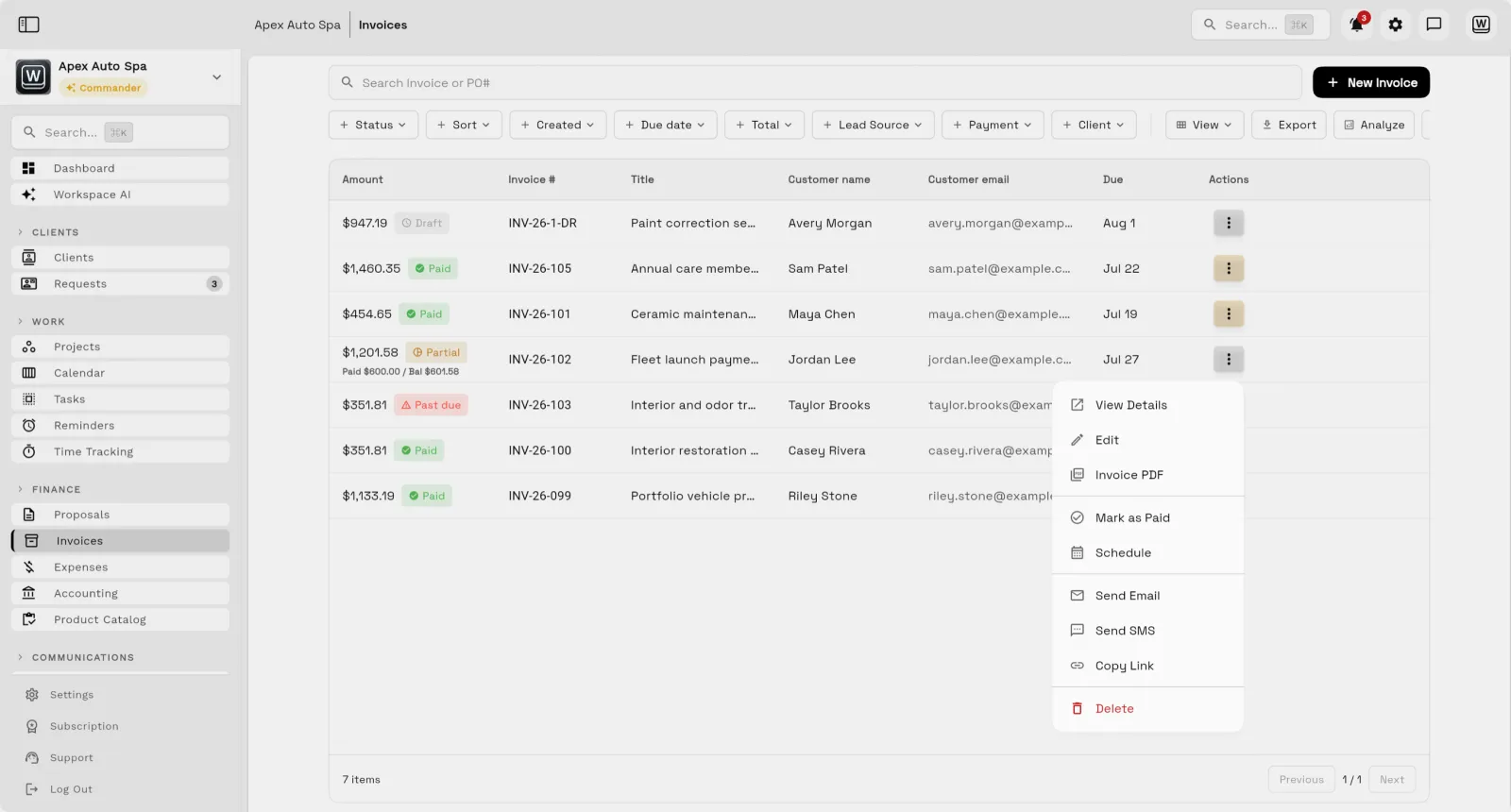
The template failures from earlier — numbering, status, payment, follow-up — are the parts a system handles by default. Open an invoice in Workspace369 and the number is already assigned, the client's billing details sit beside the itemized lines, and the live preview shows exactly what the client receives: the status badge, the amount still due, and the Pay Now button.

That Pay Now step is where the email thread ends. Instead of answering "how do I pay?", the invoice goes out with payment built in, and status updates on its own when money arrives — paid, open, or overdue is visible without searching the bank app. Partial payments are tracked the same way: the invoice above shows $600 paid to date against the full total.
Follow-up works like that too. A nudge on an overdue invoice runs as an automated workflow rather than depending on memory, and when the next job starts, the proposal that won the work becomes the invoice instead of being retyped. The picture holds on a phone as well — the invoice list carries status and totals per client, and expenses (from Specialist) sit beside it, so receivables stop living in a second spreadsheet.
Final recommendation
Use the template for the first invoice. Use invoicing software as soon as billing is regular — the moment numbering, status, reminders, and reporting matter more than the document.
Review the invoices feature for the operational model, the CRM with invoicing hub for the connected workflow, or the Excel invoice template alternative for the spreadsheet-side comparison.
Run client follow-up in one workspace.
CRM, inbox, voice, invoicing, payments, projects, files, AI, and workflow automations — connected instead of exported.
14-day free trial. Card required. After the trial: from $29/month. Renews automatically every month until you cancel. Cancel anytime in Settings → Billing.