How to track time with ChatGPT (logged to your real projects)
Track time with ChatGPT two ways: a chat that adds up hours you type, or the Workspace369 plugin, where each entry is logged to a project at your rate.

By Simon Dziak, Founder, Workspace369 · LinkedIn
Workspace369 publishes this guide. The screenshots come from our own demo workspace, recorded in ChatGPT on November 23, 2026.
You can track time with ChatGPT in two ways. On its own, ChatGPT adds up the hours you type into a chat, and that's where they stay. Connected to time tracking software through a plugin, it logs real time entries: saved to a project and a client, at your own rate, ready to bill. This guide shows both, then walks through the second with the Workspace369 plugin, step by step.
Key takeaways
- ChatGPT on its own can add up hours you type into a chat, but it doesn't keep a timesheet: nothing is saved against a client or a project, and there's nothing to bill from.
- With Workspace369's approved ChatGPT plugin, say what you worked on and for how long, and ChatGPT logs a time entry to the right project and client.
- Entries are billable by default, at the rate set in Workspace369, so you see what the time is worth as soon as it's logged.
- Ask what the week adds up to and you get the hours and their value by project, the same totals as Time Tracking in Workspace369.
What's inside?
Two ways to track time with ChatGPTHow to track time with ChatGPT and Workspace369Ask what the week adds up toTime tracking prompts to try in ChatGPTWhat it costs
Two ways to track time with ChatGPT
1. ChatGPT on its own. Tell ChatGPT what you worked on through the day and it can total the hours, or lay them out as a table. But it doesn't keep a timesheet. Nothing is saved against a client or a project, your rate is whatever you type, and when it's time to invoice you copy everything out by hand.
2. ChatGPT with a time tracking plugin. Add your time tracker's plugin in ChatGPT and each entry is logged for real. With Workspace369, ChatGPT finds the project and the client, saves the entry for the day you worked and applies the rate set in your workspace. The time then sits in Time Tracking, marked Unbilled, until you invoice it.
| ChatGPT on its own | ChatGPT with the Workspace369 plugin | |
|---|---|---|
| Where the hours live | In the chat | In Time Tracking, on the project |
| Client and project | What you type | Matched to your own projects |
| Hourly rate | What you type | The rate set in Workspace369 |
| Weekly total | Re-add it each time | Hours and value by project |
| Billing | Copy it out by hand | Unbilled time, ready to invoice |
How to track time with ChatGPT and Workspace369
Step 1: Connect Workspace369 to ChatGPT
The workspace owner or an admin turns on Allow AI connections in Settings, AI connections. Then, in ChatGPT, open the Workspace369 plugin, add it, and sign in to Workspace369 to choose the workspace and approve what ChatGPT may do. The ChatGPT tutorial shows every click.
Step 2: Say what you worked on, and for how long
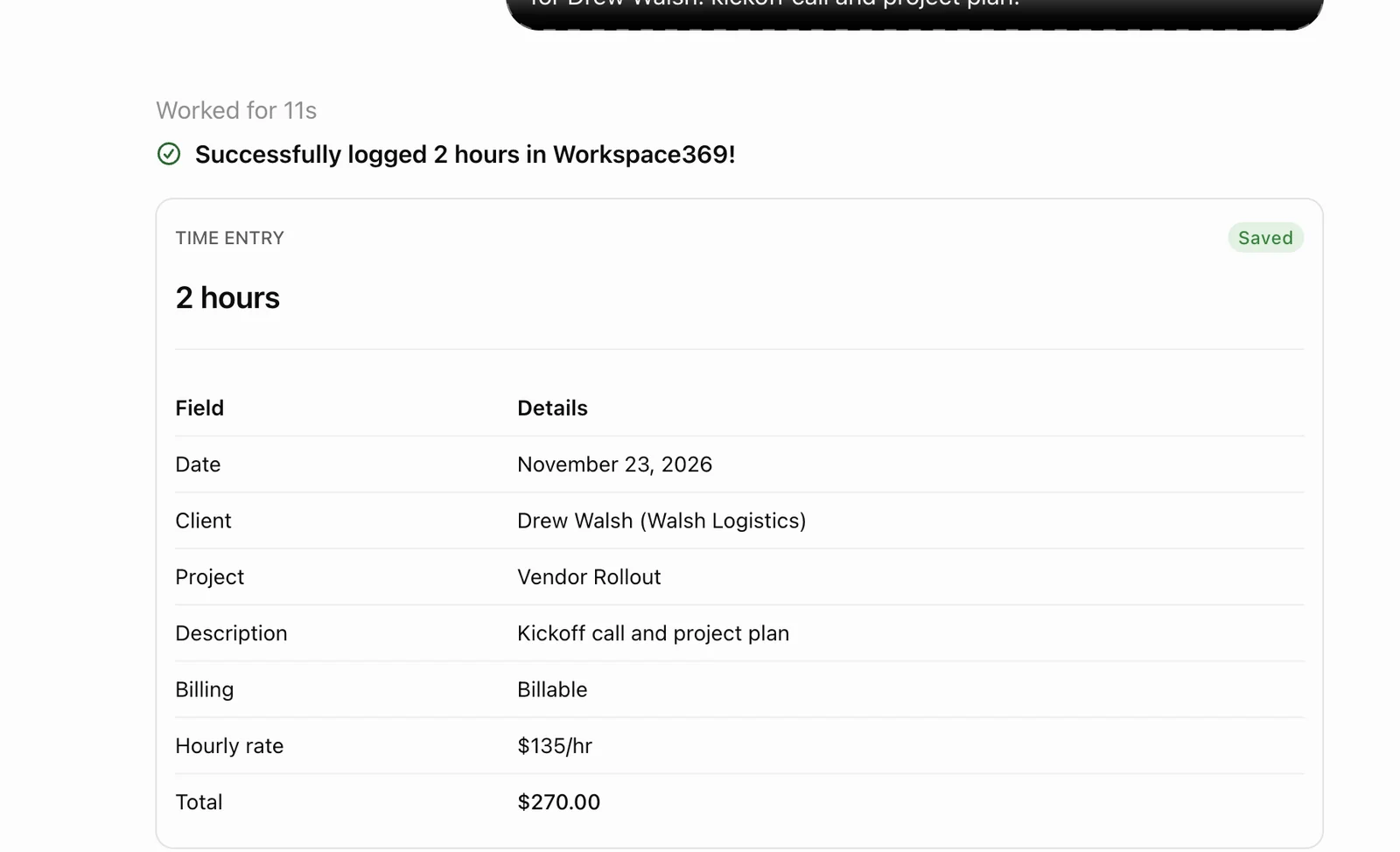
Pick Workspace369 in the message box and describe the work. For example: "Log 2 hours today on the Vendor Rollout project for Drew Walsh: kickoff call and project plan."
ChatGPT logs the entry to that project and shows what it saved: the date, the client, the project, your description, the rate and the total.
Step 3: Add the next entry the same way
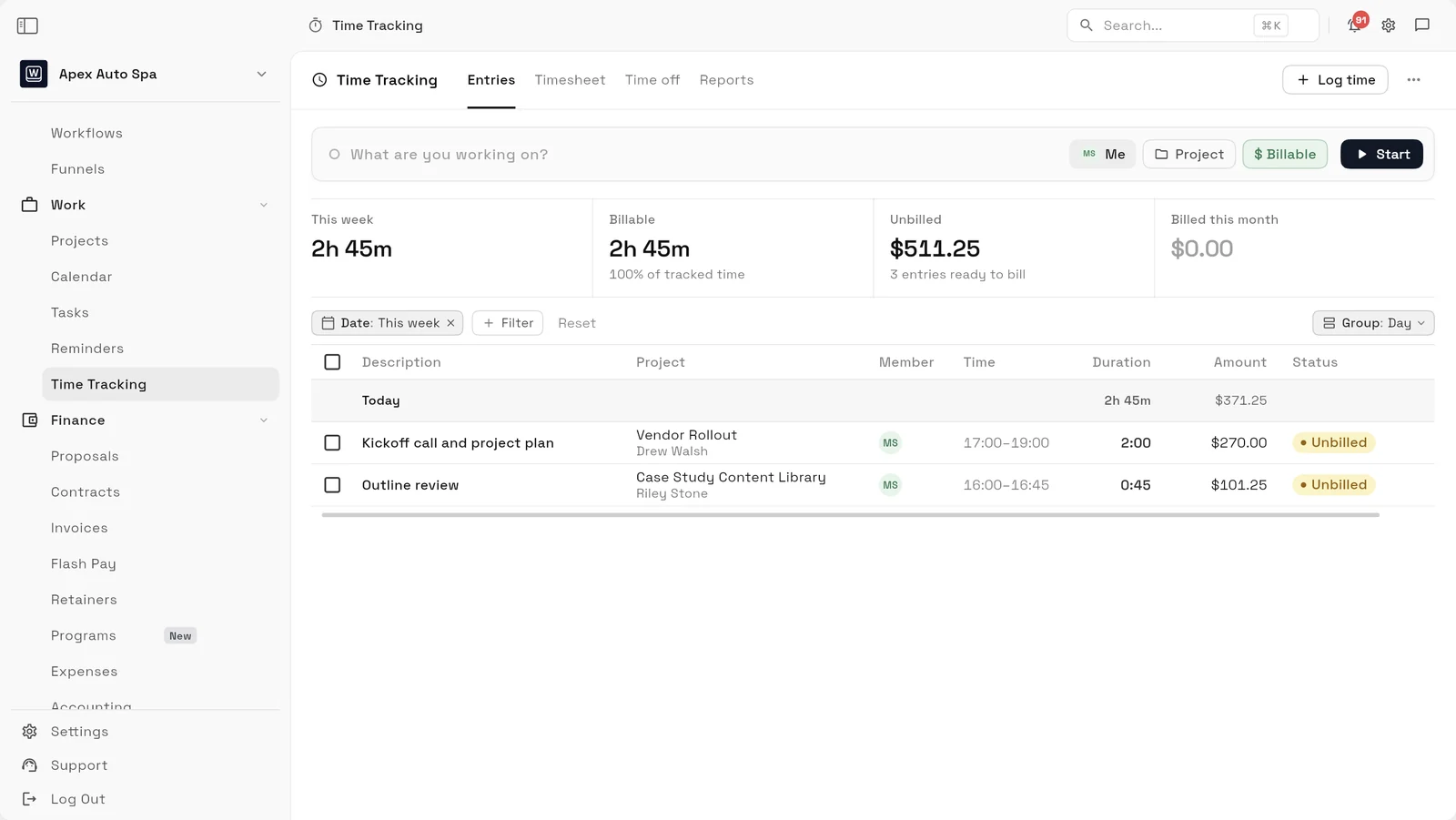
Keep going in the same chat. For example: "And 45 minutes on Case Study Content Library for Riley Stone: outline review." Each entry goes to its own project and client, and ChatGPT keeps a running total for the day.
Step 4: See the entries in Workspace369
Open Time Tracking in Workspace369. The entries sit under the day you worked, with the project, the client, the duration and the amount, marked Unbilled. You can edit one there, or bill the time on an invoice when you're ready.

Ask what the week adds up to
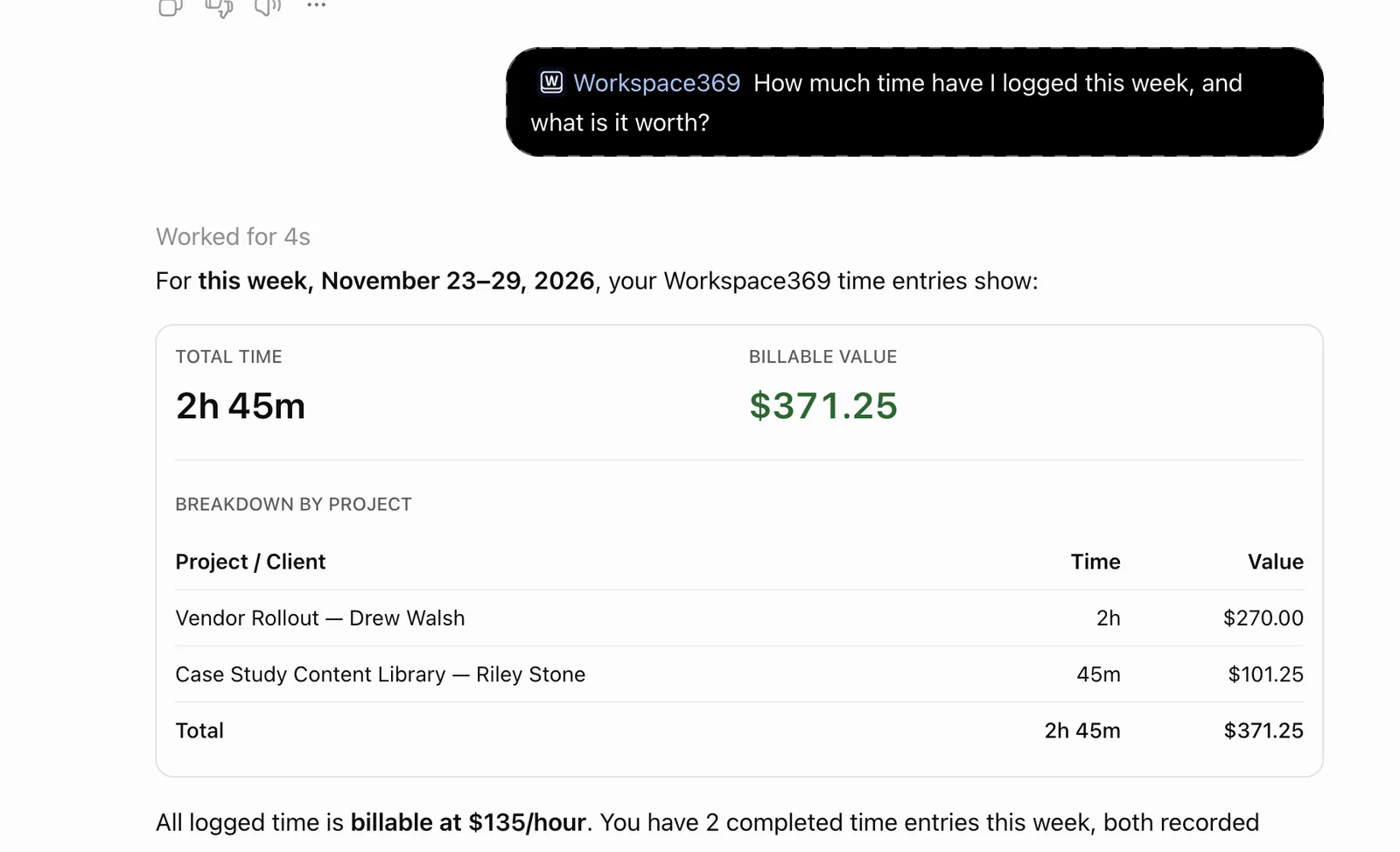
Ask: "How much time have I logged this week, and what is it worth?"
ChatGPT reads your entries from Workspace369 and returns the total hours, their billable value and a breakdown by project. It's the value of the work you logged, not money invoiced or collected, and ChatGPT says so.
Time tracking prompts to try in ChatGPT
- "Log 2 hours today on the Vendor Rollout project for Drew Walsh: kickoff call and project plan."
- "And 45 minutes on Case Study Content Library for Riley Stone: outline review."
- "How much time have I logged this week, and what is it worth?"
- "How much unbilled time do I have, by client?"
- "Log 30 minutes yesterday for Riley Stone, not billable: internal review."
When the time is ready to bill, turn it into an invoice in Workspace369, or see how to make an invoice with ChatGPT. For more ideas, see 24 MCP CRM prompts.
What it costs
Time tracking and the ChatGPT plugin are on every Workspace369 plan, from Cadet at $29 a month (one seat). Every successful ChatGPT request counts toward the workspace's monthly AI usage. Start with the 14-day trial; a card is required, and the plan renews monthly after the trial until you cancel. Compare the plans.
Sources reviewed for this guide
- Workspace369 is now an approved ChatGPT pluginApproval and plans, reviewed November 23, 2026.
- Workspace369 time trackingTimers, timesheets and billable time, reviewed November 23, 2026.
- Workspace369 pricingPlan prices and trial terms, reviewed November 23, 2026.
Run client follow-up in one workspace.
CRM, inbox, voice, invoicing, payments, projects, files, AI, and workflow automations — connected instead of exported.
14-day free trial. Card required. After the trial: from $29/month. Renews automatically every month until you cancel. Cancel anytime in Settings → Billing.
See pricing