Best Freelancer Time Tracking and Invoicing Software 2026
Freelancer software with time tracking and invoicing together should turn a billable hour into an invoice line without retyping. The best time tracking and invoicing software for freelancers who want timers, time-to-invoice, reminders and a client portal on the entry plan is Workspace369 (our product, so see the disclosure below), from $29 a month on Cadet. Harvest and Clockify cost less when hours and invoices are all you need, FreshBooks suits invoicing-first freelancers, Bonsai suits proposal-led work, and Toggl Track suits people who invoice elsewhere.
Freelancer software with time tracking and invoicing together: seven tools compared on entry price, plan limits and what follows the invoice, plus a trial test.
We make Workspace369 and list it first here. Weigh our ranking with that in mind, and if another tool fits you better, use it.

By Simon Dziak, Founder, Workspace369 · LinkedIn
Setting a rate first? Try the free hourly rate calculator.
Disclosure and method: Workspace369 publishes this guide and is one of the options (what Workspace369 is). It is a documentation-based shortlist, not a hands-on benchmark. Official vendor pages were reviewed on October 23, 2026. Check current plans with each vendor before you buy.
Key takeaways
- Time tracking and invoicing software should turn billable hours into a sent, collected invoice without an export step in between.
- Workspace369 puts timers, timesheets, time-to-invoice, payment reminders and recurring invoices on its $29 a month Cadet plan, but Cadet is one seat, so a team needs Voyager or above.
- Harvest and Clockify cost less if hours and invoices are all you need: Harvest lists a free plan with invoicing for one seat, and Clockify lists invoicing from $5.49 per user a month billed yearly.
- Toggl Track is a dedicated tracker whose pricing page does not list invoicing in any plan, and Hubstaff lists client invoices on every plan, from $4.99 per seat a month billed yearly with a 2-seat minimum.
- Run one week of fictional billable hours through each trial, from timer to reminder, and count the steps you do outside the tool.
What's inside?
What time tracking and invoicing software is (and what it is not)How we compared these toolsThe best time tracking and invoicing software in 2026Side-by-side comparisonWhich tool fits how you bill?Run a billable-hours test during the trialLogging time and billing it in Workspace369When a simple tracker is enough
What time tracking and invoicing software is (and what it is not)
Time tracking and invoicing software records the hours you work for each client, marks them billable at a rate, and turns them into invoice line items. The useful versions also cover what happens next: sending the invoice, taking payment, chasing late ones and repeating the bill each month for retainer clients. It is not payroll, and it is not employee monitoring. A tracker that stops at the timesheet leaves you exporting a report and retyping it, which is where hours go missing.
How we compared these tools
We compared each tool on the same five points, using only the vendor's own pricing and product pages:
- Entry price for one person with both tracking and invoicing, monthly and billed yearly, as listed on October 23, 2026.
- Where invoicing starts: whether the first plan with invoices is the entry plan or a higher tier.
- Plan limits that bite early: seats, projects, clients or report history.
- What sits around the invoice: payment collection, reminders, recurring billing and the client record.
- Trial terms: length, and whether the vendor says a card is needed.
We did not test timer accuracy, mobile apps, support or reliability, and we did not use third-party ratings. Order reflects fit for someone who bills by the hour and wants the whole path from timer to paid invoice in one place; it is not the cheapest-first order.
The best time tracking and invoicing software in 2026
1. Workspace369, best for hourly billers who want reminders, recurring billing and the client record on the entry plan
Workspace369 tracks time against a client and project, then pulls billable entries into invoice line items through time-to-invoice. All of that is on Cadet, $29 a month for one seat ($23.25 a month billed yearly), along with invoices, online card payments through Stripe, recurring invoices, retainers, proposals with deposits, a client portal and public intake forms. A pre-made payment follow-up automation emails reminders 1, 3, 7, 14 and 30 days after the due date, with email automations and 3 active workflows on Cadet. If you run the billable-hours test below, expect the hours, invoice and reminder to sit on one client record.

Limitations: Cadet is one seat with unlimited projects; Voyager ($74 a month) adds a second seat. Expense tracking and project profitability start at Specialist ($149 a month), and credit notes are listed as coming soon. For tracking plus invoices alone, Harvest and Clockify cost less. The 14-day trial needs a card.
Best for: freelancers and small studios who bill hours, and want the invoice, reminders, recurring billing and client record in one tool.
2. Harvest, best for a free tracker with invoicing built in
Harvest's pricing page lists time tracking and invoicing on every plan. Free is $0 for 1 seat and 2 projects. Teams is $11 per seat a month, or $9 billed yearly, with unlimited seats, and Enterprise is $17.50 per seat a month, or $14 billed yearly. The trial is 30 days and the page says no card is required. Harvest is a focused tracker with invoicing attached, so if you run the test, expect the timer-to-invoice step to be quick and the rest of the client workflow to live in other apps. See the Harvest vs Workspace369 comparison for more.
Limitations: the free plan is capped at 2 projects. The pricing page does not list a client portal, proposals or CRM, so those need other tools.
Best for: a solo consultant who wants the cheapest way to track hours and send an invoice.
3. FreshBooks, best for an invoicing-first tool with unlimited time tracking
FreshBooks' pricing page lists unlimited time tracking and unlimited customized invoices on every plan. Lite is listed at $23 a month before promotion and covers 5 billable clients. Plus is $43 before promotion for 50 clients, and Premium is $70 for unlimited clients. On October 23, 2026 FreshBooks was showing 80% off for the first 4 months ($4.60, $8.60 and $14 a month). Extra team members are $11 a month each. The trial is 30 days, with no card required. Because FreshBooks is built around accounting-style invoicing, expect the invoice side to feel more complete than the project side.
Limitations: Lite caps billable clients at 5, and promotional prices end, so budget for the list price.
Best for: freelancers and small firms who think of invoices first and time tracking second. Workspace369 vs FreshBooks sets the two side by side.
4. Clockify, best for a low-cost team plan with invoicing
Clockify's pricing page lists invoicing from the Standard plan: $5.49 per seat a month billed yearly, or $6.99 billed monthly. Basic is $3.99, Pro $7.99 and Enterprise $11.99 billed yearly. Free is listed for up to 5 users, with report history limited to 1 month, and the page offers a 7-day trial of Pro with no card. If you run the test, expect timers and timesheets to be straightforward, and check how far the invoice goes when you want payments collected.
Limitations: invoicing is not on Free or Basic, and the free plan's one-month report window limits billing back-dated work.
Best for: teams of several people who want tracking with invoices at a low per-seat price.
5. Bonsai, best for freelancers who want proposals and contracts alongside hours
Bonsai's pricing page lists time tracking on Basic ($15 a month, or $9 billed yearly) but invoices, proposals and the client portal from Essentials, $25 a month or $19 billed yearly, per user. The trial is 7 days, and the page says no card is asked at sign-up, though one is needed to continue. Bonsai is a freelancer suite, so if you run the test, expect the hours, proposal and invoice to connect.
Limitations: invoicing needs Essentials, and every extra seat is charged at the plan's per-user price. The 7-day trial is short for a billing-cycle test. Workspace369 vs Bonsai compares the two plan by plan.
Best for: freelancers who want proposals, contracts and time tracking from one vendor.
6. Toggl Track, best for the dedicated tracker
Toggl Track's pricing page lists Free ($0, limited to 3 users per its FAQ), Starter at $9 per user a month billed yearly or $12 monthly, and Premium at $16 yearly or $24 monthly. Billable rates are in Starter and Premium, with project member rates from Premium. Starter and Premium offer a 30-day trial, and the page does not state a card requirement for it. Toggl is a polished tracker, so if invoicing is a separate tool in your stack, it is a strong tracker to put next to it.
Limitations: the pricing page does not assign invoicing to any plan, so billing means a report export or a second app.
Best for: people who already have an invoicing tool and want the best timer.
7. Hubstaff, best for tracking with activity visibility
Hubstaff's pricing page lists client invoices on every plan: Starter is $4.99, Grow $7.50 and Team $10 per seat a month billed yearly (monthly-billing prices load in the browser, so see its site), each with a 2-seat minimum, and Enterprise is $25 billed annually. The comparison table lists team invoices, described as automated billing for tracked time, from Team. The trial is 14 days with no card required. Hubstaff leans toward distributed teams that want activity reports, so check in the trial whether the invoice step suits a client-facing billing workflow.
Limitations: the 2-seat minimum means a solo freelancer pays for two seats, and automated billing for tracked time starts on Team.
Best for: remote teams that need activity reporting more than a client-facing billing workflow.
Side-by-side comparison
| Tool | Entry price with tracking and invoicing | Billed yearly | Main entry-plan limit | Trial |
|---|---|---|---|---|
| Workspace369 | $29 (Cadet) | $23.25 a month | 1 seat, unlimited projects | 14 days, card required |
| Harvest | Free, or $11 per seat (Teams) | $9 per seat | Free: 1 seat, 2 projects | 30 days, no card |
| FreshBooks | $23 list (Lite), 80% off for the first 4 months (October 23, 2026) | Not listed | 5 billable clients | 30 days, no card |
| Clockify | $6.99 per seat (Standard) | $5.49 per seat | Invoicing not on Free or Basic | 7 days (Pro), no card |
| Bonsai | $25 per user (Essentials) | $19 per user | Basic has no invoicing | 7 days, card to continue |
| Toggl Track | Invoicing not listed in any plan | Starter $9 per user | No invoicing on pricing page | 30 days, card not stated |
| Hubstaff | $7 per seat (Starter, 2-seat minimum) | $4.99 per seat | 2-seat minimum | 14 days, no card |
Which tool fits how you bill?
| If you mostly need | Start with | Why |
|---|---|---|
| Hours, reminders, recurring bills and a client portal in one tool | Workspace369 | All on Cadet, with proposals and deposits |
| The cheapest way to track and invoice one person | Harvest | Free plan with invoicing for 1 seat |
| Invoicing-first with unlimited time tracking | FreshBooks | Time tracking on every plan, priced by client count |
| A low per-seat price for a team | Clockify | Invoicing from $5.49 per seat billed yearly |
| Proposals and contracts alongside hours | Bonsai | Essentials adds invoices, proposals and portal |
| The best timer beside your own invoicing tool | Toggl Track | Dedicated tracker with billable rates |
Run a billable-hours test during the trial
Feature lists look alike. Put one fictional week of work through each tool you shortlist:
- Log five entries across two clients, using the timer for at least one.
- Mark them billable and set a rate for each client.
- Create an invoice from the tracked time, and check the line items match the entries.
- Send it, pay it by card as the "client" and note whether the payment shows on the invoice.
- Set the invoice to repeat next month and see what a late invoice triggers.
- Count how many times you exported, retyped or opened another app.
If you run the test, expect the cheapest tools to be strongest on steps 1 to 3 and the all-in-one tools to pull ahead on steps 4 to 6. That count is a better buying signal than any table, including the ones above.

Logging time and billing it in Workspace369
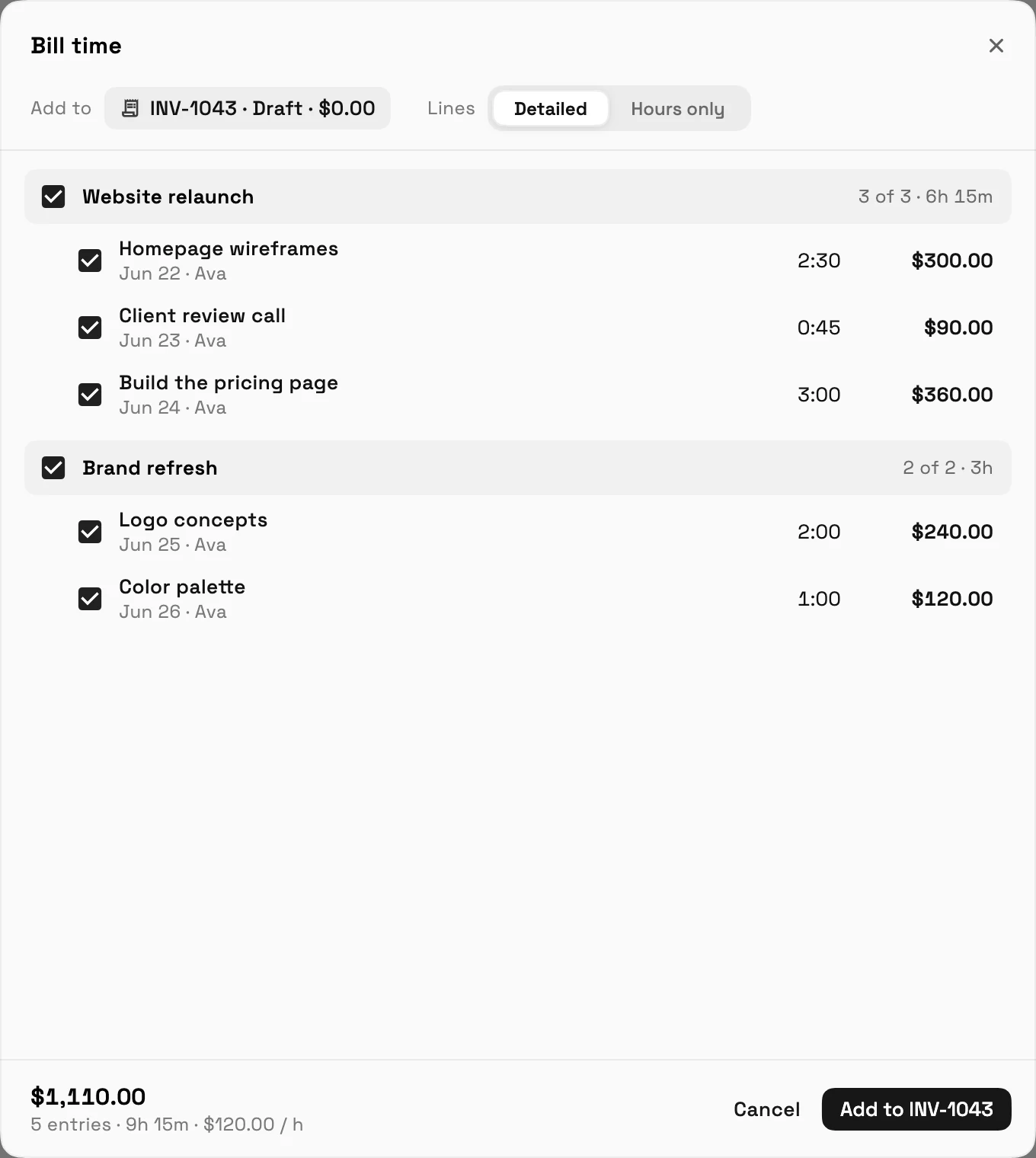
Demo data in both screenshots below, not real clients. Hours are logged with a timer or a manual entry against a client and project, and each person fills a weekly timesheet that is submitted for approval. Time tracking, timers, timesheets, billable time and time-to-invoice are on every plan, including Cadet.
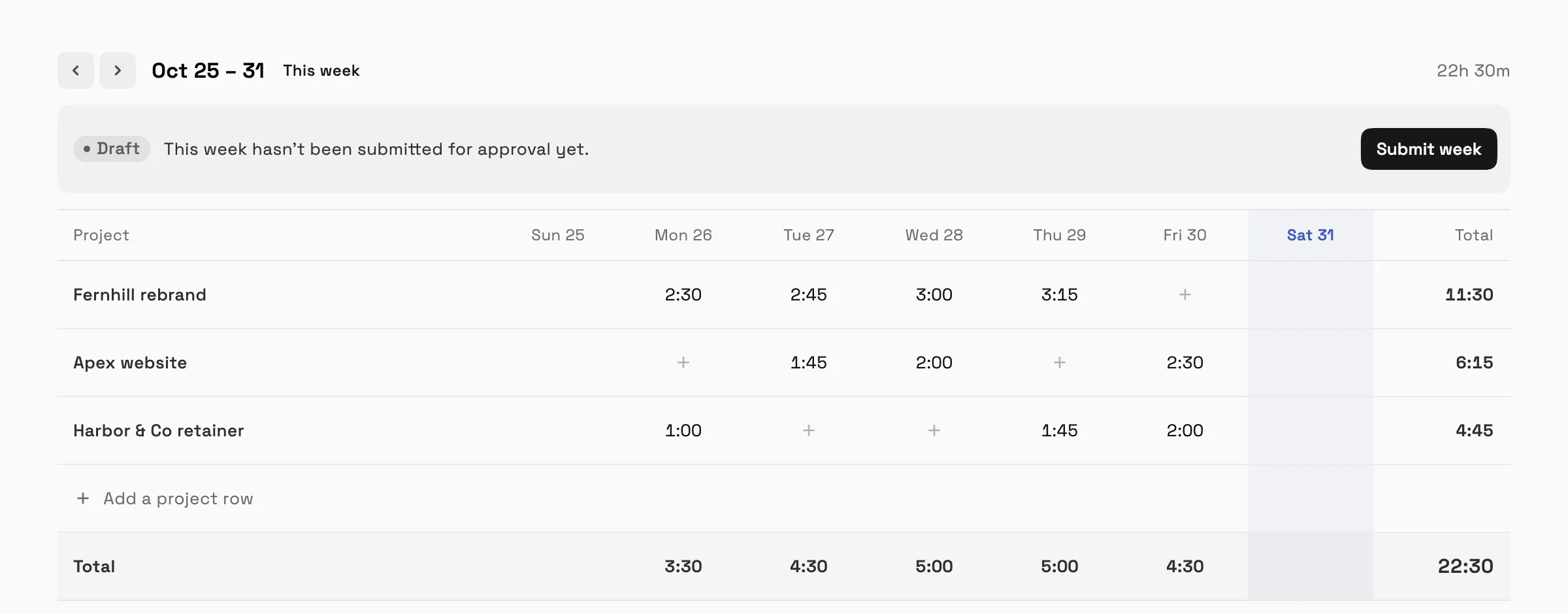
Once the week is approved, the "Bill time" step adds entries to a draft invoice. You pick which entries to include and choose detailed lines or hours only, and the total updates as you tick them.
For retainer clients, recurring invoices repeat the bill each month. Expense tracking is separate and starts at Specialist.
When a simple tracker is enough
If you have a few hourly clients and already send invoices from an accounting tool, a plain timer with a billable-hours report can carry you a long way. Move to a combined tool when you retype hours into invoices, when late payments need chasing by hand, or when repeat clients need the same bill every month. The convert billable hours to an invoice guide covers the review and rate details, and the time tracking and invoicing page has Workspace369's plan details.
HoneyBook switched its Time Tracker off on September 8, 2026 and brought it back on September 15, 2026; a HoneyBook employee confirmed in its community that previous entries were kept (checked October 25, 2026). If you are coming from HoneyBook, the same test below applies.
Whichever tool you trial, finish one full billing cycle with demo data before you import real clients, and confirm you can export your records. Compare current plans on the pricing page.
Sources reviewed for this guide
- Workspace369 pricingPlan matrix reviewed October 23, 2026.
- Harvest pricingOfficial pricing page reviewed October 23, 2026 for plan prices, free plan limits and trial terms.
- Clockify pricingOfficial pricing page reviewed October 23, 2026 for plan prices, invoicing plan gate and trial terms.
- FreshBooks pricingOfficial pricing page reviewed October 23, 2026 for plan prices, client limits and trial terms.
- Bonsai pricingOfficial pricing page reviewed October 23, 2026 for Basic and Essentials features and trial terms.
- Toggl Track pricingOfficial pricing page reviewed October 23, 2026 for plan prices, billable rates and trial terms.
- Hubstaff pricingOfficial pricing page reviewed October 23, 2026 for plan prices, the client invoices row and trial terms.
Workspace369 publishes this documentation-based comparison and is one of the options. It is not an independent ranking or a hands-on benchmark.
Run client follow-up in one workspace.
CRM, inbox, voice, invoicing, payments, projects, files, AI, and workflow automations — connected instead of exported.
14-day free trial. Card required. After the trial: from $29/month. Renews automatically every month until you cancel. Cancel anytime in Settings → Billing.
See pricing