SEO client management software: compare workflows and agency tools
Compare SEO client management software for retainers, requests, delivery and billing. Use a practical demo checklist and choose tools by agency workflow.

By Simon Dziak, Founder, Workspace369 · LinkedIn
SEO client management software keeps each SEO client's scope, deliverables, requests, communication and invoices on one record, next to the SEO tools that measure performance. Workspace369's SEO agency management software is one option; this guide compares the workflow, not just the tools.
An SEO agency needs tools for search research and measurement, client reporting, delivery tracking, client communication, and billing. These are five jobs to cover, not five subscriptions to buy: keep your specialist SEO tools and choose the operational software around the handoffs your team needs.
Disclosure and method: Workspace369 publishes this guide and is one of the options. This is a documentation-based shortlist, not a hands-on benchmark or an independent ranking. Vendor pages and Workspace369 pricing were checked October 21, 2026. The examples below are suggested evaluation exercises, not customer results.
What's inside?
What tools do SEO agencies use to manage client deliverables and campaigns?Separate SEO reporting from account managementRun one retainer through the demoWhat an SEO client record needsCompare the full cost, including the work to switchFollowing an account inside Workspace369When to keep your current stack
What tools do SEO agencies use to manage client deliverables and campaigns?
SEO client management software organizes the relationship around an SEO engagement: scope, contacts, deliverables, requests, communication, invoices, and payment status. It complements your crawler, rank tracker, Search Console, and reporting platform.
| Job | What to evaluate |
|---|---|
| Search research and measurement | Crawlers, rank trackers, and Search Console |
| Client reporting | Reporting dashboards linked to the client record |
| Deliverables and campaign work | Tasks with owners, deadlines, and approval status |
| Client context and requests | CRM, shared communication, and request intake |
| Billing and capacity | Invoices, time, budgets, and resource planning |
For each workflow, distinguish built-in functionality from a paid add-on, an external integration, or a manual step. A reporting link is not a data integration; a task board is not a profitability report.
Turn the monthly plan into a usable delivery record
Use the free SEO deliverables tracker to record each deliverable, owner, dependency, client decision and completion evidence. Start blank or load the fictional month, then export a CSV or print the plan. It does not connect to Search Console or measure rankings.
Keep invoice preparation, review, sending and payment separate from the work schedule. Productive, for example, documents recurring invoice draft creation as a configured step; a draft is not a sent invoice or a collected payment. Verify the exact released workflow and plan in whichever system you choose.
Choose the shortlist around the operational gap
Choose around the problem the agency is trying to solve. If nobody knows who owns the next deliverable, start with project management. If people and budgets are overallocated, investigate resourcing and profitability. If client history, requests, and billing are scattered, evaluate a connected client workspace. The SEO agency management page explains that last workflow in Workspace369.
| Option | Reason to shortlist it | Question to resolve in a demo |
|---|---|---|
| ClickUp | Configurable tasks, documents, and team work | Can your team maintain the client, scope, and billing context with its existing finance tools? |
| monday.com | Visual work management and configurable processes | Which product and plan cover your sales-to-delivery handoff? |
| Productive | Agency budgets, resources, time, and profitability | Does its capacity and budget workflow match how you sell retainers? |
| Teamwork | Managing client projects and delivery | Can the account manager see the information needed for the monthly review? |
| Workspace369 | Client records connected to projects, communication, proposals, and invoices | Does the relevant plan cover your communication and billing needs without unnecessary overlap? |
The table is a shortlist by use case. Its order is not a score, and no tool wins every agency scenario.
Separate SEO reporting from account management
Best CRM for SEO Agencies 2026: SEO Agency Management Software Ranked

A search-performance report can show impressions, clicks, or conversions. It will not, by itself, tell the account manager whether the client approved a new content brief or whether an invoice is overdue. Conversely, an invoice dashboard cannot diagnose a ranking change.
Keep your analytics and SEO tools as the source for performance data. Use the client workspace for the commercial agreement and the work around it. Link the reporting location from the engagement record, record who is responsible for the review, and track the actions agreed afterward. Do not promise the client that switching CRM will improve rankings.
Workspace369 belongs in the client-operations evaluation; this guide does not establish native SEO reporting, campaign execution or utilization forecasting. If those are requirements, verify them separately before switching. Retainers that invoice every cycle are on every plan.
Run one retainer through the demo
Create a fictional client with a monthly retainer, an account owner, three agreed deliverables, and a separate reporting link. Then add a request outside the agreed scope. The exercise should reveal whether the agency can handle an exception without losing the original agreement.
- Store the agreed scope and identify the client contact who can approve changes.
- Assign each deliverable an owner and a due date.
- Record the extra request and decide whether it needs a separate proposal.
- Create the appropriate invoice and find its payment status from the client record.
- Prepare the monthly review from outstanding work, decisions, and billing context.
- Ask a teammate who did not create the account to locate the next action.
Record every manual copy, external tool, and permission adjustment. The useful result is a list of operational gaps, not a vendor score invented from a feature checklist. Repeat the same exercise with each shortlisted tool.
What an SEO client record needs
Keep the record small enough to maintain: primary contact, account owner, engagement scope, reporting location, current project, renewal date, and outstanding commercial decisions. Store sensitive access credentials in your password manager, not in client notes.
For a retainer, distinguish what was sold from what is currently being delivered. A new request should not silently expand the monthly scope. An approval should be easy for a colleague to find later. When billing lives in a separate accounting platform, decide which system is authoritative for payment status and who reconciles discrepancies.

Compare the full cost, including the work to switch
Workspace369 monthly USD plans include Cadet at $29 for one seat, Voyager at $74 for two, Specialist at $149 for ten, and Commander at $299 for twenty. Additional member seats cost $10 per month from Voyager. SMS and calls start at Voyager; IVR, call queues and payment plans start at Specialist. Usage allowances and plan limits matter alongside the subscription. Check the current feature matrix against the workflow you actually need.
Public invoice payment links do not require a client account. That does not establish free authenticated client-portal seats: confirm the access model and seat cost for your intended client workflow.
For each alternative, request a quote for the same team size, billing period, required modules, and country. An annual price expressed per month is not a month-to-month subscription. Include migration time, existing software you will keep, and any paid integrations. A bundle is only cheaper when it replaces costs you currently incur.
Following an account inside Workspace369
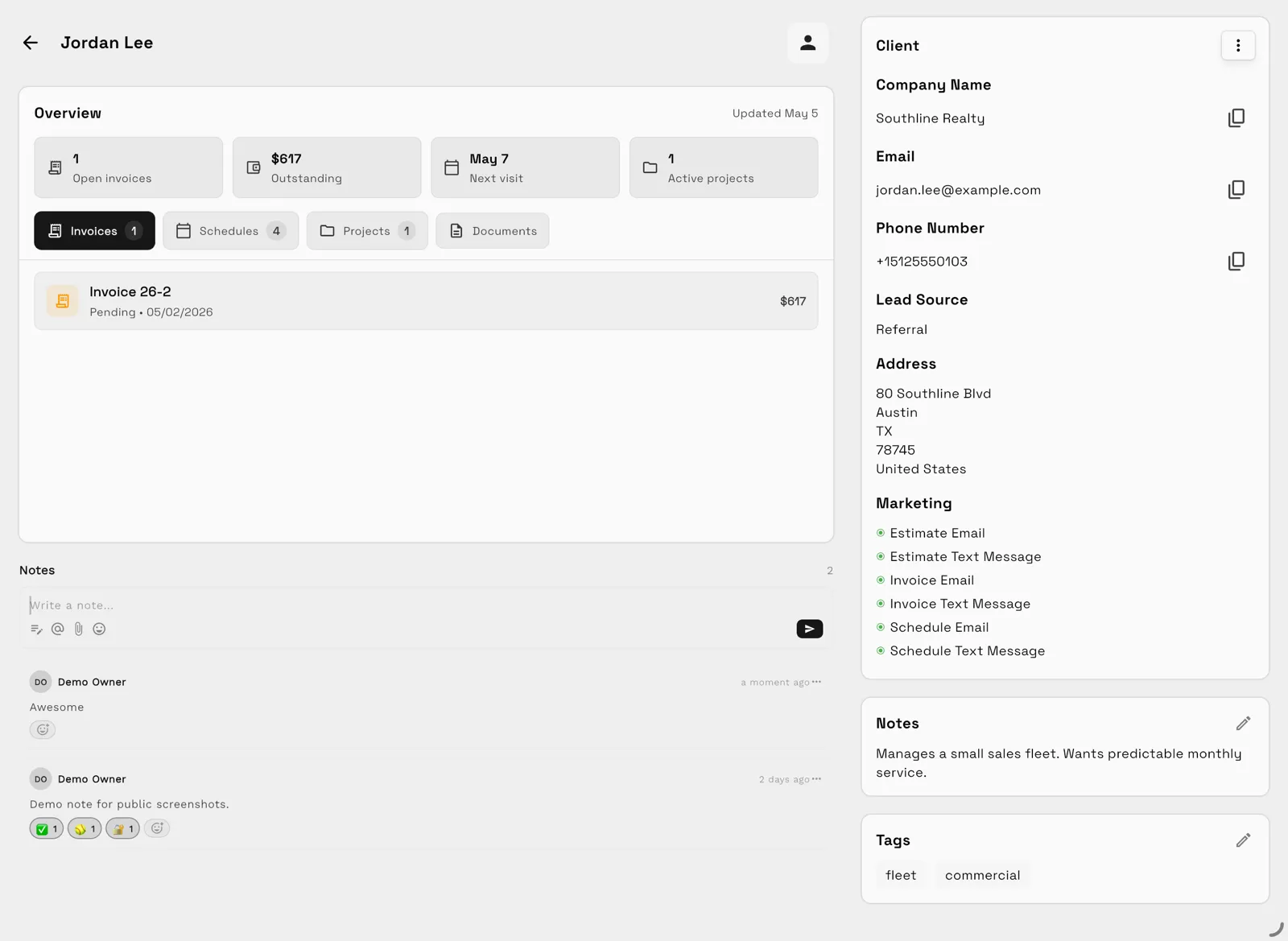
This is a demo client record, not a real SEO customer or a measured case study. It illustrates the connection between the client and related work. In an agency trial, use CRM to organize the account, Projects for deliverables, and Invoices for billing. Confirm permissions in the Client Portal and the plan required before inviting a client.
The point of this exercise is retrieval: can the account manager find the agreement, the next deliverable, and the unpaid invoice without asking three people? The screenshot alone does not prove every part of that process; reproduce your own workflow in the trial.
When to keep your current stack
A project tool can be enough if client records and billing already work well elsewhere. An agency whose main constraint is resource allocation should evaluate dedicated agency operations tools. Avoid moving a stable accounting process solely to reduce the number of logins.
Shortlist Workspace369 when the repeated problem is disconnected client history, work, communication, and billing. Start with one engagement, document the manual steps that remain, and make the purchase decision from that evidence.
Run client follow-up in one workspace.
CRM, inbox, voice, invoicing, payments, projects, files, AI, and workflow automations — connected instead of exported.
14-day free trial. Card required. After the trial: from $29/month. Renews automatically every month until you cancel. Cancel anytime in Settings → Billing.