Best agency management software for a 5-person agency, 2026
The best agency management software for a 5-person agency depends on what you bill and track. Workspace369 puts CRM, projects, a client portal, proposals and invoices on one record for $104 a month (Voyager plus three seats) or $149 on Specialist; ClickUp and monday.com go deeper on tasks and boards, and Productive on budgets and utilization. Workspace369 is also a native app for iPhone and iPad, with iPad in every orientation.
Best agency management software for a 5-person agency: seven tools compared on seat cost, plan limits and whether CRM, projects, portal and invoices connect.
We make Workspace369 and list it first here. Weigh our ranking with that in mind, and if another tool fits you better, use it.

By Simon Dziak, Founder, Workspace369 · LinkedIn
Price your stack with the free software stack cost calculator.
Disclosure and method: Workspace369 publishes this guide and is one of the options (what Workspace369 is). It is a documentation-based shortlist, not a hands-on benchmark. Official vendor pages were reviewed on October 23, 2026, including each billing toggle. Check current plans with each vendor before you buy.
Key takeaways
- Agency management software should carry a client from inquiry to proposal, project, time and paid invoice on one record, not only coordinate tasks.
- Workspace369 fits small agencies of 2 to 10 people that want CRM, projects, a client portal, proposals and invoicing together; Specialist includes 10 seats for $149 a month.
- ClickUp and monday.com are stronger work-management tools, Productive leads on budgets and resourcing, and Teamwork on hours-based billing and retainers.
- Bonsai and HoneyBook cover proposals, contracts and invoices well for one to four people, but both price by seat or tier and are lighter on shared inbox and reporting.
- Load three fictional clients at different stages in each trial and count the screens it takes to answer your Monday-morning questions.
What's inside?
What agency management software is (and what it is not)How we compared these toolsThe best agency management software in 2026Side-by-side comparisonWhich agency management tool fits your agency?Where the cost landsRun a Monday-morning owner test during the trialWhen a different tool is the better fit
What agency management software is (and what it is not)
Agency management software connects sales, delivery and money for client work. A serious system covers client records, intake, projects and tasks, communication, proposals, invoices, payments and reporting. It is not only a task board, and it is not only a proposal builder. If a tool covers one layer, it is one part of the stack, and every handoff to the next layer depends on someone copying context across. That is fine when each department has one stable need. It hurts when sales, delivery and finance touch the same account each month.
How we compared these tools
Agency Management Software: What a 5-Person Agency Really Pays (2026)

We compared each tool on the same five points, using only the vendor's own pricing and product pages:
- Seat price and cost at 10 seats, from listed per-seat prices or included-seat plans.
- Client-work coverage on the plan you would buy: CRM, projects, proposals, time tracking, invoicing and online payment.
- Client portal and retainer billing: whether clients can see status themselves and whether scheduled billing is listed.
- Hard limits: minimum seats, project caps, form caps and add-on gates.
- Trial terms: length, and whether the vendor states a card is needed.
We did not test speed, support, reliability or migration effort, and we did not use third-party ratings. Order reflects documented fit for a small agency that wants the full client-work cycle in one tool.

The best agency management software in 2026
1. Workspace369, best for small agencies that want the whole client cycle in one workspace
Workspace369 connects client records, proposals approved and signed by link, projects with boards, a client portal, time tracking, invoices and online card payments through Stripe. Cadet at $29 a month lists all of that, plus deposits, recurring invoices, retainers, payment schedules and email reminders on overdue invoices. Seats are the agency lever: Voyager is $74 for two seats, each extra seat is $10, and Specialist is $149 for ten, adding online booking, payment plans, expenses, AR aging and project profitability. The shared inbox, SMS and calls, the timeline view and project financials start at Voyager. Portal visitors do not take a team seat, so clients can see status without adding to the bill.
Limitations: Cadet is one seat and up to 5 active projects, and the team workload view starts at Commander. Credit notes are listed as coming soon, the 14-day trial needs a card, and task-board depth is lighter than ClickUp or monday.com.
Best for: agencies of 2 to 10 people who lose client context between a CRM, a project tool and an invoicing app.
2. ClickUp, best for task and document depth
ClickUp's pricing page (re-read October 23, 2026) lists a free plan with unlimited tasks and members and no card, limited to 60 MB of storage and 1 form. Core is $9 per user a month billed yearly ($12 monthly) and Business is $17 yearly ($25 monthly). Time tracking is included on paid plans (ClickUp lists it as a trial on Free). Core adds Gantt charts, goals, guest permissions and unlimited storage, forms and custom fields; Business adds advanced dashboards, resource management, timesheets and 10,000 automations a month. For an agency running delivery, the strengths are docs, sprints, dashboards and Gantt in one tool, and a free tier that lets a small team start with no card.
Limitations: invoicing and proposals are not described on the pricing page, and CRM appears only as an integration, so an agency still needs billing and client-document tools beside it. Paid upgrades apply to the whole workspace, and the AI add-ons are priced separately per user.
Best for: delivery-heavy teams that standardise tasks, docs and sprints and already have billing sorted.
3. monday.com, best for configurable boards across a team
monday's pricing page (re-read October 23, 2026) lists work-management Basic at $9, Standard at $12 and Pro at $19 per seat a month billed yearly; at 10 seats that is $90, $120 and $190 a month, with Standard shown under a limited-time discount. The free plan covers up to 2 seats and 3 boards with no card, and the page describes a 14-day free trial of Pro. Basic adds unlimited items and free viewers, Standard and Pro add automations, integrations, and, on Pro, resource and portfolio tooling. The strength is flexible boards that an operations lead can reshape without code, with a deep template library.
Limitations: invoicing and proposals are not listed on the work-management plans, and the CRM is a separate monday product with its own seat prices. Costs scale with every seat, and AI features are metered by credits.
Best for: operations-minded teams that want to shape internal processes on flexible boards.
4. Teamwork, best for hours-based billing and retainer budgets
Teamwork's pricing page (re-read October 23, 2026) lists Basics at $9.99 per user a month billed yearly and Accelerate at $24.99. Basics gives Gantt, board and list views, templates and billable time tracking. Accelerate adds time budgets and retainers and builds client invoices from logged time, which is the step many agencies do by hand. Paid plans carry a 14-day trial with no card, and the free plan allows 5 users and 5 projects. Five Accelerate seats are $124.95 a month billed yearly and ten are about $250.
Limitations: the full invoicing and retainer features start at Accelerate, Optimize is quote-only, and a full CRM is not the core of the product. Proposals and e-signature are not named on the page.
Best for: project-led agencies that bill from tracked hours.
5. Productive, best for resourcing, budgets and profitability
Productive's pricing page (re-read October 23, 2026) lists Essential at $10 per user a month billed yearly ($12 monthly) and Professional at $25 ($29 monthly), with a 14-day trial and no card. Essential includes budgeting, resource planning, project and task management, docs, time and expense tracking and reporting. Professional adds recurring budgets, teams, billable-time and expense approvals and an HRIS and invoicing integration set. All plans need at least 3 seats, so five Professional seats are $125 a month billed yearly. The strength is seeing utilisation and project margin before a project runs over.
Limitations: the pricing page no longer lists CRM, deals or invoices as plan features, and no e-signature or branded client portal is named. Check the billing step in the trial before you commit.
Best for: agencies of 5 or more where utilisation and project margin are the main worry.
6. Bonsai, best for one to four people who want proposals and invoices at a low seat price
Bonsai's pricing page (re-read October 23, 2026) lists Basic at $15 a user per month ($9 yearly), Essentials at $25 ($19 yearly), Premium at $39 ($29 yearly) and Elite at $59 ($49 yearly). Basic includes CRM, tasks, unlimited projects and time tracking; invoices, proposals, contracts, forms and the client portal start at Essentials. Workload management and a deals pipeline start at Premium. The trial is 7 days, and the FAQ says you enter a card to continue after it. Ten Essentials seats are $250 a month billed monthly or $190 billed yearly. The strength is a low entry price for the proposal, contract and invoice steps.
Limitations: pricing is per user, so the bill grows with each hire. A shared inbox, voice and SMS are not listed, and the pipeline waits until Premium. If per-user billing is the problem, see all-in-one agency software with flat pricing instead of per-seat.
Best for: one-to-four-person studios selling scoped projects who want proposals and invoices without paying for a larger workspace. Price the extra seats before you hire.
7. HoneyBook, best for a polished clientflow for solo and two-person studios
HoneyBook's pricing page (re-read October 23, 2026) lists Starter at $29 a month billed yearly ($36 monthly), Essentials at $49 ($59 monthly, up to 2 team members) and Premium at $109 ($129 monthly) with unlimited team members. All plans start with a free trial, and the page says no card is needed. Clients and projects are unlimited, while live lead forms are capped at 2 on Starter and 10 on Essentials. The strength is a smooth path from inquiry through proposal, contract and payment, with e-signature on contracts and forms and a client portal.
Limitations: team members are capped until Premium, and the page does not list a shared inbox, voice or cross-client reporting. Lead forms are capped on the lower plans, which matters for an agency running several intake pages.
Best for: solo and two-person client businesses whose main job is turning inquiries into signed, paid bookings. Price Premium before adding a third person, or compare a HoneyBook alternative for a small agency team, which prices five people on each tool.
Side-by-side comparison
| Tool | Entry price | Cost at 10 seats | Client-work coverage | Main limit | Trial |
|---|---|---|---|---|---|
| Workspace369 | $29 Cadet (1 seat); $149 Specialist (10 seats) | $149 a month (Specialist) | CRM, projects, portal, proposals, invoices | Cadet: 1 seat, 5 active projects | 14 days, card required |
| ClickUp | Free; $9 Core (yearly) | $90 yearly (Core) | Tasks, docs, dashboards | No invoicing described | Free plan, no card |
| monday.com | $9 Basic (yearly) | About $120 yearly (Standard) | Boards and automations | Proposals and invoicing not listed | 14 days; free plan no card |
| Teamwork | $9.99 Basics (yearly) | $249.90 yearly (Accelerate) | Projects, time, invoicing, retainers | Invoicing from Accelerate | 14 days, no card |
| Productive | From $10 per user (yearly; $12 monthly) | $100 Essential or $250 Professional (yearly) | Budgets, resourcing, time | 3 seats minimum; invoices on all plans, retainer invoicing on Professional | 14 days, no card |
| Bonsai | $25 Essentials ($19 yearly) | $250 monthly or $190 yearly | Proposals, invoices, portal, time | Per-seat; pipeline on Premium | 7 days, card to continue |
| HoneyBook | $29 Starter (yearly) | $109 Premium (yearly, unlimited members) | Proposals, contracts, invoices | 2 team members until Premium | 30 days, no card |
Ten-seat figures are arithmetic from listed per-seat prices; they exclude taxes, add-ons and plan changes. Workspace369 is shown billed monthly, and the 20% yearly discount is listed on every plan.
Which agency management tool fits your agency?
| Agency situation | Start with | Why |
|---|---|---|
| Client context lost between CRM, projects and billing | Workspace369 | One record carries sales, delivery, portal and invoices |
| Delivery-heavy team standardising tasks and sprints | ClickUp | Deepest task and doc features here |
| Operations team wanting flexible boards | monday.com | Configurable boards and automations |
| Hours-based billing and retainer budgets | Teamwork | Invoicing from logged time on Accelerate |
| Utilisation and project margin at 5 or more people | Productive | Budgeting and resource planning on Essential |
| One to four people sending a few proposals a month | Bonsai or HoneyBook | Lower entry cost and polished client documents |
Where the cost lands
Ask every vendor for the same headcount, billing period and modules. Per-seat tools compound as the team grows: ten Bonsai Essentials seats are $190 a month billed yearly before you add a phone tool, while Workspace369 Specialist includes ten seats for $149 billed monthly. At five seats the picture changes, because Bonsai Essentials is $95 a month billed yearly and Workspace369 is $104 on Voyager plus three extra seats billed monthly. Compare the connected workspace against the stack you pay for today, not a single invoice-app subscription. The pricing page lists current plans and seat counts.

Run a Monday-morning owner test during the trial
This test is for whoever runs the agency, not the person doing the work. Load three fictional clients at different stages: one new request, one project in delivery and one with an overdue invoice. Then try to answer these questions in each tool you shortlist:
- Which clients need something from you today?
- Which project has hours logged but nothing invoiced?
- Who owes you money, and how late is it?
- What did the client last write, and who on the team owns the reply?
- Can a teammate see only the clients they work on?
- How many separate screens did it take?
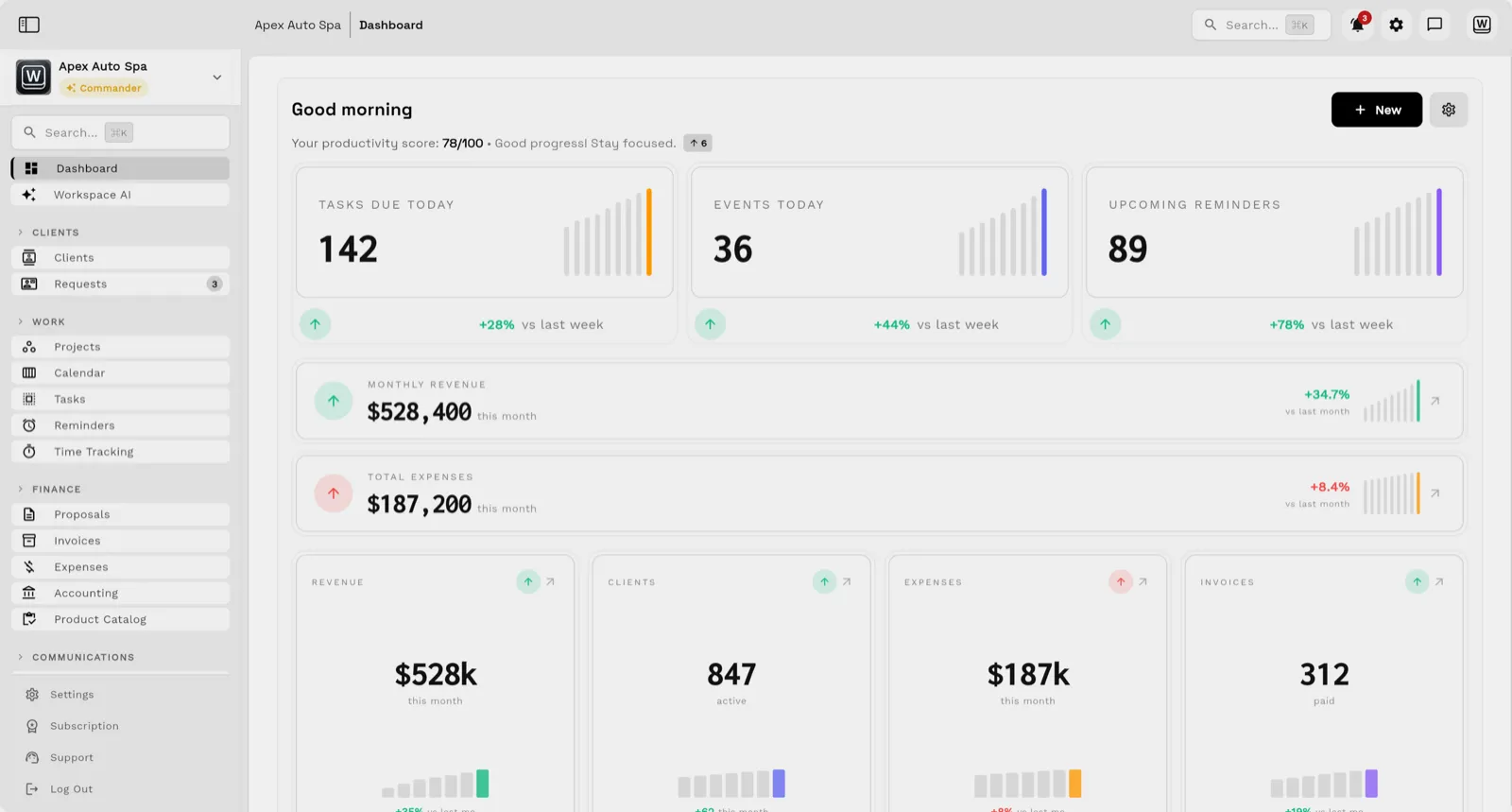
The number of screens is a better signal than any table. If you run the test in Workspace369, the board and dashboard below are what you will work from; both are demo data, not customer results.

Delivery dates live on the team calendar beside the board, and files stay attached to the project they belong to. For the owner's view, the dashboard shows tasks due today, reminders, monthly revenue, active clients, paid invoices and expenses posted this month, with automations and analytics behind it.
When a different tool is the better fit
A specialist tool wins when the agency has one narrow problem. If the only pain is task coordination, ClickUp or monday.com is cheaper and faster to adopt. If the agency is one or two people sending a few proposals a month, Bonsai or HoneyBook costs less than a full workspace. If you already run a CRM you like and only lack invoicing, adding a billing tool can beat replacing the stack. Details are in the ClickUp, monday.com, Bonsai and HoneyBook comparisons.
Whichever tool you trial, finish a full client cycle with demo data before you import real clients, and confirm you can export your records if you ever leave. Start with the agency management software hub if you want to see how Workspace369 handles the cycle.
Sources reviewed for this guide
- Workspace369 pricingPlan matrix reviewed October 23, 2026.
- ClickUp pricingOfficial pricing page reviewed October 23, 2026 for the free plan limits and per-member prices.
- monday.com pricingOfficial pricing page reviewed October 23, 2026 for work-management seat prices and the trial.
- Bonsai pricingOfficial pricing page reviewed October 23, 2026 for seat prices, plan features and trial terms.
- Teamwork pricingOfficial pricing page reviewed October 23, 2026 for per-user prices, invoicing and trial terms.
- Productive pricingOfficial pricing page reviewed October 23, 2026 for per-user prices, minimum seats and trial terms.
- HoneyBook pricingOfficial pricing page reviewed October 23, 2026 for plan prices, team members and trial terms.
Workspace369 publishes this documentation-based comparison and is one of the options. It is not an independent ranking or a hands-on benchmark.
Run client follow-up in one workspace.
CRM, inbox, voice, invoicing, payments, projects, files, AI, and workflow automations — connected instead of exported.
14-day free trial. Card required. After the trial: from $29/month. Renews automatically every month until you cancel. Cancel anytime in Settings → Billing.