Billing & payments
Accounting reports move to one clear report page
Profit & Loss, Balance Sheet, aging, tax, budget and profitability reports now share one report page, with chips along the top and Export CSV.
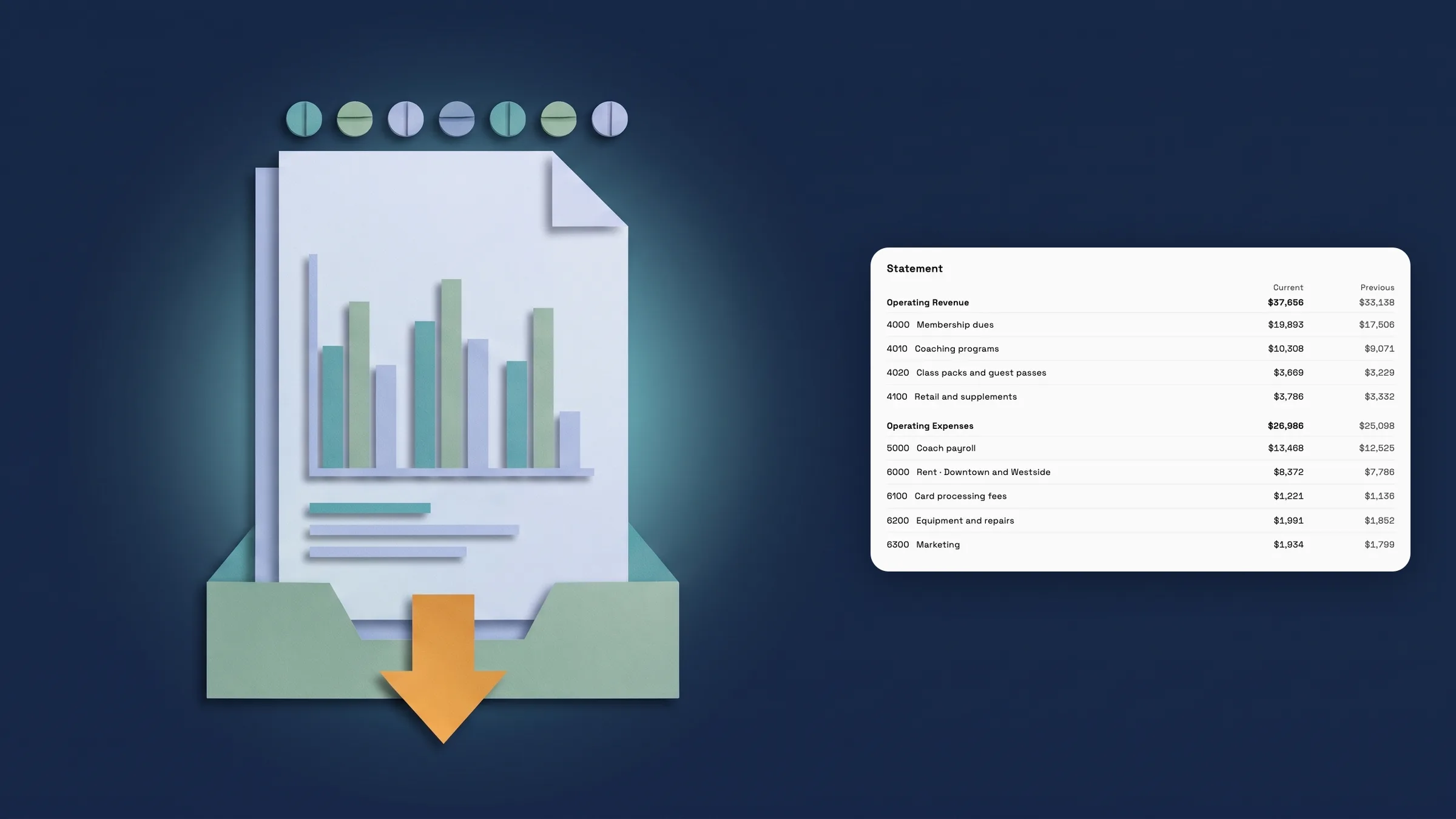
Statements open on the new report page
Profit & Loss, Balance Sheet, Cash Flow Statement, Trial Balance and General Ledger now share one report page. There is no Generate button: a statement reads when it opens, and reads again when you change a chip along the top, such as Period, Cost center, Compare or Account. The page starts with one sentence about the result, for example how much of your revenue you kept as net income, then up to four figures, then the statement as quiet rows with totals under a rule.
Where a report has a Compare chip, such as Profit & Loss, it adds a Previous period column. The Balance Sheet uses an As of chip in place of a period and says when it is out of balance, and by how much. The General Ledger asks you to pick an account with the Account chip, then lists that account's entries with Money in, Money out and Balance. The Trial Balance ends with Balanced or Out of Balance.
Export CSV is a button at the top of the report, and on the statements Export PDF and Help are in the ⋯ menu. From Reports on a tablet or desktop, a statement opens in place with Reports at the top to go back; on a phone it opens as its own page. Statements are on Commander and Enterprise. It is on the web app now and comes to the iPhone app with its next update.
- No Generate button: statements read when they open
- One sentence first, then up to four figures, then the statement
- Period, Cost center, Compare, As of and Account chips
- Export CSV at the top, Export PDF and Help in the ⋯ menu
- Where to find it
- Finance
- Reports
- Profit & Loss
- Plans
- Commander and up
- Learn more
- AccountingReports home
AR Aging, AP Aging and Tax Summary on the same page
AR Aging now uses the same page. It shows To collect, Overdue and Over 90 days, with an Aging chip, a Project chip when you have more than one project, and client search above the table. Bulk reminders, PDF and CSV export, and the per-invoice actions to view, send a reminder or record a payment are all still there for people allowed to use them. Bulk reminders are on tablet and desktop.
AP Aging shows To pay, Overdue, Due in 7 days and Over 90 days by vendor, with an As of chip, and tapping a vendor shows its bills. On a phone each vendor is a two-line row with its total and how late it is, such as 1–30 days late or Not yet due.
Tax Summary has a Period chip and three figures: Tax collected, Tax paid and Net tax liability, with Credit (overpaid) under it when you paid more than you collected. Two tables list the tax From invoices and From bills and expenses. Export CSV is new on AP Aging and Tax Summary. AR Aging is on Specialist, Commander and Enterprise; AP Aging and Tax Summary are on Commander and Enterprise. It is on the web app now and comes to the iPhone app with its next update.
- AR Aging: To collect, Overdue and Over 90 days
- AP Aging: To pay, Overdue, Due in 7 days and Over 90 days
- Tax Summary: Tax collected, Tax paid and Net tax liability
- Export CSV on AP Aging and Tax Summary
- Where to find it
- Finance
- Reports
- AR Aging
- Plans
- Specialist and up
Budget vs Actual and profitability reports on the report page
Budget vs Actual has a Period chip and a Budget chip that shows all lines, only lines over budget, or only lines with no budget. A sentence says how far actuals are over or under the period's budget, then tiles for Budget, Spent, Over budget and Lines over sit above a table of Category, Budget, Spent, Difference and Used with a Total row. Difference reads, for example, $688 over, On budget or $120 under. Edit budget sits beside Export CSV and asks before you go back to Reports with unsaved changes.
Customer Profitability, Job Profitability and Service Profitability get a Period chip, tiles for revenue, costs, gross profit and margin (Service Profitability shows units sold in place of gross profit), and a table with the name pinned, sortable columns, search above it and a Total row. The drill-down under each row is kept. Without cost-rate access, Customer Profitability shows a margin band and Job Profitability says Margin hidden. Export CSV is new on all four.
Customer Profitability and Job Profitability are on Specialist, Commander and Enterprise. Budget vs Actual and Service Profitability are on Commander and Enterprise. It is on the web app now and comes to the iPhone app with its next update.
- Budget vs Actual: Budget, Spent, Over budget and Lines over
- Difference reads $688 over, On budget or $120 under
- Customer, Job and Service Profitability with sortable columns
- Export CSV on all four reports
- Where to find it
- Finance
- Reports
- Budget vs Actual
- Plans
- Specialist and up
- Learn more
- AccountingReports home
Quick answers
- Do the accounting statements in Workspace369 have a Generate button now?
- No. Profit & Loss, Balance Sheet, Cash Flow Statement, Trial Balance and General Ledger read when they open and read again when you change a chip such as Period, Compare or Account.
- Which accounting reports moved to the new report page?
- Profit & Loss, Balance Sheet, Cash Flow Statement, Trial Balance, General Ledger, AR Aging, AP Aging, Tax Summary, Budget vs Actual, and Customer, Job and Service Profitability.
- Which plans include these reports?
- AR Aging, Customer Profitability and Job Profitability are on Specialist, Commander and Enterprise. The other reports listed here are on Commander and Enterprise.
- How do I export a report from the new page?
- Use the Export CSV button at the top of the report. On the statements, Export PDF and Help are in the ⋯ menu.
- Can I compare a statement with an earlier period?
- Yes, where the report has a Compare chip, such as Profit & Loss. It adds a Previous period column. The Balance Sheet uses an As of chip instead.
- Is the new report page on the iPhone app?
- It is on the web app now and comes to the iPhone app with its next update.
Related updates
 Sell memberships and check members in
 Refund a card payment straight from the invoice
 Reports now opens with your key figures
Accounting reports move to one clear report page, in your own workspace
Start your free trial on Commander, then find it under Finance.
14-day free trial. Card required. After the trial: $299/month for Commander. Renews automatically every month until you cancel. Cancel anytime in Settings → Billing.