Price, term and sessions
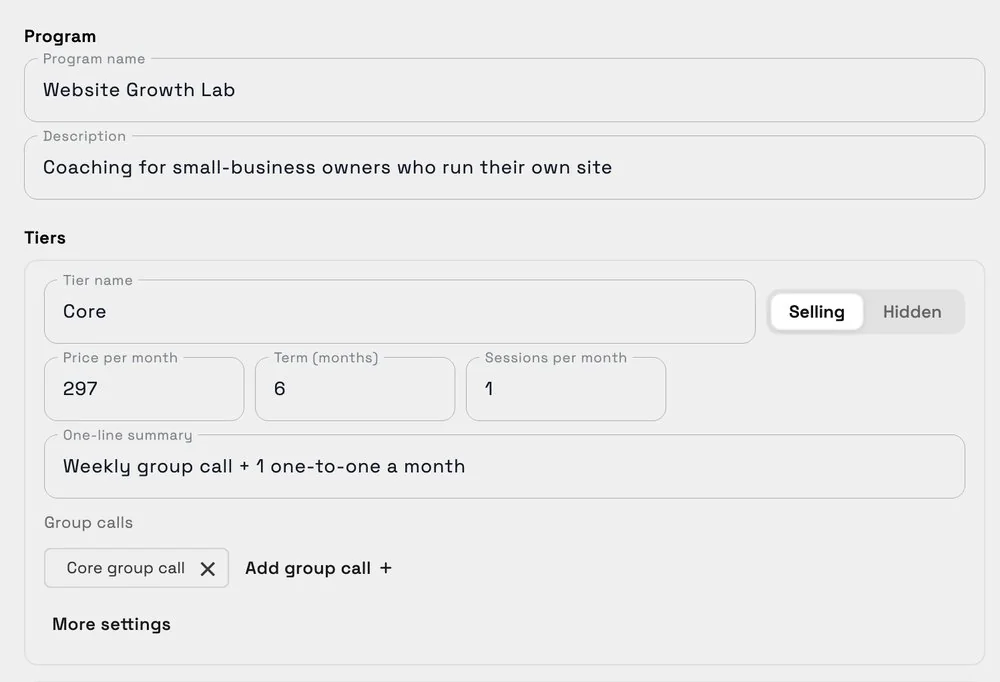
Each tier has a monthly price, a term in months, sessions per month and optional group calls.
Set each tier's price, term and sessions a month, enrol a client with their coach, and the program starts when they pay. Members, renewals due and the show-up rate sit on one page. On the web app now.
14-day free trial. Card required. After the trial: from $29/month. Renews automatically every month until you cancel. Cancel anytime in Settings → Billing.
Request a demo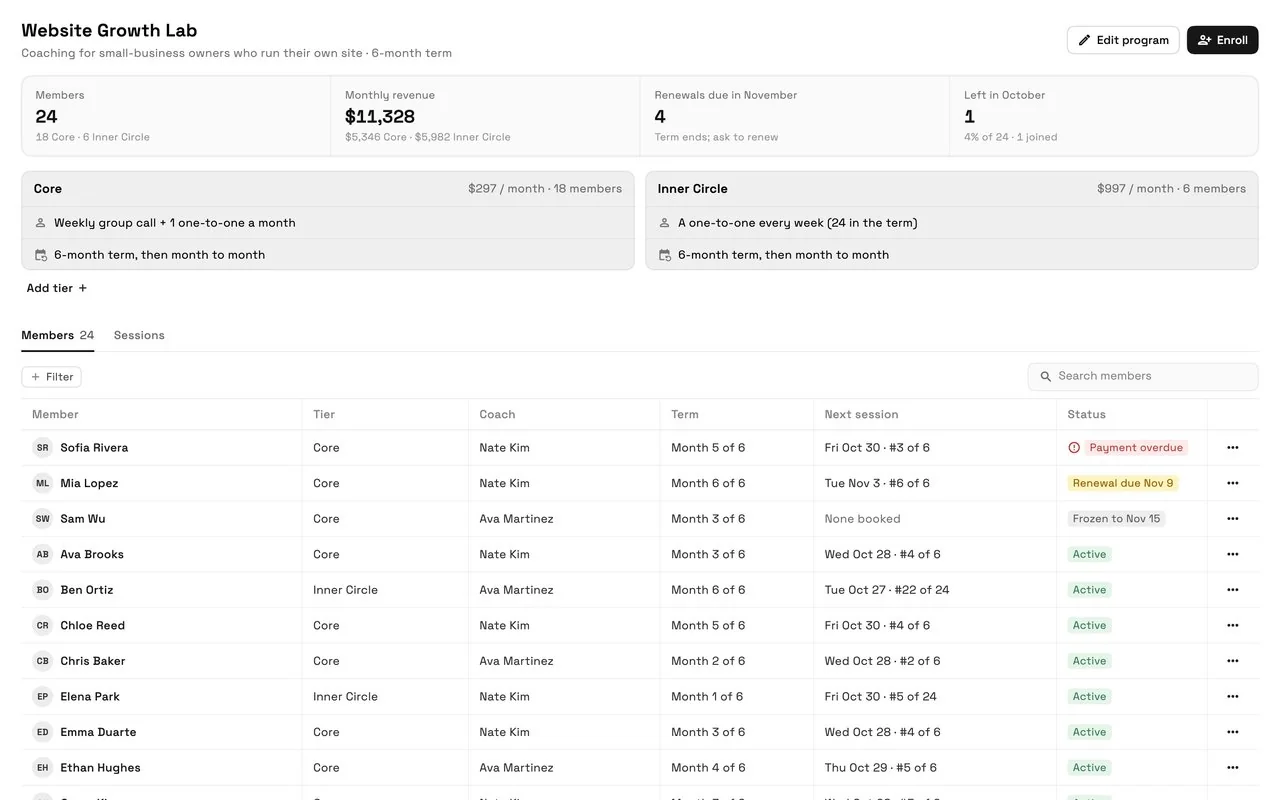
Programs in Workspace369 let a coach sell a coaching program in tiers. Each tier has a monthly price, a term in months and a number of sessions a month, and can include group calls. You enrol a client in a tier with their coach, they pay through a Stripe pay link, and the program starts when they pay. The program page shows every member's tier, coach, month of the term, next session and status, and a Sessions tab shows booked, attended and no-show sessions with the show-up rate. Programs run on Memberships, so payments go to your own Stripe account. Programs launched on November 2, 2026 and are on the web app now; iPhone app support is planned for its next update.
Reviewed November 4, 2026 by the Workspace369 Product Team. Availability can vary by plan, region, and workspace configuration.
Read the payments documentationPrograms run on Memberships, so tiers bill monthly through your own Stripe account. They are not instalment payment plans.
Each tier has a monthly price, a term in months, sessions per month and optional group calls.
Enrol a client in a tier with their coach; they pay through a Stripe pay link to your account.
Tier, coach, month of the term, next session and status: Renewal due, Frozen, Payment overdue or Awaiting payment.
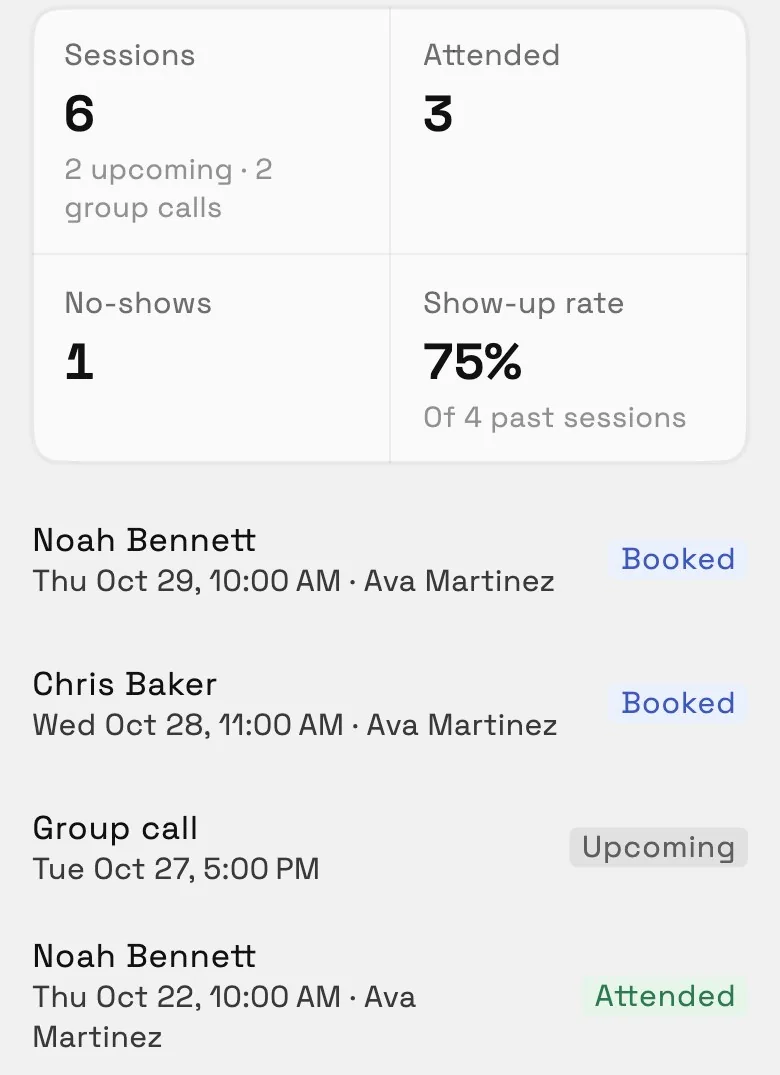
Booked, attended and no-show sessions from your calendar, with the show-up rate.
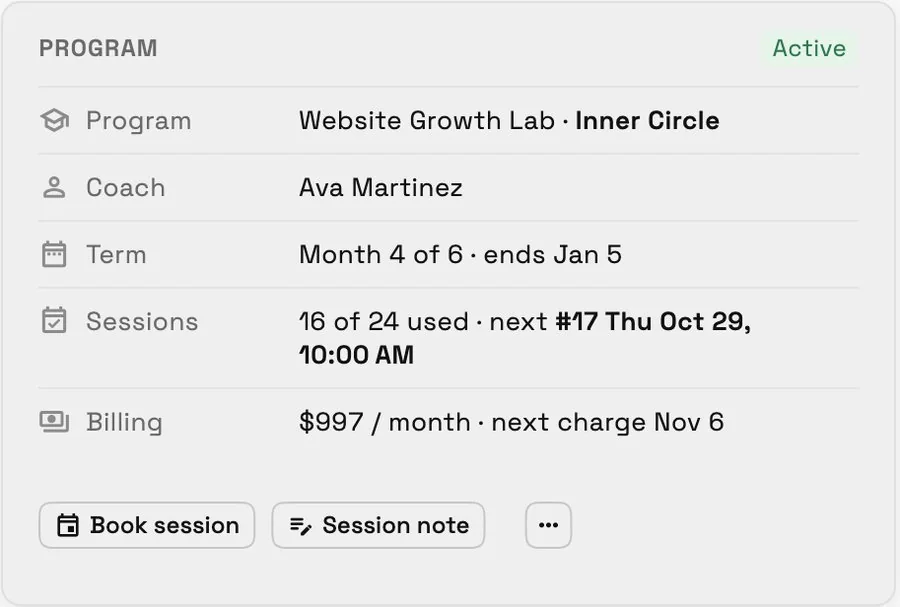
Program, coach, term, sessions used and next charge, with Book session and Session note.
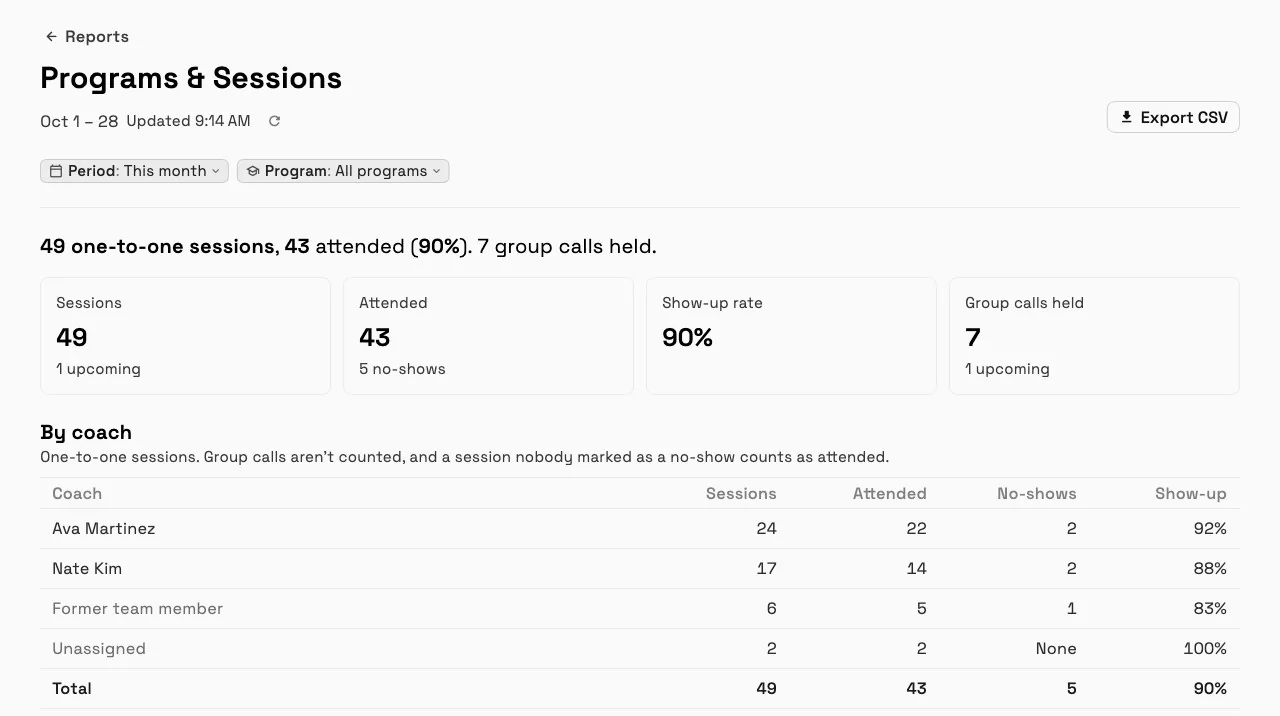
Compare sessions and show-up rate by coach, and members, joins, leavers and renewals due by tier. The Programs & Sessions report is on Voyager and up.
Built into the operating flow
Programs connect to Memberships for billing and the client's portal line, your calendar for booked sessions, client records for the program card, and Reports for the Programs & Sessions report.
Go to Finance, then Programs, then New program. New programs start from the Coaching program preset: a monthly price, a 6-month term and sessions with a coach.
Give each tier a Price per month, a Term (months), Sessions per month, a one-line summary and any group calls. Set a tier to Hidden to stop selling it.
Choose the client, the tier and their coach. The membership starts when the client pays.
Book the next session from the client's program card, and add a Session note afterwards. You book sessions; clients don't book their own.
Each tier gets its own price per month, term and sessions, a one-line summary and its group calls.
The Sessions tab lists each member's booked, attended and no-show sessions, with the show-up rate on top.
The program card shows the tier, coach, month of the term, sessions used and the next charge, with Book session and Session note.
Sessions, attendance and show-up rate by coach, and members, joins, leavers and renewals due by tier.
Common operating scenarios
These examples describe how the feature fits into connected client work. They are product workflows, not promised business outcomes.
Core with a weekly group call and one one-to-one a month; Inner Circle with a one-to-one every week.
The Coaching program preset with sessions each month; the Sessions tab shows each member's booked, attended and no-show sessions.
Two coaches on one program; the report compares sessions and show-up rate by coach.
Set a tier to Hidden to stop selling it.
Programs connect to Memberships for billing and the client's portal line, your calendar for booked sessions, client records for the program card, and Reports for the Programs & Sessions report.
A level of your coaching program with its own monthly price, term in months and sessions per month, like Core and Inner Circle.
Through a Stripe pay link when you enrol them. Payments go to your own Stripe account, and the program starts when they pay.
Yes. Each enrolment has a coach, and the Programs & Sessions report splits sessions and show-up rate by coach.
In their client portal: their tier, the month of the term and their next session, plus any session note you choose to share, under that session.
No. Programs are coaching tiers and sessions; Workspace369 doesn't host courses or recorded content.
Finance, then Programs, in the web app. Connect Stripe first, then create a program. Programs come with Memberships; see Pricing for plans.
Start free and bring this workflow into the rest of your workspace.
14-day free trial. Card required. After the trial: from $29/month. Renews automatically every month until you cancel. Cancel anytime in Settings → Billing.
See pricing