Best CRM for Claude in 2026: 6 connectors compared
Six CRMs that connect to Claude compared on what Claude can do, whether sends wait for approval, and price. Connector pages and pricing checked Nov 2026.
We make Workspace369 and list it first here. Weigh our ranking with that in mind, and if another tool fits you better, use it.

By Simon Dziak, Founder, Workspace369 · LinkedIn
The best CRM for Claude is one whose connector lets Claude do real work in it, like drafting an invoice or a proposal, while nothing reaches a client until you say so. For client-work businesses such as consultants, agencies and studios, our pick is Workspace369: Claude answers from your own clients, drafts invoices and proposals at your own catalog prices, and every send waits for your approval by default. For sales teams, Attio and HubSpot are strong choices.
Disclosure and method: Workspace369 publishes this guide and is one of the options. We read each CRM's Claude connector page, help pages and pricing page on November 18 to 20, 2026, and we used Workspace369 with Claude ourselves. Prices are usual list prices, billed monthly, without promotions. Where a vendor didn't say something, we say "not stated".
Want to see it first? Watch how to connect Claude to Workspace369, a short tutorial.
Key takeaways
- Many CRMs now connect to Claude, most through Claude's connector directory. We compared six on what Claude can do in them, what happens before anything reaches a client, and the plan you need.
- Workspace369 is our pick for client-work businesses: Claude drafts invoices and proposals at your own catalog prices, and by default every send waits in Approvals until you say yes. It isn't in Claude's directory yet, so you add it by its server URL; it works on every plan, from $29 a month.
- HoneyBook's connector reaches your pipeline, invoices and contracts, but its help says changes have no preview and no undo, and HoneyBook serves only the US, Canada, the UK and Australia.
- Bonsai's connector drafts proposals and contracts for you to send from Bonsai, but its server is still in beta. HubSpot works from the free CRM on a paid Claude plan, with invoices read-only and approval a setting you choose.
- Attio asks before most actions by default, and its connector doesn't draft or send email; Pipedrive's official connector suits sales pipelines but has no invoice or quote tools.
What's inside?
What a CRM for Claude should doThe best CRMs for Claude in 2026Side-by-side: six CRMs that work with ClaudeDraft an invoice from Claude and approve the sendWhich CRM for Claude fits youHow to connect a CRM to Claude
What a CRM for Claude should do
Claude works with your CRM through a connector, which runs on MCP, the Model Context Protocol. Most connectors are listed in Claude's connector directory; others you add as a custom connector with the CRM's server URL. Either way, you sign in to the CRM, and Claude can then read or change your records with the access you approved. We checked each CRM on four points:
- Connects with a sign-in: you sign in on the CRM's own page, without pasting an API key.
- Proposals and invoices: whether Claude can draft them from your own data, or only read them.
- Sends wait for you: what happens before an email, proposal or invoice reaches a client: an approval step that is on by default, a setting you choose, or nothing described.
- One place per client: whether the client, the work and the billing live in the same CRM, and the plan you need.
The order reflects fit for a client-work business. Positions 2 to 6 are not a quality score.
The best CRMs for Claude in 2026
1. Workspace369, best overall for client work
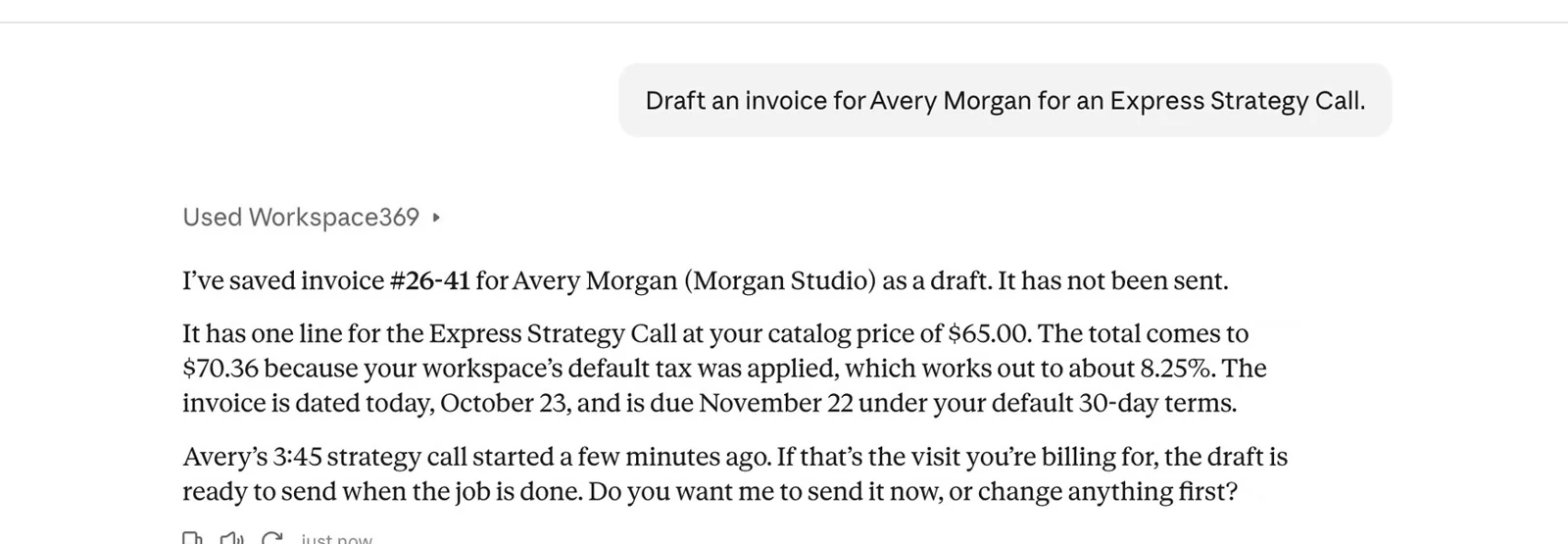
Workspace369 isn't in Claude's connector directory yet, so you add it as a custom connector: paste the server URL, https://mcp.workspace369.com/mcp, then sign in to Workspace369, choose the workspace and approve what Claude may do. No API key is needed. On Claude's Free plan, it uses your one custom connector.
Once it's connected, ask in your own words. Claude looks up clients and their history, answers questions like who to follow up with this week, adds clients, drafts invoices and proposals with real line items at your catalog prices, creates projects and tasks, checks availability and schedules events, logs time, and expenses on Specialist and up, and records payments.
Sends are where it differs. By default, an invoice, proposal, contract, email or text that Claude wants to send waits in Approvals until you approve and send it, or decline, and Claude can't approve its own request. Only the person who made the connection can turn on Send without asking for it. Claude works with your own permissions, so it can only see and do what your account can.
The connection is on every plan, from Cadet at $29 a month (one seat) and Voyager at $74 (two seats). The workspace owner or an admin turns on AI connections in Settings first. Start with the 14-day trial; a card is required, and the plan renews monthly after the trial until you cancel.
Limitations: not in Claude's directory yet, so setup takes a URL. Every successful request counts toward the workspace's monthly AI usage, and a send nobody approves expires after an hour.
Best for: consultants, agencies, studios and other client-work businesses that want Claude to draft the invoice or proposal and a person to approve the send.
2. HoneyBook, best for client-work bookings in the US, Canada, the UK and Australia
HoneyBook's connector reads your pipeline, projects, invoices and contracts, creates and updates projects, and HoneyBook's blog says it can build a proposal, invoice or contract from your templates, publish it for a client and raise a payment request. Its help says the assistant should check with you first and wait for you to say go.
Limitations: HoneyBook's help also says there's no preview and no undo: a change happens the moment it runs. HoneyBook is only available in the US, Canada, the UK and Australia, and which plans include the connector isn't stated. HoneyBook says it's listed in Claude's directory; we couldn't find its listing on Claude's public pages.
Price: Starter $36, Essentials $59 and Premium $129 a month, billed monthly.
Best for: service businesses in those four countries that already book clients through HoneyBook.
3. Bonsai, best for freelancers already in Bonsai
Bonsai's connector is listed in Claude's directory. It creates invoices and drafts proposals, contracts and quotes from your templates, and documents stay drafts: you review and send them in Bonsai. Bonsai's docs advise asking the assistant to confirm before it creates or edits anything.
Limitations: Bonsai's docs say the server is still in beta. Invoices and proposals start on Essentials.
Price: Basic $15, Essentials $25 and Premium $39 a user a month, billed monthly.
Best for: freelancers who already run proposals and invoices in Bonsai.
4. HubSpot, best for starting free
HubSpot's connector, listed in Claude's directory, works from the free CRM (up to two users), on a paid Claude plan (Pro, Max, Team or Enterprise). Claude can search and update contacts, companies, deals and tickets, and log activities. Bulk changes run 10 records at a time, and nothing can be deleted.
Limitations: quotes are in beta and invoices are read-only. HubSpot recommends setting write tools to Needs Approval; with Always allow, its knowledge base says edits may happen without asking. A super admin may need to approve the connector first.
Price: free CRM $0; Sales Hub Starter's usual price is $20 a seat a month, and Professional is $100 a seat a month on an annual commitment, with a required $1,500 onboarding fee.
Best for: sales and marketing teams that already run on HubSpot, or want to start on a free CRM.
5. Attio, best for modern sales teams
Attio's connector searches, creates and updates records, notes, tasks and lists. By default, your AI app asks for your approval before running most Attio tools. Attio says its MCP doesn't draft or send email.
Limitations: Attio's plans list no invoices or proposals, so billing lives in another tool.
Price: free for up to three users; Plus is $50 a month for the workspace including one user, plus $44 for each extra user, billed monthly.
Best for: startups and sales teams that want writes to ask first.
6. Pipedrive, best for sales pipelines
Pipedrive's official connector manages deals, leads, contacts, organizations, activities and notes, on every paid Pipedrive plan. Pipedrive says usage is capped by plan token allowances. An approval step isn't described.
Limitations: Pipedrive's tools list has no invoice, quote, send or delete tools.
Price: Lite $24, Growth $49 and Premium $79 a seat a month, billed monthly.
Best for: small sales teams that live in a deal pipeline.

Side-by-side: six CRMs that work with Claude
| CRM | How it connects | Proposals and invoices | Before anything reaches a client | From (billed monthly) |
|---|---|---|---|---|
| Workspace369 | Custom connector by URL, sign-in | Drafts both | Waits in Approvals by default | $29 (1 seat) |
| HoneyBook | Connector, sign-in | Builds proposals, invoices and contracts from templates; payment requests | Should check with you; no preview or undo | $36 |
| Bonsai | Directory, beta server | Creates invoices; drafts proposals | Documents stay drafts; confirm advised | $15 a user |
| HubSpot | Directory; paid Claude plan | Quotes in beta; invoices read-only | Approval is a setting you choose | $0 (2 users) |
| Attio | Directory | None listed | Asks first for most tools; no email | $0 (3 users) |
| Pipedrive | Directory | Not in the connector | Not described | $24 a seat |
As stated on each vendor's connector, help and pricing pages, November 18 to 20, 2026.
Draft an invoice from Claude and approve the send
Here's how it looks in Workspace369. Ask Claude for an invoice, like one for a strategy call, and it saves a draft in your workspace with the line item and price from your product catalog, plus your default tax. The draft shows up in Invoices like any other, ready for you to check.
When you ask Claude to send it, nothing goes out yet. The request lands in Approvals with the invoice, the amount and the recipient, and it goes out only when you press Approve and send. The same holds for proposals, contracts, emails and texts.
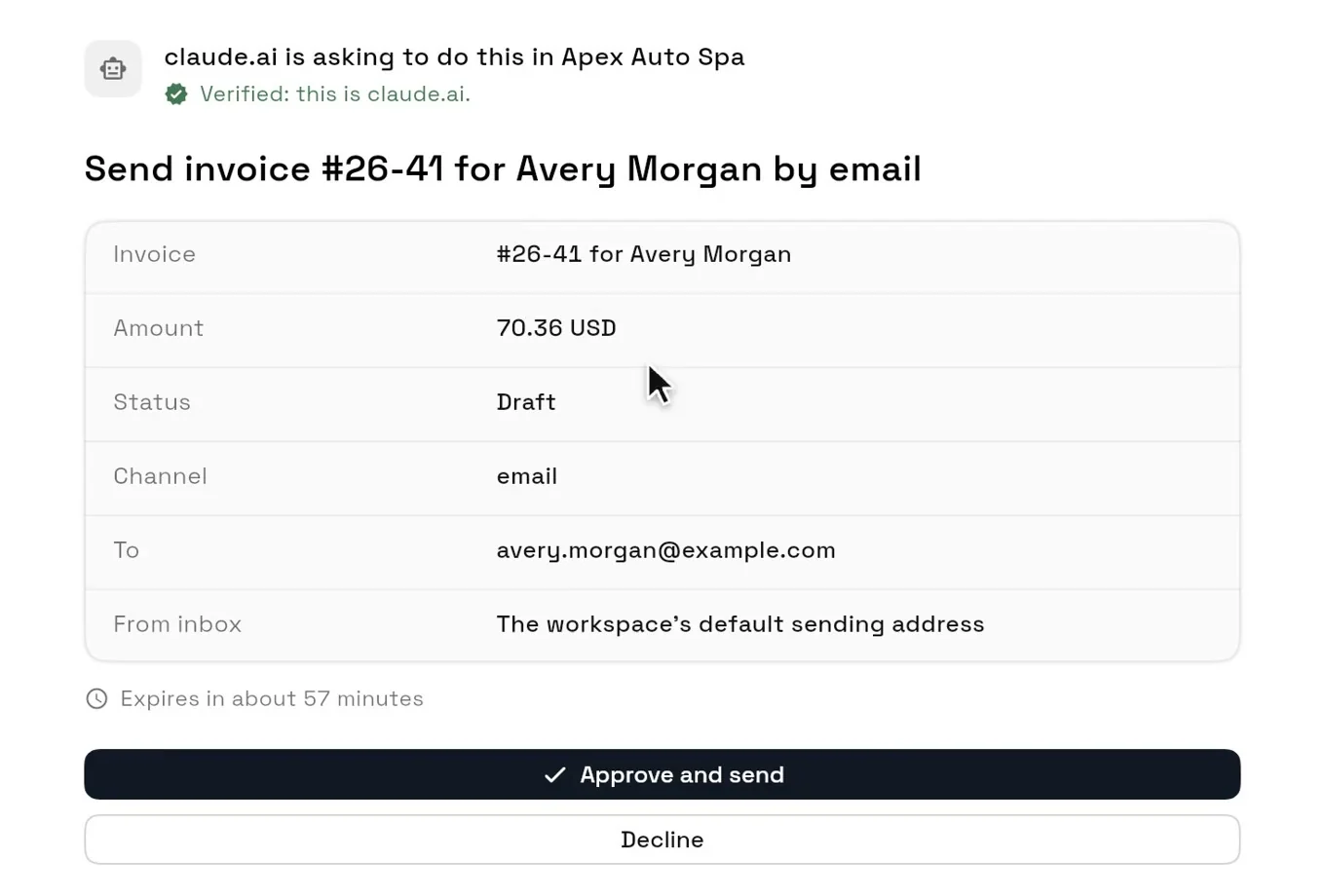
The full setup, from turning on AI connections to the approval, is in the Claude tutorial. For more you can ask, see 24 MCP CRM prompts.
Which CRM for Claude fits you
| If your priority is… | Look at |
|---|---|
| Clients, proposals and invoices from a chat, with every send approved first | Workspace369 |
| Bookings through HoneyBook in the US, Canada, the UK or Australia | HoneyBook |
| A solo business already invoicing in Bonsai | Bonsai |
| Starting on a free CRM | HubSpot, on a paid Claude plan |
| Writes that ask first, and no email from the AI | Attio |
| A sales pipeline with deals and activities | Pipedrive |
Also in Claude's directory: monday.com, Close (it can now send an existing draft email or text, with full write access), Zoho CRM, Notion and Salesforce's beta connector, for organizations Salesforce approves. folk and HighLevel connect by URL. For a closer look at each CRM's server, see our CRM MCP server comparison. Using ChatGPT instead? Workspace369 is also an approved ChatGPT plugin.
How to connect a CRM to Claude
- In your CRM, turn on AI or MCP access if it asks for it. In Workspace369, the owner or an admin switches on Allow AI connections in Settings, AI connections, where you also copy the server URL.
- In Claude, open Customize, then Connectors. Add the CRM from the directory, or click + Add, choose Add custom connector and paste its server URL.
- Sign in on the CRM's own page, choose the account or workspace, and approve what Claude may do.
- Ask something small first, like "Who should I follow up with this week?", then try a draft. Check that a send asks for your approval before you rely on it.
Ready to try it? Set up Workspace369 with Claude, watch the tutorial, or compare the plans.
Sources reviewed for this guide
- Get started with custom connectors using remote MCP (Anthropic help)Custom connectors by Claude plan, reviewed November 20, 2026.
- Use connectors to extend Claude's capabilities (Anthropic help)Directory connectors and per-tool permissions, reviewed November 20, 2026.
- Workspace369 MCP permissions, usage and auditApprovals and Send without asking, reviewed November 20, 2026.
- Workspace369 pricingPlan prices, seats and trial terms, reviewed November 20, 2026.
- About the HoneyBook connector (HoneyBook help)What it reaches, approval wording and the no-undo note, reviewed November 20, 2026.
- HoneyBook MCP announcementActions and availability, reviewed November 20, 2026.
- HoneyBook pricingPrices billed monthly, without promotions, reviewed November 20, 2026.
- Bonsai connector for ClaudeWhat it does and how documents are sent, reviewed November 20, 2026.
- Bonsai MCP docsBeta status and confirmation guidance, reviewed November 20, 2026.
- Set up and use the HubSpot connector for Claude (HubSpot knowledge base)Read and write access, read-only invoices, approval settings and the paid Claude plan, reviewed November 20 and 21, 2026.
- HubSpot Sales Hub pricingUsual prices billed monthly, Professional on an annual commitment, and the Professional onboarding fee, reviewed November 20 and 21, 2026.
- Attio MCPPlans and supported AI apps, reviewed November 20, 2026.
- Attio MCP prompts and best practicesApproval defaults and the no-email rule, reviewed November 20, 2026.
- Attio pricingPrices billed monthly, reviewed November 20, 2026.
- Pipedrive connector for ClaudePlans and example actions, reviewed November 20, 2026.
- Pipedrive MCP tools (Pipedrive support)Tool list, reviewed November 20, 2026.
- Pipedrive pricingPrices billed monthly, reviewed November 18, 2026.
Workspace369 publishes this comparison and is one of the options. We used Workspace369 with Claude ourselves; for the other CRMs we read their Claude connector pages, help pages and pricing. It is not an independent ranking.
Run client follow-up in one workspace.
CRM, inbox, voice, invoicing, payments, projects, files, AI, and workflow automations — connected instead of exported.
14-day free trial. Card required. After the trial: from $29/month. Renews automatically every month until you cancel. Cancel anytime in Settings → Billing.
See pricing