Best CRM for Membership Communities in 2026
Six tools for paid membership communities compared on price, member billing and onboarding, plus a failed-renewal test for the trial.
We make Workspace369, which is on this list. Weigh our ranking with that in mind.

By Simon Dziak, Founder, Workspace369 · LinkedIn
The best CRM for membership communities is usually a community platform that also bills members. Circle fits branded communities with payments and workflows, Mighty Networks fits courses and cohorts, Skool fits the lowest entry price, Kajabi fits courses plus email, and Memberful fits billing in front of your own site. Workspace369 fits only the services side.
Workspace369 (see its membership communities page) comes last of six here because it has no community feed, member directory or course hosting. To see what your current stack costs before you switch, try the free software stack cost calculator.
Disclosure and method: Workspace369 publishes this guide and is one of the options; we rank it last of six for this reader. It is a documentation-based shortlist, not a hands-on benchmark. Official vendor pages were reviewed on October 26, 2026. Check current plans with each vendor before you buy.
Key takeaways
- A paid community needs two systems that agree: the space where members meet and the record of who paid, who onboarded and who is about to leave. Community platforms bundle the first and part of the second.
- Circle lists Professional at $89 a month and Business at $199; Skool lists $9 or $99 a month; Mighty Networks lists Launch at $79 a month (annual billing; the monthly view is See site); Kajabi starts at $179 a month and Memberful at $49.
- Workspace369 Cadet is $29 a month ($23.25 billed yearly) for one user and has no community feed, member directory or course hosting, and its 14-day trial covers Cadet through Commander and needs a card. We rank it last of six, for communities that also sell proposals-based services.
- Test each tool with a fictional member whose card fails on renewal: you should see the failure, the onboarding state and the message history in one place.
What's inside?
What a CRM for membership communities is (and what it is not)How we compared these toolsThe best CRM for membership communities in 2026Side-by-side comparisonWhich tool fits your membership community?Workspace369 in action for a community that sells servicesRun a failed-renewal test during the trialKeep the community space and the business record separateWhen to keep it simple
What a CRM for membership communities is (and what it is not)
For a paid community, a CRM is the operating record behind the membership: who joined and at what price, whether onboarding finished, which payments failed, who has gone quiet and who bought something extra. It is not the feed, the courses or the live-event room, although several platforms bundle those with member billing. If billing sits in one app, the community in another and the support emails in a third, a single failed renewal means checking three places before you can write to the member.
How we compared these tools
Each tool was checked against five points taken from its own pricing page, as read on October 26, 2026:
- Price and billing view, the entry plan on monthly and yearly billing, and whether the page shows both.
- Member billing, meaning whether the plan takes member payments, as the vendor describes it.
- Community and member features on the plan priced: spaces, directory, courses, events and email.
- Automation and integration gates, meaning which plan unlocks workflows, API or webhooks.
- Limits and trial terms: space, host or product caps, and whether a card is stated.
We did not test uptime, member experience, support, mobile apps or migration tools, and we did not use third-party ratings. The order follows documented fit for an operator running a paid community with recurring member payments. Where a page does not name a feature, we say it is not named rather than that it is missing.
The best CRM for membership communities in 2026
1. Circle, best for a branded community with payments and workflows in the plan
Circle's pricing page lists Professional at $89 a month, shown on annual billing, with unlimited members, community, courses, live events, a website, a member directory, rich member profiles, reporting, payments, gamification, a custom domain and apps. Business is $199 and adds workflows, custom profile fields, APIs and activity scores; Scale is $419 and adds webhooks and unlimited workflows. Professional allows 20 spaces. The page offers a 14-day trial and says no credit card is required.
Limitations: the page does not show a monthly price, so we could not verify what month-to-month costs. Workflows, custom profile fields and the API wait until Business, so the entry plan is a community product more than an operations record. Circle's pricing page names no proposals or invoicing.
Best for: operators who want the feed, directory, courses and payments in one branded space and expect to add workflows as the community grows.
2. Mighty Networks, best for communities that sell courses and programs from one plan
Mighty Networks' pricing page lists Launch at $79 a month ($950 a year), Scale at $179 and Growth at $354, with a Monthly Billing and an Annual Billing switch ("2 months free" on annual). We could not read the monthly-billing prices in the page text, so the monthly figure is See site. Launch lists the AI Cohost, community, courses and basic automations, with 3 hosts and 10 moderators. Scale adds more automations, APIs and MCP access and third-party integrations, with 5 hosts and 15 moderators.
Limitations: the page states a 14-day free trial with no credit card required, and its FAQ says every trial runs on the Growth plan, so the trial does not show how Launch feels. Hosts and moderators are capped on the lower plans, and the integrations and API sit behind Scale. Branded apps and community services are priced by quote under Mighty Pro.
Best for: creators who want courses, cohort programs and community on one subscription and can budget for Scale when automations matter.
3. Skool, best for a low entry price with one flat community model
Skool's pricing page shows Hobby at $9 a month and Pro at $99 on the Monthly view, with a Yearly switch whose prices are See site. Both list unlimited members, courses, videos and live calls, a custom URL and affiliates. The page description names a 14-day free trial and says you can cancel anytime.
Limitations: the pricing page lists no workflows, API or CRM fields, so we could not verify automation or record-keeping beyond the community itself. The page does not state whether a card is needed for the trial.
Best for: operators starting a paid community who want a low price and are happy to keep member records, invoices and services elsewhere.
4. Kajabi, best for a community inside a full course and marketing business
Kajabi lists Basic at $179 a month ($143 a month billed annually), Growth at $249 ($199 yearly) and Pro at $499 ($399 yearly). Its plan table lists, for Basic, 5 products, 2,500 contacts, 1 website, 1 community and 2 admin users; Growth lists 50 products, 25,000 contacts and 11 admin users. The page names marketing emails, landing pages, funnels and access groups among the features that are unlimited. It also states a 14-day free trial and a 30-day money-back guarantee.
Limitations: it is the most expensive entry price here, and the community is one feature of a broader course platform. Basic caps products at 5 and admin users at 2. The page does not say whether the trial needs a card.
Best for: operators whose community sits alongside courses, email funnels and a website, and who want one bill for all of it.
5. Memberful, best for member billing on your own site
Memberful lists a single Standard plan at $49 a month, with unlimited members. The page says you can try it free until you go live and start taking payments, and that the paid plan is billed month-to-month. Its feature list names subscriptions of any kind, free and paid trials, coupons, group plans, a referral program, automated retention discounts, cancellation surveys, growth metrics, custom fields and integrations with chat communities. The page notes the product is a Patreon company.
Limitations: it manages the paywall and the member account, not the community space, so you bring your own forum, chat group or content. The page shows no yearly price.
Best for: teams that already have a site, a newsletter or a chat group and need membership billing and retention tools in front of it.
6. Workspace369, best for community businesses that also sell services by proposal
Workspace369 keeps the member or client record, a proposal, a contract, recurring invoices, a client portal and the conversation history together. Cadet costs $29 a month for one user ($23.25 billed yearly) and allows 5 active projects. Recurring invoices, retainers with payment schedules, deposits on acceptance, public intake forms, custom fields, CSV client import and email automations are listed on every plan. The screenshot below is demo data, not a customer outcome.

Limitations: there is no community feed, member directory, course hosting or join page that unlocks community access, so it does not replace Circle, Skool or Mighty Networks. Webhooks and API start at Specialist ($149 a month, $119.25 billed yearly, 10 seats). Voyager adds a second seat and SMS steps for $74 a month ($59.25 billed yearly). Cadet automations are email only. The 14-day trial covers Cadet through Commander, card required. Skool at $9 costs less than Cadet at $29, and Circle at $89 costs more than Voyager at $74 but includes the community space.
Best for: communities that also sell high-ticket coaching, done-for-you work or events by proposal, and want those deals, recurring invoices and a client portal in a record that stays put if the community platform changes.
Side-by-side comparison
| Tool | Plan priced | Monthly | Billed yearly | Community and billing at that plan | Trial |
|---|---|---|---|---|---|
| Circle | Professional | Not shown | $89 a month | Community, courses, events, member directory, payments; 20 spaces | 14 days, no card |
| Mighty Networks | Launch | See site | $79 a month | Community, courses, AI Cohost, basic automations; 3 hosts | 14 days, no card |
| Skool | Hobby | $9 | See site | Unlimited members, courses, live calls; no workflows named | 14 days, card not stated |
| Kajabi | Basic | $179 | $143 a month | Courses, 1 community, checkout, email; 5 products | 14 days, card not stated |
| Memberful | Standard | $49 | Not shown | Member billing and retention tools; no community space | Free until you go live |
| Workspace369 | Cadet | $29 | $23.25 a month | Recurring invoices, portal, Proposals; no community space | 14 days on Cadet to Commander, card required |
Which tool fits your membership community?
| If you mostly need | Start with | Why |
|---|---|---|
| A branded community with directory, courses and payments | Circle | All listed on the entry plan; workflows from Business |
| Courses and cohort programs inside the community | Mighty Networks | Community and courses on Launch; automations deepen at Scale |
| The lowest entry price to launch | Skool | $9 a month, against $99 for Pro |
| Community plus courses, email and a website | Kajabi | One subscription with checkout, email and a website |
| Billing and retention in front of your own site | Memberful | Subscriptions, coupons and retention discounts at $49 a month |
| Services by proposal beside the community | Workspace369 | Proposals, retainers, recurring invoices and a portal on Cadet |
Workspace369 in action for a community that sells services
For a community operator, the Workspace369 side is the paid offer that sits next to the membership: a private review call, a done-for-you project or a retainer. The first screenshot is the invoice editor in a demo workspace with sample data (an auto-detailing business, not a community). It shows tabs for Details, Payment Plan, PO Matching, Payment and Audit History, with a live invoice preview marked partially paid beside the form. In your own setup, a monthly retainer would be set up through recurring invoices and retainers, and the member pays from a link on the invoice.

The second screenshot is the dashboard, also a demo workspace with sample data. The left menu groups Clients, Requests, Projects, Calendar, Tasks, Reminders, Proposals and Invoices, and the main area shows tasks due today, events today and upcoming reminders. That is where a failed-renewal follow-up task would show up once you create it, either by hand or from a Workflow Automation with a scheduled-time trigger.
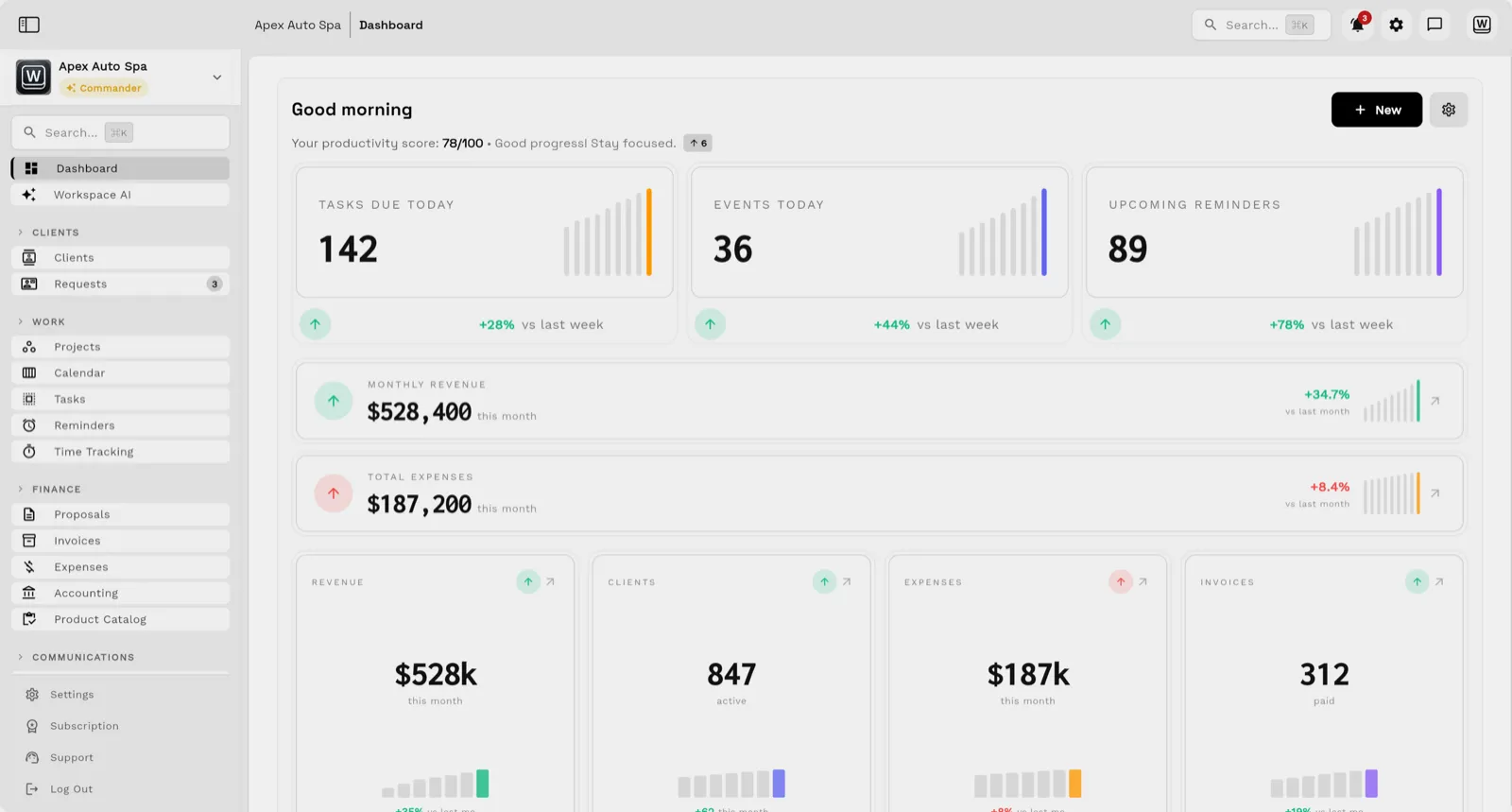
What it does not do: Workspace369 does not see whether a member's platform card failed, because it has no link to Circle, Skool or Mighty Networks unless you build one with webhooks and the API from Specialist. A failed renewal on the community platform is something you log on the member record yourself.
Run a failed-renewal test during the trial
Take one fictional member through each tool you shortlist:
- Sign the member up at a paid tier and note what the onboarding screen shows them.
- Fail the renewal card and check where you see the failure, and what the member is told.
- Message the member from the record, and see whether the history sits beside the billing.
- Downgrade the member, then cancel them, and see what you can export.
- Add a one-off purchase, such as a private review call, and check that it lands on the same record.
- Look for any step where you retyped a name, a date or a price.
The best tool shows the payment state, the onboarding state and the conversation on one screen. If a failed renewal means opening the payments dashboard, the community admin and your inbox, that gap is exactly what this test exposes.

Keep the community space and the business record separate
The feed, the courses and the live room belong in a community product. The record of what each member bought, what is owed and what you promised belongs somewhere you can export. If you pair a community platform with Workspace369, record each member's platform status in a client custom field, give members a client portal for their invoices and messages, and use Workflow Automations to create a follow-up task when a renewal needs a manual check. If you want to pass events to your community platform, webhooks and the API begin at Specialist. Always test any connection with sample members first.
When to keep it simple
If you run a small paid group and the platform already shows who paid and who is active, a shared sheet of onboarding steps may be enough. Add a separate record when members begin buying services, when you take deposits or invoices outside the platform, or when you cannot say which members are at risk. The membership communities product page shows how Workspace369 handles communications, invoices and the client portal, and current plans are on the pricing page. For adjacent paid-program setups, compare the high-ticket coaching guide and the masterminds guide.
Before you import real members, run a whole renewal cycle on demo data and confirm you can export what you entered.
Sources reviewed for this guide
- Workspace369 pricingPlan matrix reviewed October 26, 2026 for seats, active projects, recurring invoices, retainers and payment schedules, the client portal, intake forms, custom fields, scheduled-time automations, SMS, webhooks and API, and trial terms.
- Circle pricingOfficial pricing page reviewed October 26, 2026 for Professional, Business and Scale prices (shown on annual billing), space limits, the plan gates for workflows, API and webhooks, and the 14-day trial with no card required. The page has no monthly toggle.
- Mighty Networks pricingOfficial pricing page reviewed October 26, 2026 for the Launch, Scale and Growth prices as displayed, the $950 a year Launch figure, host limits and the 14-day, no-card trial wording. The monthly-billing prices did not show in the page text we could read, so they are See site.
- Skool pricingOfficial pricing page reviewed October 26, 2026 for the Hobby and Pro prices on the Monthly view. The Yearly view prices did not show in the page text we could read, so they are See site. The page description names a 14-day free trial.
- Kajabi pricingOfficial pricing page reviewed October 26, 2026 with the Monthly and Annual tabs for Basic, Growth and Pro, plan limits, the 14-day trial and the 30-day money-back guarantee.
- Memberful pricingOfficial pricing page reviewed October 26, 2026 for the Standard price, the free-to-try wording and the included features.
Workspace369 publishes this documentation-based comparison and is one of the options. It is not an independent ranking or a hands-on benchmark.
Run client follow-up in one workspace.
CRM, inbox, voice, invoicing, payments, projects, files, AI, and workflow automations — connected instead of exported.
14-day free trial. Card required. After the trial: from $29/month. Renews automatically every month until you cancel. Cancel anytime in Settings → Billing.