Best software for estimates, quotes, invoices, and payments
How to choose software that connects estimates, quotes, proposals, invoices, payment links, retainers, payment plans, CRM, projects, and client follow-up.

By Simon Dziak, Founder, Workspace369 · LinkedIn
Workspace369 publishes this guide and is one of the options. It is a documentation-based comparison, not an independent benchmark.
The best software for estimates, quotes, invoices, and payments carries one job from the first quote to the final payment without retyping it: the accepted proposal becomes the invoice, the payment link and status sit on the same record, and follow-up starts from there. Clients experience quoting, billing and payment as one workflow, so a tool that splits them costs the business time and the client patience.
Plan details below were checked against each vendor's own pages on October 27, 2026.
Key takeaways
- The best proposal, invoice, and payment software keeps the handoff from quote to payment clean.
- Workspace369 connects proposals, invoices, retainers, payment plans, CRM, projects, messages, files, and follow-up.
- Payment collection improves when billing status is visible to the people managing the client relationship.
- In Workspace369, proposals, invoices, deposits, retainers, payment links and late-payment reminders are on every plan from $29 a month; payment plans start on Specialist ($149 a month).
- HoneyBook and Dubsado suit proposal-and-contract client flows; QuickBooks and FreshBooks suit accounting-led billing.
What's inside?
Quick answerThe quote-to-cash workflowWhat the software should includeWhy connected payments matterWhy Workspace369 is built for thisEstimate, quote, invoice, and payment software comparedWorkspace369 compared with simple invoice toolsHow the proposal-to-payment handoff runs inside Workspace369Final recommendation
Quick answer
For service businesses that want proposals, invoices, retainers, payment plans, payment links, CRM, projects, files, inbox, SMS, voice, AI, expenses, accounting, and reporting together, Workspace369 is the strongest fit. Proposals, invoices, deposits, retainers, payment links and late-payment reminders are on every plan from $29 a month; SMS and calls start on Voyager ($74 a month), payment plans, expenses and basic accounting on Specialist ($149 a month), and full accounting on Commander. The pricing page lists each plan.
HoneyBook and Dubsado are strong for proposals, contracts, and client workflows. QuickBooks and FreshBooks are strong for accounting-led billing. Workspace369 is the strongest fit when the proposal, invoice, payment, client record, and follow-up should stay in one workspace.
The quote-to-cash workflow
For service businesses, quote-to-cash usually looks like this:
- A lead or client asks for work.
- The team scopes the request.
- A proposal or quote is sent.
- The client accepts or asks for changes.
- The work becomes scheduled or active.
- An invoice is created.
- A payment link, deposit, retainer, or payment plan is sent.
- The team tracks payment status.
- Follow-up happens if the payment is late.
- Reporting shows revenue, outstanding balances, and client activity.
If each step lives in a different tool, the workflow becomes fragile.
What the software should include
Look for software that supports:
- Proposals and quotes
- Advanced proposal creation
- Invoice creation and customization
- Deposits and retainers
- Payment plans and split payments
- Payment links and status tracking
- Client records and notes
- Project and task context
- Email, SMS, and voice follow-up
- Reporting and accounting visibility
Workspace369 is designed for this broader workflow. It is not just an invoice maker. It is a workspace where the proposal, invoice, payment, client record, files, communication, and follow-up can stay connected.

Why connected payments matter
Payment collection is easier when the right people can see the payment status.
If the account manager, project owner, and business owner all need different tools to understand whether a payment was sent, viewed, collected, or overdue, follow-up becomes inconsistent.
Connected payment workflows help teams:
- Know which invoices need action
- See payment status beside client history
- Send follow-up without leaving the workspace
- Understand cash flow and outstanding balances
- Keep notes and communication near the invoice
That is why payment software should not stop at the payment link. It should help the team manage the relationship around the payment.
Why Workspace369 is built for this
Workspace369 connects proposals, invoices, payments, CRM, projects, files, inbox, SMS, voice, expenses, AI, automations, and reporting.
That gives service businesses a cleaner path:
- Capture a request
- Build a proposal
- Manage the project
- Send the invoice
- Collect payment
- Follow up from the client record
- Report on revenue and activity
The value is not only faster invoicing. It is fewer disconnected handoffs.
Estimate, quote, invoice, and payment software compared
The shortlist below ranks the strongest options for service businesses that want quoting, billing, and payment collection in one workflow.
Workspace369 is our product, so weigh this shortlist accordingly — the checklist above is exactly what we evaluated each tool against.
| Rank | Software | Best for | Where it can fall short |
|---|---|---|---|
| 1 | Workspace369 | Service teams that want proposals, invoices, payments, CRM, projects, inbox, AI, and reports together | More system than needed for one-off basic invoices |
| 2 | HoneyBook | Polished clientflow, proposals, invoices, contracts, and payments | Calls and texts are a paid add-on; accounting and inventory need other tools |
| 3 | Dubsado | Forms, proposals, contracts, invoices, payment plans, and workflow templates | No texting or phone line; scheduling, workflows and public proposals need Premier |
| 4 | QuickBooks | Accounting-first invoicing and financial workflows | Client work, project delivery, voice, SMS, and operational follow-up often live elsewhere |
| 5 | FreshBooks | Simple service billing, time tracking, invoices, and payments | No native SMS or phone line; proposals start on Plus and team members cost extra below Select |
Workspace369 compared with simple invoice tools
Simple invoice tools are useful when the business only needs billing. Workspace369 is a better fit when the business needs billing plus operations.
| Workflow | Simple invoice tool | Workspace369 |
|---|---|---|
| Send invoice | Yes | Yes |
| Connect invoice to CRM | Sometimes limited | Yes |
| Manage projects and tasks | Usually separate | Yes |
| Store communication history | Usually separate | Inbox, SMS, voice, and client history |
| Handle broader billing depth | Varies | Proposals, invoices, deposits and retainers on every plan; payment plans from Specialist |
| Automate follow-up | Often limited | Built into the workspace depending on plan |
| Report across operations | Often export-based | Connected reporting |

How the proposal-to-payment handoff runs inside Workspace369
The steps above are easier to judge when they are visible. Inside Workspace369, the handoff starts when the team builds the proposal from the client record, prices the work, and sends it for approval. Once the client accepts, the approved scope becomes the basis for billing instead of being retyped into a separate invoicing tool.

The invoice editor shows what that looks like in practice. Line items, billing details, and the client contact sit on the left, with tabs for payment plans, PO matching, payment, and audit history above them. A live preview on the right shows exactly what the client receives, including partially paid status, the paid-to-date amount, and the remaining balance with a Pay Now action. Because payment links, deposits, and payment plans stay attached to the same record, the team can see whether an invoice was sent, viewed, partially paid, or settled without asking accounting.
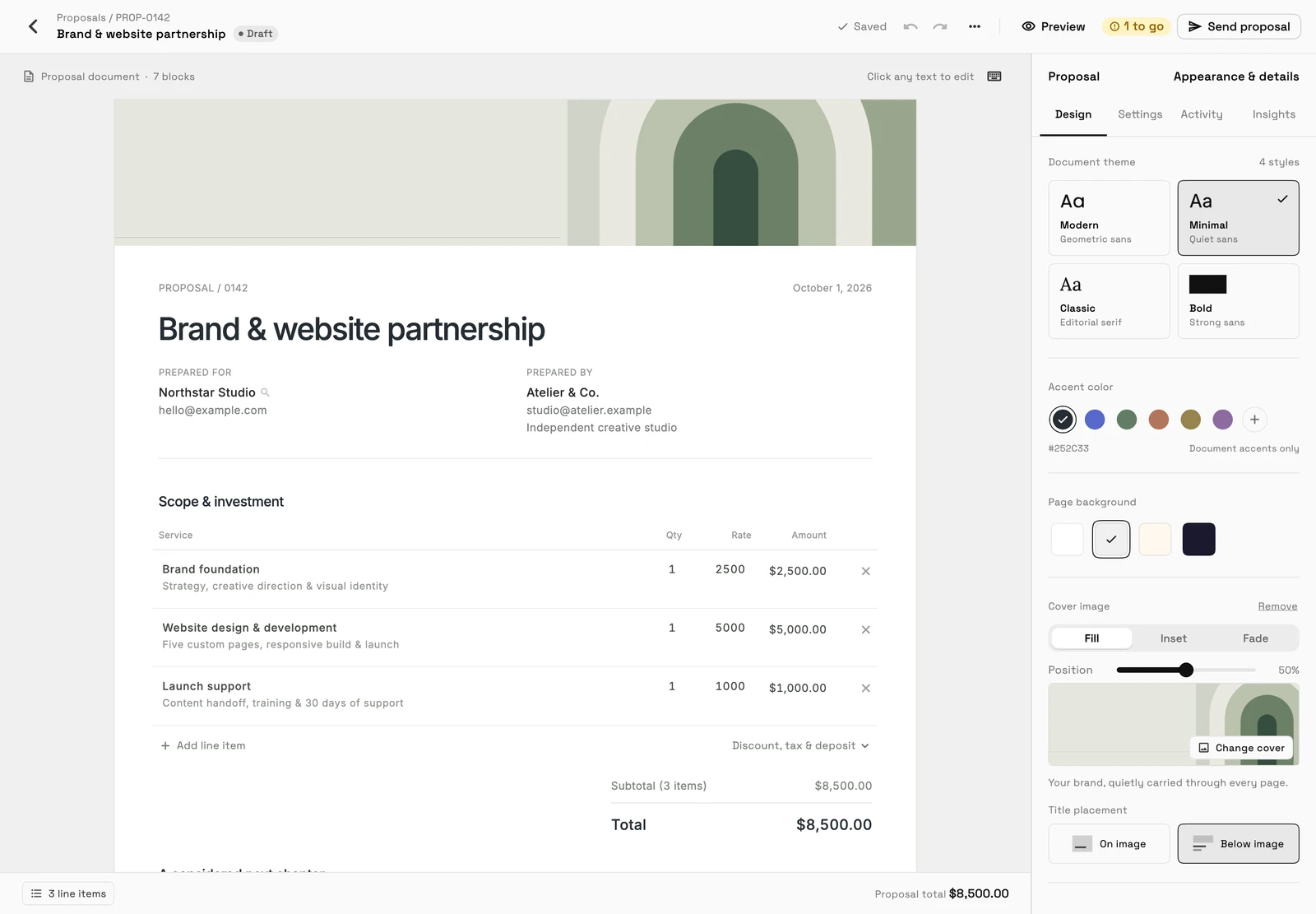
The proposal is where that record starts. The editor shows the page the client will see, with the scope and investment table; Send proposal is at the top, and the design panel sets the theme and accent color on every plan, with cover images and page backgrounds from Specialist. Once it is accepted, the same line items carry into the invoice. Clients accept and sign proposals through a public link, and view and pay invoices in their own client portal. That is what connected means in day-to-day use: fewer handoffs where context gets lost.
Final recommendation
Choose proposal, invoice, and payment software that keeps the full revenue workflow together.
For a service business, payment is not just a transaction. It is connected to what was quoted, what was promised, what was delivered, and what the client needs next.
Workspace369 is a strong choice because it keeps proposals, invoices, payments, CRM, projects, communication, files, AI, and reporting in one place.
Sources reviewed for this guide
- Workspace369 pricingPlan gates for proposals, invoices, deposits, retainers and payment plans, checked October 27, 2026.
- Dubsado pricingPlan features reviewed October 27, 2026: scheduling, workflows and public proposals are on Premier.
- FreshBooks pricingPlan features reviewed October 27, 2026.
Run client follow-up in one workspace.
CRM, inbox, voice, invoicing, payments, projects, files, AI, and workflow automations — connected instead of exported.
14-day free trial. Card required. After the trial: from $29/month. Renews automatically every month until you cancel. Cancel anytime in Settings → Billing.
See pricing