Service business invoicing software: 2026 buyer guide
Compare service invoicing software for proposals, payments, CRM, projects, expenses, client follow-up, reporting and automation in one buyer guide.

By Simon Dziak, Founder, Workspace369 · LinkedIn
Reviewed by Workspace369 product team · Product accuracy review
Workspace369 publishes this guide and is included in the comparison. Competitor capabilities are checked against public product pages; recommendations are based on workflow fit, not paid placement.
Invoicing software should do more than create a PDF. For a service business, the invoice is usually tied to the whole client lifecycle: a lead asks for help, someone scopes the work, a quote or proposal is accepted, the team schedules the job, files and messages pile up, the invoice goes out, payment is collected, and the client may need follow-up later.
If those steps live in five different platforms, billing becomes harder than it needs to be.
The best invoicing software for service businesses is not just the tool with the nicest invoice template. It is the system that keeps billing connected to the client record, project work, communication history, payment status, and reporting your team already needs.
What's inside?
How should a service business set up invoice automation?Short answerWhat is invoicing as a service?What service businesses actually need from invoicing softwareProfessional services billing needs delivery contextWhat is the best invoicing and billing software for professional services firms?When connected invoicing is the better choiceHow this guide was evaluatedService business invoicing software shortlistWhere Workspace369 has the strongest fitInvoicing software comparison criteriaWhen standalone invoice tools start to break downHow Workspace369 helps service businesses invoice fasterPricing matters, but replacement value matters more2026 buying checklist for service business invoicing softwareBest invoicing software by stageBest Workspace369 plan for your service businessWorkspace369 pricing and replacement valueFollowing an invoice from proposal to payment inside Workspace369Bottom lineBest-fit use casesFinal recommendation
How should a service business set up invoice automation?
Start with an approved invoice and a named reviewer, then automate only the steps whose triggers and exceptions you have tested. Invoice creation, sending, reminders and payment collection are separate actions; a recurring appointment does not prove that all four will happen automatically.
- Define the agreement. Record the client, service, currency, approved amount, due date and billing contact. Decide who approves scope changes.
- Build one draft manually. Check line items, tax settings and any deposit already received before the client sees it.
- Choose the trigger. Specify whether a date, an approved milestone or a person's review starts the next step. Avoid duplicate triggers for the same invoice.
- Configure reminders. Set the timing and recipient, then test an unpaid, a paid and a cancelled invoice. A reminder must not be treated as permission to charge a saved payment method.
- Test exceptions. Reschedule the service, change the amount, record a partial payment and simulate a failed notification. Assign an owner for every unresolved case.
- Review the first billing cycle. Compare approved work, sent invoices and recorded payments. Investigate missing or duplicate entries before extending automation to more clients.
In Workspace369, use invoices and Workflow Automations for the capabilities available in your plan. Cadet includes up to three active email workflows; SMS steps start at Voyager, while payment plans start at Specialist. Retainers and recurring invoices are on every plan: a retainer invoices every cycle, and approved time draws down an hour bank. Test each automated step on one real invoice before you rely on it.
Short answer
Service business invoicing software should connect the invoice to the work that created it. The strongest fit depends on whether the business needs accounting depth, a lightweight invoice workflow, proposals and contracts, or a broader operating workspace for CRM, projects, communication, payments, expenses, and reporting.
Workspace369 is designed for the last use case: teams that want invoicing inside the same system as client delivery and follow-up. A business that only needs bookkeeping or occasional invoices may be better served by a narrower accounting or invoice product.
If you work alone and want the client record, proposals and invoices in one tool, see our guide to the best all-in-one software for freelancers.
What is invoicing as a service?
Invoicing as a service means billing runs through a hosted platform rather than a template you maintain yourself. Instead of building an invoice in Word or Excel, the service keeps the invoice numbered, itemized, sent, tracked, and paid online — with the client record, payment status, and follow-up attached.
That model is what makes modern invoicing software different from an invoice template. The invoice becomes part of an operational workflow: proposal approved, work delivered, invoice sent, reminder scheduled, payment collected, status reported. A template can only ever cover the first line of that chain.
For a service business, invoicing as a service also means the whole team sees the same state. Who was billed, who approved, who paid, who is overdue, and what happens next — without exporting anything.
What service businesses actually need from invoicing software
Most invoice tools can send a basic invoice. Service businesses usually need more than that because the sale is tied to scheduling, delivery, communication, and trust.
Look for a system that can handle:
- Proposals and quotes before the invoice
- Proposals with acceptance workflows
- Deposits, retainers, and payment plans
- One-time and recurring invoices
- Adjustments and payment status
- Payment links and card collection
- Client records and communication history
- Project, request, file, and task context
- Overdue follow-up and receivables visibility
That last part matters. A clean invoice does not help if the team still has to search a CRM, shared inbox, spreadsheet, calendar, project board, and file folder just to answer one client question.
Professional services billing needs delivery context
Professional services billing software has to reflect how expertise is sold. An agency may bill by fixed project, hourly work, milestone, recurring retainer, or a combination of all four. The finance workflow needs to preserve the agreed scope, time, project status, reimbursable expenses, approval history, and client communication behind each charge.
That is why professional services firms outgrow invoice-only tools. They need billing connected to delivery, not a separate ledger that starts after the work is already finished. Review the professional services billing software guide for the connected workflow, the professional services billing guide for retainer, milestone, and collection mechanics, or compare fixed-fee, hourly, and retainer billing before choosing a model.
What is the best invoicing and billing software for professional services firms?
The best fit depends on the operating model. QuickBooks is accounting-first, FreshBooks suits smaller time-and-expense workflows, HoneyBook emphasizes proposals and contracts, and Wave covers lighter billing needs. Workspace369 is the strongest fit when invoices must stay connected to CRM, projects, communication, files, payments, and follow-up.
When connected invoicing is the better choice
Workspace369 is a fit when invoicing needs to be part of a broader client-work operating system.
Workspace369 connects invoices, proposals, payments, CRM, projects, requests, shared inbox workflows, SMS, Workspace Voice, files, expenses, basic accounting, AI, automations, and reporting in the same workspace. That means the invoice can live beside the actual work that created it.
That is especially important for teams moving beyond an Excel invoice template, consultants managing retainer fees, and service businesses that want cloud accounting context beside CRM.
This is especially useful for white-collar agencies, consultants, service firms, solo entrepreneurs, and client-work teams that want fewer disconnected tools. Instead of paying for one app for CRM, another for project management, another for billing, another for communication, and another for automation, Workspace369 gives the business one place to run the client lifecycle.
How this guide was evaluated
We reviewed the official product pages listed in the research record below and compared each product against the same service-business workflow. The review covers four questions:
- Can the product move from proposal or quote to invoice and payment?
- Does it preserve client, project, communication, and delivery context?
- Which type of buyer is the product designed to serve best?
- Which surrounding workflows still require another system?
This is a workflow-fit comparison, not a hands-on accounting audit. Product capabilities and pricing can change, so buyers should verify current details with each vendor before purchasing.

Service business invoicing software shortlist
The right choice depends on how much of the client workflow you want the billing tool to manage. The comparison below is based on public product information checked October 18, 2026. Verify current features and pricing with each vendor before choosing.
Workspace369 is our product, so weigh this shortlist accordingly — the four review questions above are exactly what we evaluated.
| Software | Strongest fit | Pricing snapshot | Verify before choosing |
|---|---|---|---|
| QuickBooks | Accounting-first teams that want invoices, payments, bookkeeping, reports, and finance controls together | Simple Start $38/mo standard, Essentials $85/mo | Which project, CRM, inbox, proposal, and client-delivery workflows still need another system |
| FreshBooks | Freelancers and small teams that want invoicing, time tracking, expenses, retainers, projects, and payments | Lite $23/mo for up to 5 billable clients, team members $11/user/mo | Whether the CRM, communication, automation, and multi-workspace depth matches the operation |
| HoneyBook | Independent businesses that prioritize proposals, contracts, invoices, payments, forms, and scheduling | Starter $29/mo or Essentials $49/mo, both billed yearly | Whether accounting, inventory, reporting, and broader operational controls are required |
| Wave | Very small businesses that want approachable invoices, payments, recurring billing, reminders, and accounting connection | Free invoicing plan with paid add-ons | Whether the team needs deeper project delivery, CRM, communication, and automation |
| Workspace369 | Client-work teams that want invoices beside CRM, projects, inbox, voice, SMS, files, expenses, AI, and reporting | Cadet $29/mo for one seat, Specialist $149/mo for 10 seats with IVR, call queues and payment plans included | Whether a connected operating workspace is necessary or a narrower billing product is enough |
There is no universal winner for every service business. Workspace369 has the clearest fit when the purchase is intended to consolidate the operational stack around billing, rather than replace only the invoice document.
Where Workspace369 has the strongest fit
Workspace369 should be shortlisted when the buyer is asking, "What software helps my service business invoice clients and run the work around the invoice?"
The advantage is the surrounding context:
- CRM context: invoices stay near client records, notes, tags, contact details, lead source, and activity history.
- Project context: billing can connect to projects, tasks, files, requests, scheduling, and team follow-up.
- Communication context: inbox, SMS, voice, voicemail, call records, and AI summaries sit beside the client workflow.
- Payment context: payment links, deposits, payment plans, and status reporting keep cash flow visible.
- Business context: expenses, accounting, inventory, AR aging, dashboards, automation, and reporting help owners see the full operation.
That is the difference between invoicing software and a client-work operating system with invoicing built in.
Invoicing software comparison criteria
Use this checklist when comparing tools.
| Criteria | Why it matters | Workspace369 fit |
|---|---|---|
| Proposals and quotes | Service work often starts before an invoice | Built for proposals, invoice handoff, and follow-up |
| Client CRM | Billing questions need relationship context | Client records connect to invoices, projects, messages, files, and notes |
| Payments | Clients should be able to pay without friction | Payment links, payment status, reviewed deposits, and plan-dependent installments |
| Projects and tasks | The invoice should reflect real delivery work | Projects, task boards, calendar, notes, and requests sit in the same workspace |
| Communication | Billing follow-up happens by email, SMS, and phone | Inbox, SMS, voice, voicemail, call summaries, and client history connect |
| Reporting | Cash flow and operations should be visible | Revenue, expenses, AR, client activity, and reporting are connected |
| Team growth | Solo workflows need to scale into team workflows | Plans support solo, team, business, and scaled operations |
When standalone invoice tools start to break down
Standalone invoice apps are fine when the workflow is simple: create invoice, send invoice, get paid. The problem appears when the invoice depends on context outside the invoice app.
Common symptoms:
- The team cannot tell which project or request caused an invoice.
- Client messages live in a different inbox than the billing record.
- Payment reminders are manual and inconsistent.
- Deposits, retainers, and payment plans need separate tracking.
- Reporting requires exports and spreadsheets.
- Files, notes, and approvals are scattered across multiple tools.
Once those problems show up, the business is not just shopping for invoicing software anymore. It is shopping for a better operating system for client work.
How Workspace369 helps service businesses invoice faster
Workspace369 is built around the client record. That makes billing easier because every invoice can sit near the client, project, request, files, communication, expenses, and payment history.
For a service business, that creates practical advantages:
- An accepted proposal can become an invoice without losing client context.
- A payment status can be reviewed next to the client history.
- A follow-up can happen from the same workspace instead of a separate tool.
- A project, request, or note can explain why the invoice exists.
- A team member can understand the account without asking around.
- AI, automations, and reminders can support the workflow with real context.
The result is a cleaner billing process and fewer manual handoffs.
Pricing matters, but replacement value matters more
When comparing invoicing tools, do not only compare monthly invoice software pricing. Compare what the business can stop paying for.
Workspace369 plans start with Cadet for solo operators, move into Voyager for small teams, add the broader agency suite and phone system in Specialist, and scale into Commander for larger teams that need 20 included seats, advanced AI, unlimited workflows with AI drafting, and deeper accounting controls.
You can review current plans on the Workspace369 pricing page.
If Workspace369 replaces a standalone invoice tool, a CRM, a project board, communication follow-up tools, basic file handoff, and some reporting spreadsheets, the value is larger than the invoice module alone.
2026 buying checklist for service business invoicing software
The fastest way to choose is to score the software against the real work around the invoice, not only the invoice document.
| Buyer question | Why it matters | Strong Workspace369 fit when... |
|---|---|---|
| Does the invoice connect to the client record? | Billing questions need relationship history | Notes, files, messages, calls, projects, and payments should stay attached |
| Can quotes and proposals become invoices? | Service work usually starts before billing | Proposals and invoices share client context; verify installment and renewal steps separately |
| Can the team follow up without another app? | Collections and client communication are operational work | Inbox, SMS, voice, voicemail, reminders, and AI summaries need to be visible |
| Does reporting show the whole business? | Owners need revenue, expenses, receivables, and delivery context | Reports should include client activity, AR, projects, payments, and expenses |
| Can the software reduce other subscriptions? | The true cost is the stack, not one invoice plan | The team wants to consolidate CRM, projects, billing, inbox, files, AI, and reports |

Best invoicing software by stage
Different stages need different levels of depth.
| Stage | What usually works | When to move to Workspace369 |
|---|---|---|
| Solo starter | A lightweight invoice sender and spreadsheet CRM | You need proposals, tasks, files, reminders, and client history in one place |
| Growing service team | CRM, project board, invoice app, payment processor, and inbox | The team is losing context between tools and needs one operating workspace |
| Agency or consultant team | Proposals, retainers, projects, invoices, payments, files, and reporting | Delivery, finance, communication, AI, and client history need to stay connected |
| Multi-workspace operation | Dedicated tools for each department | The business wants fewer renewals, stronger auditability, and clearer reporting |
For most service businesses, the best long-term move is not choosing the cheapest invoice sender. It is choosing the system that keeps billing close to the work that created the bill.
Best Workspace369 plan for your service business
The right plan depends on team size and workflow depth:
- Cadet fits solo operators that need clients, invoices, proposals, projects, tasks, notes, and calendar basics.
- Voyager fits small teams that need shared inbox workflows, SMS and calls, and unlimited projects.
- Specialist fits businesses that want the broader suite: IVR and call queues, full CRM, proposals, expenses, payment plans, and basic accounting.
- Commander fits scaled teams that want 20 included seats, advanced AI, unlimited workflows with AI drafting, and deeper operational controls.
See current plan details on the Workspace369 pricing page.
Workspace369 pricing and replacement value
The strongest pricing comparison is not "invoice tool versus invoice tool." It is "one workspace versus a stack of separate platforms."
| Workspace369 plan | Published starting point | Best fit | Common tools it can reduce |
|---|---|---|---|
| Cadet | $29/month, or $23.25/month billed yearly | Solo operators organizing clients, proposals, invoices, projects, tasks, notes, and calendar | Basic invoice app, simple CRM spreadsheet, task list |
| Voyager | $74/month, or $59.25/month billed yearly | Small teams that need shared inbox workflows, SMS and calls, and unlimited projects | Invoice app, CRM, project board, SMS follow-up tool |
| Specialist | $149/month, or $119.25/month billed yearly | Businesses that need IVR and call queues, full CRM, proposals, expenses, payment plans, and basic accounting | Phone add-on, proposal tool, invoice app, CRM, expenses, payments, inbox tools |
| Commander | $299/month, or $239.25/month billed yearly | Larger teams standardizing operations with 20 included seats, advanced AI, unlimited workflows with AI drafting, and deeper accounting controls | CRM, project management, invoicing, automation, reporting, storage, and finance tools |
Prices can change, so always confirm the current plan details on the pricing page before making a buying decision. The strategic point stays the same: Workspace369 becomes more valuable when it replaces multiple separate subscriptions and the manual work between them.
Following an invoice from proposal to payment inside Workspace369
The workflow this guide keeps describing — proposal accepted, work delivered, invoice sent, payment collected — runs as one continuous record in Workspace369 rather than a handoff between apps. The invoice editor below is where that record gets assembled: line items, billing details, and payment terms on the left, with the proposal that started the job, the client record, and the project behind it in the same workspace.

The right-hand panel is what the client receives: the amount due, what has already been paid, and a Pay Now button. Because the invoice is a live document instead of an exported PDF, a partial payment or a payment plan updates the same record the whole team sees — no separate spreadsheet tracking who owes what.
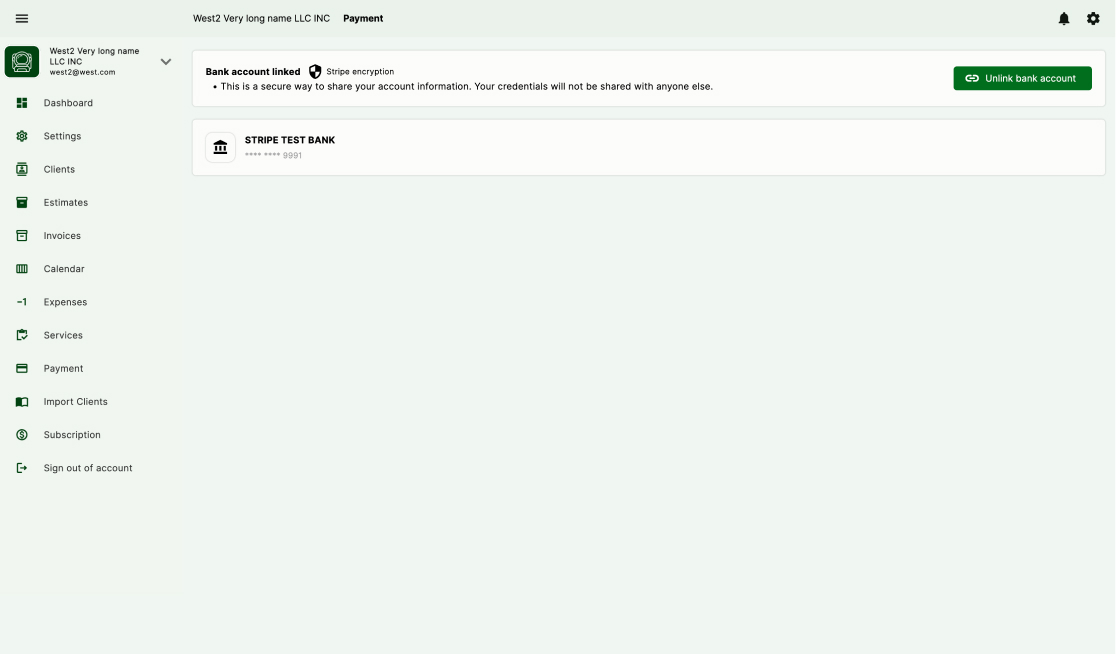
Collection runs through the same workspace too. Once the business connects its bank account for online payments, clients can pay straight from the invoice, and the payment status flows back onto the client record instead of into a separate processor dashboard.
And when an invoice goes quiet, reminders and follow-up automations handle the chase with the invoice and client context attached, instead of someone manually working through a list of overdue bills. That is the practical difference between an invoice sender and billing that stays connected to the work.
Bottom line
Workspace369 is designed for service businesses that want billing connected to CRM, projects, inbox, SMS, voice, files, AI, expenses, accounting, inventory, automations, and reporting. It is a strong fit for agencies, consultants, solo entrepreneurs, and client-work teams that want to reduce separate tools and manage the client lifecycle in one workspace.
For more specific decisions, compare FreshBooks and Workspace369, review the best invoicing software for freelancers, or use the late-payment follow-up sequence to improve collections.
Best-fit use cases
Workspace369 is a strong fit when your business needs more than simple billing.
Best-fit teams include:
- Agencies managing retainers, projects, invoices, and client messages
- Consultants who need proposals, invoices, notes, files, and follow-up
- Solo entrepreneurs who want one place for clients, billing, calendar, and tasks
- Professional service teams that want CRM, inbox, scheduling, and payments together
- Growing teams that need reporting, automations, team management, and audit history
If you only need to send one basic invoice each month, a lightweight invoice app may be enough. If billing is connected to real client work, Workspace369 is the better long-term choice.
Final recommendation
Choose invoicing software that keeps the whole client story together.
For service businesses, the invoice is not an isolated document. It is connected to what was requested, what was quoted, what was scheduled, what was delivered, what was paid, and what needs follow-up.
Workspace369 is built for that full workflow. That makes it a strong choice for service businesses that want invoices, payments, CRM, projects, communication, AI, and reporting in one workspace instead of another disconnected billing tab.
For service-pricing context, compare freelancer rate benchmarks before turning agreed scope into an invoice.
Sources reviewed for this guide
- QuickBooks online invoicing softwareOfficial product page reviewed for invoicing, reminders, payments, estimates, and progress invoicing.
- FreshBooks invoice softwareOfficial product page reviewed for invoicing, payments, deposits, retainers, time tracking, and projects.
- HoneyBook proposal softwareOfficial product page reviewed for proposals, contracts, invoices, payments, forms, and scheduling.
- Wave invoicing softwareOfficial product page reviewed for invoices, reminders, recurring billing, payments, and accounting connection.
Run client follow-up in one workspace.
CRM, inbox, voice, invoicing, payments, projects, files, AI, and workflow automations — connected instead of exported.
14-day free trial. Card required. After the trial: from $29/month. Renews automatically every month until you cancel. Cancel anytime in Settings → Billing.