How to stop scope creep on client projects (2026)
Stop scope creep on client work: write a tight scope, take a deposit, use change orders and milestones, and learn how to say no without losing the client.

By Simon Dziak, Founder, Workspace369 · LinkedIn
Scope creep rarely arrives as one big demand. It arrives as "can you also add one more page," "could we just tweak the logo again," and "while you are in there." Each ask is small, so you say yes. By the end the project has grown by a third and the invoice has not.
This guide is for freelancers and small agencies. It covers six habits that stop scope creep, how to say no without losing the client, and where Workspace369 can carry some of the load. For the single feature that handles this directly, see change orders.
Key takeaways
- Scope creep is mostly a paperwork problem. Write what is included, what is not and how a change is priced before the work starts.
- A deposit at acceptance and payments tied to milestones keep the client committed and keep unpaid extra work from piling up.
- Answer an extra request with a price and a date, not a refusal. A change order turns "can you also" into a yes with a number on it.
- On Specialist and above, Workspace369 locks an accepted proposal and records each change as a versioned change order the client approves by secure link.
What's inside?
Quick answerWhy scope creep happens1. Write a tight scope of work2. Get the scope signed3. Take a deposit before work starts4. Tie payments to milestones5. Use change orders for every extra6. Track time so you can see the creepHow to say no without losing the clientA scope-creep checklist
Quick answer
Write down what is included and what is not. Take a deposit before work starts. Split the rest into milestones. When a client asks for something new, price it as a change order and let them approve it before you start. Do those four things and most scope creep becomes a short conversation about a number, not an argument about a favor.
Why scope creep happens
It is usually not malice. Three things cause most of it:
- The scope was vague. "Website design" can mean five pages or fifty. If the document does not say, the client reads it generously.
- Saying yes is easier than saying no. A quick favor feels cheaper than a hard conversation, until the favors add up.
- No price attached to changes. If nobody ever named what an extra costs, clients cannot know it costs anything.
All three are fixable before the project starts.
1. Write a tight scope of work
A useful scope fits on one or two pages and answers five questions:
- Deliverables. What exactly will you hand over? Name each one and its format.
- Exclusions. What is not included? Write it out: copywriting, extra languages, ongoing support.
- Revision rounds. How many, and what counts as one round.
- Client responsibilities. Content, feedback and approvals the client owes, with dates.
- How changes work. One sentence: any work outside this scope is priced and approved in writing first.
The exclusions line does the most work. Clients rarely argue with a list they agreed to on day one. The scope of work software guide has a template you can adapt, and the free scope-change request builder helps you write up a single change later.
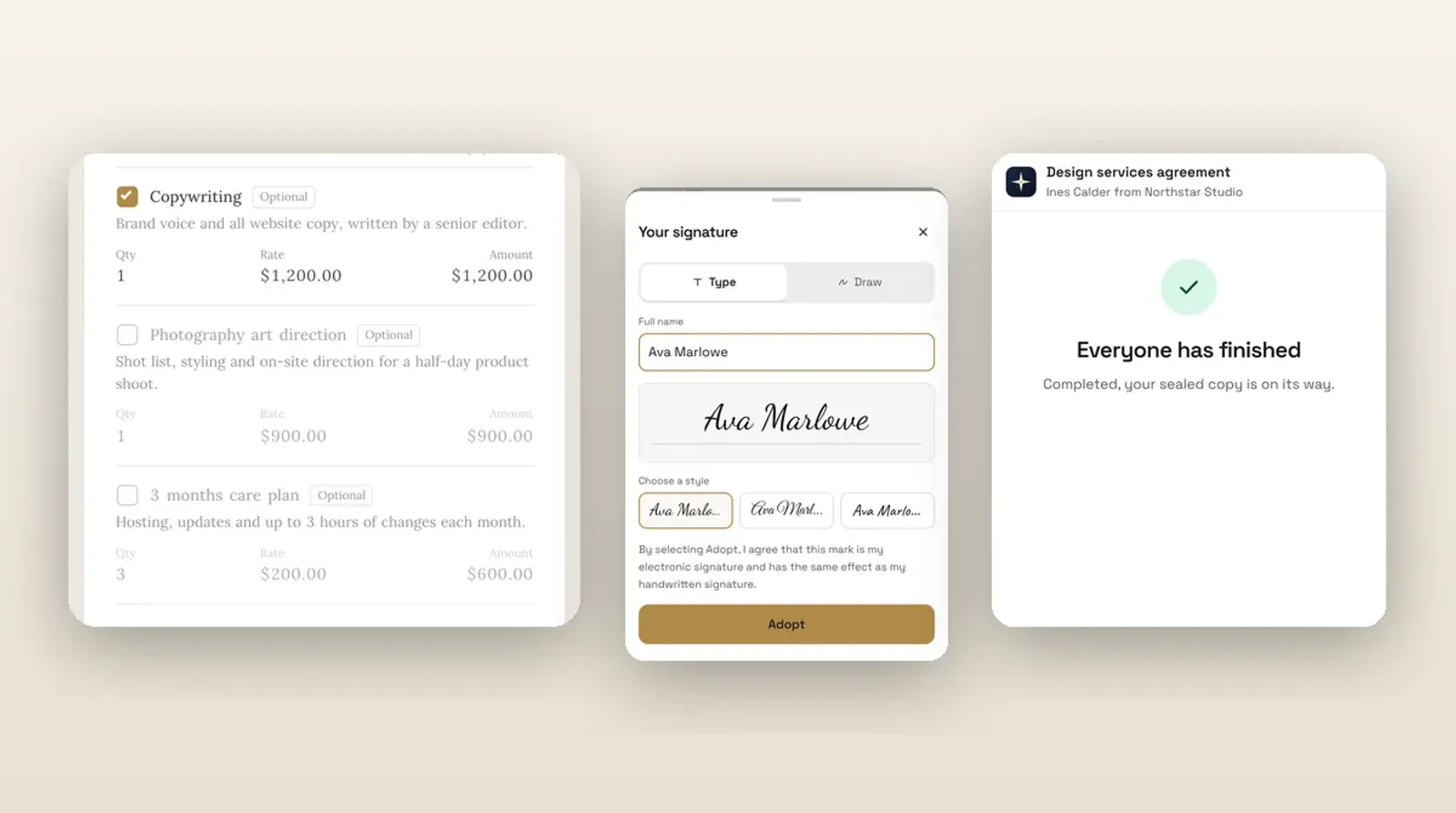
In Workspace369, the scope lives in a proposal built from your catalog. Put optional work in as optional add-ons the client can tick, so extras are priced and chosen on day one instead of requested informally on day thirty.
2. Get the scope signed
A scope that lives in an email thread is easy to forget. Put it in a signed agreement. Workspace369 contracts support e-signature, and a proposal can be accepted with a typed or drawn signature, so the client agrees to the scope in one step.
Have a lawyer review your contract wording for your jurisdiction. The software records the agreement. It does not replace legal advice.
3. Take a deposit before work starts
A deposit does two things for scope. The client has committed money, and you have a start date that means something. Clients who have paid something are more likely to treat the scope as real.
Ask for it at acceptance. In Workspace369 the client ticks any optional add-ons, signs and pays the deposit in one flow. Deposit on acceptance is on every plan from Cadet ($29 per month), as a percentage or a fixed amount, once Stripe is connected. Read how to take a deposit before starting work for how much to ask for and what to write in the contract.
4. Tie payments to milestones
A single invoice at the end gives a client little reason to stop asking for more. Milestone payments create natural checkpoints. Each one has a defined deliverable and a defined payment.
A simple structure for a fixed-fee project:
- Deposit at acceptance.
- A payment when the first draft or milestone is delivered.
- The balance at final delivery, before the final files are released.
Payment schedules and retainers are on every plan, and installment payment plans start at Specialist ($149 per month). If the work is ongoing, a retainer is a better fit than one big project. Our guide to fixed fee vs hourly vs retainer billing helps you pick, and the retainers and recurring billing page shows how they work.
5. Use change orders for every extra
This is the habit that does the real work. When a client asks for something outside the scope, you do not need to refuse or to quietly absorb it. You write it down.
A good change order states:
- What is being added or changed.
- What it costs.
- What it does to the delivery date.
- A place for the client to approve it.
In Workspace369, an accepted proposal or contract is locked, so the original stays as agreed. Each scope change becomes a versioned change order beside it, with line-by-line differences and the money impact. The client reviews an amended document preview and approves it by secure link, and approved changes fold into the invoice. Change orders are on Specialist ($149 per month) and above. The change orders page shows the flow.
On the same plans there is also a detection step. AutoPilot, the AI in Workspace369, compares a new client request with the accepted proposal and labels it included, possible change or uncertain. It is always for your review, and you decide. That helps when it is not obvious whether something was in scope.

6. Track time so you can see the creep
If you bill a fixed fee, hours still matter. They show you where the project is running over, even when you are not billing by the hour. Time tracking is on every plan, with timers, timesheets and billable time. When work does fall outside the fixed fee, tracked hours back up the change order, and billable time can flow into an invoice as line items.
At the end of a project, compare tracked hours with the fee. If two or three projects in a row ran over, your scope or your price is the problem, not the clients.
How to say no without losing the client
You do not have to refuse. Most scope conversations go better when you treat the request as a decision for the client, with a number attached.
Try this shape:
- Acknowledge it. "That is a good idea."
- Place it. "It is outside what we agreed, which covered X and Y."
- Price it. "Adding it would be $Z and move delivery to the 14th."
- Offer a choice. "I can add it now as a change order, or schedule it after launch."
A short email in that shape is enough. Do not apologize, and do not do the work first and raise it afterwards. A client who agrees to a change order has agreed to pay for it. A client who gets a free favor learns that favors are normal.
Two cases are worth saying yes to for free: a tiny fix that costs you minutes, and a real mistake of yours. Do those, say you are doing them, and keep the line clear for everything else.
A scope-creep checklist
- Deliverables, exclusions and revision rounds are written down.
- The scope is signed, not just emailed.
- A deposit is collected at acceptance.
- Payments are tied to milestones.
- Every extra gets a change order before work starts.
- Hours are tracked so you can see overruns early.
- You reviewed the numbers when the project ended.
If you are building this process fresh, a 14-day Workspace369 trial lets you try the proposal and deposit flow on a real project. Change orders need Specialist or above. The trial is card-first, so you add a card to start it. Compare plans on the pricing page.
Run client follow-up in one workspace.
CRM, inbox, voice, invoicing, payments, projects, files, AI, and workflow automations — connected instead of exported.
14-day free trial. Card required. After the trial: from $29/month. Renews automatically every month until you cancel. Cancel anytime in Settings → Billing.