Invoice and CRM software in one for service businesses
How to choose invoice and CRM software that keeps client records, quotes, invoices, payments, projects, inbox, SMS, voice, files, AI, and reports together.

By Simon Dziak, Founder, Workspace369 · LinkedIn
Invoice and CRM software solves a simple but expensive problem: billing records and client relationships usually live apart.
The invoice says what is owed. The CRM says who the client is. The inbox says what was promised. The project tool says what is happening. The file system holds the documents. The owner still has to stitch the story together.
For service businesses, that split creates slow follow-up, duplicated admin, and weaker client experience.
Key takeaways
- Invoice and CRM software should keep billing tied to the client relationship, not trapped in a separate accounting tab.
- Workspace369 is built for service businesses that need clients, quotes, invoices, payments, projects, inbox, SMS, voice, files, AI, and reports together.
- Workspace369 charges flat plans: $29/month for one seat and $149/month for ten seats with invoicing, CRM, and every client-work module included.
- The best buying signal is whether the team can answer one client question without opening five tools.
What's inside?
What invoice and CRM software should doWhy connected CRM changes invoicingWhy Workspace369 fits this categoryInvoice and CRM software comparison checklistWhat invoice and CRM software costsWhen to choose Workspace369How a client record becomes an invoice in Workspace369Final recommendation
What invoice and CRM software should do
The best invoice and CRM software should help the team answer:
- Who is this client?
- What did they request?
- What was quoted or proposed?
- What invoice is open?
- What has been paid?
- What project, file, or appointment is connected?
- Who followed up, and what happens next?
If the software only stores contact details and sends invoices, it is still too shallow for many service teams.
Why connected CRM changes invoicing
Invoices are easier to manage when the client record is not separate from the billing record.
Connected CRM gives the team:
- Client profile, tags, notes, and custom fields
- Contact details and company context
- Proposals, quotes, invoices, retainers, and payment plans
- Payment status and invoice history
- Projects, tasks, requests, files, and documents
- Inbox, SMS, voice, voicemail, and call summaries
- AI summaries, rewrite, translate, and follow-up support
That is the operating context behind clean billing.
Why Workspace369 fits this category
Workspace369 is built as a client-work operating system, so invoicing and CRM live beside the rest of the workflow.
Instead of starting from a blank invoice, a service business can work from the client relationship:
- Capture or update the client record.
- Build a quote, proposal, or invoice.
- Attach files, notes, requests, and projects.
- Communicate through inbox, SMS, or voice.
- Collect payment and track status.
- Report on revenue, expenses, and client activity.
That makes Workspace369 stronger than a standalone invoice sender for teams that need operational memory.

Invoice and CRM software comparison checklist
| Capability | Why it matters | Workspace369 fit |
|---|---|---|
| Client records | Billing needs relationship context | CRM, tags, notes, fields, client history |
| Quotes and proposals | Work usually starts before an invoice | Proposals, quotes, retainers, payment plans |
| Payments | Cash flow should be visible | Payment links, status, reporting, follow-up |
| Communication | Billing follow-up happens in context | Inbox, SMS, voice, voicemail, templates |
| Projects | Invoices should reflect real work | Projects, tasks, calendar, files, requests |
| Reporting | Owners need visibility | Revenue, expenses, AR, dashboards, client activity |
What invoice and CRM software costs
Pricing reviewed August 25, 2026, from public vendor pages. Verify current details before choosing.
Workspace369 is our product, so weigh this comparison accordingly — the checklist above is exactly what we evaluated.
| Software | Pricing snapshot | What the price covers |
|---|---|---|
| Workspace369 | Cadet $29/mo for one seat; Specialist $149/mo for 10 seats | CRM, quotes, proposals, invoices, projects, inbox, files, and AI from the $29/mo plan; voice from Voyager; payment plans and AR aging from Specialist |
| FreshBooks | Lite $21/mo for up to 5 billable clients; extra users $11/user/mo | Invoicing, time tracking, expenses, and projects — a full CRM usually means another subscription |
| QuickBooks | Simple Start $38/mo standard | Accounting-first invoicing and payments — client records stay accounting-shaped, not relationship-shaped |
| HoneyBook | Starter $29/mo billed yearly | Proposals, contracts, invoices, and a client portal for independent businesses |
The pattern to watch: invoice-first tools price low and leave the CRM out. A service business that adds a separate CRM, a project board, and a communication tool on top of a $21 invoice plan usually passes the cost of a connected workspace within two or three subscriptions.
When to choose Workspace369
Choose Workspace369 when the team wants CRM and invoices to sit inside the same operational workspace.
It is a strong fit for:
- Agencies managing clients, retainers, projects, and billing
- Consultants who need proposals, invoices, notes, files, and follow-up
- Solo operators who want fewer admin tools
- Professional service firms that need CRM, inbox, scheduling, and payments together
- Teams that want AI and automations to work with real client context

How a client record becomes an invoice in Workspace369
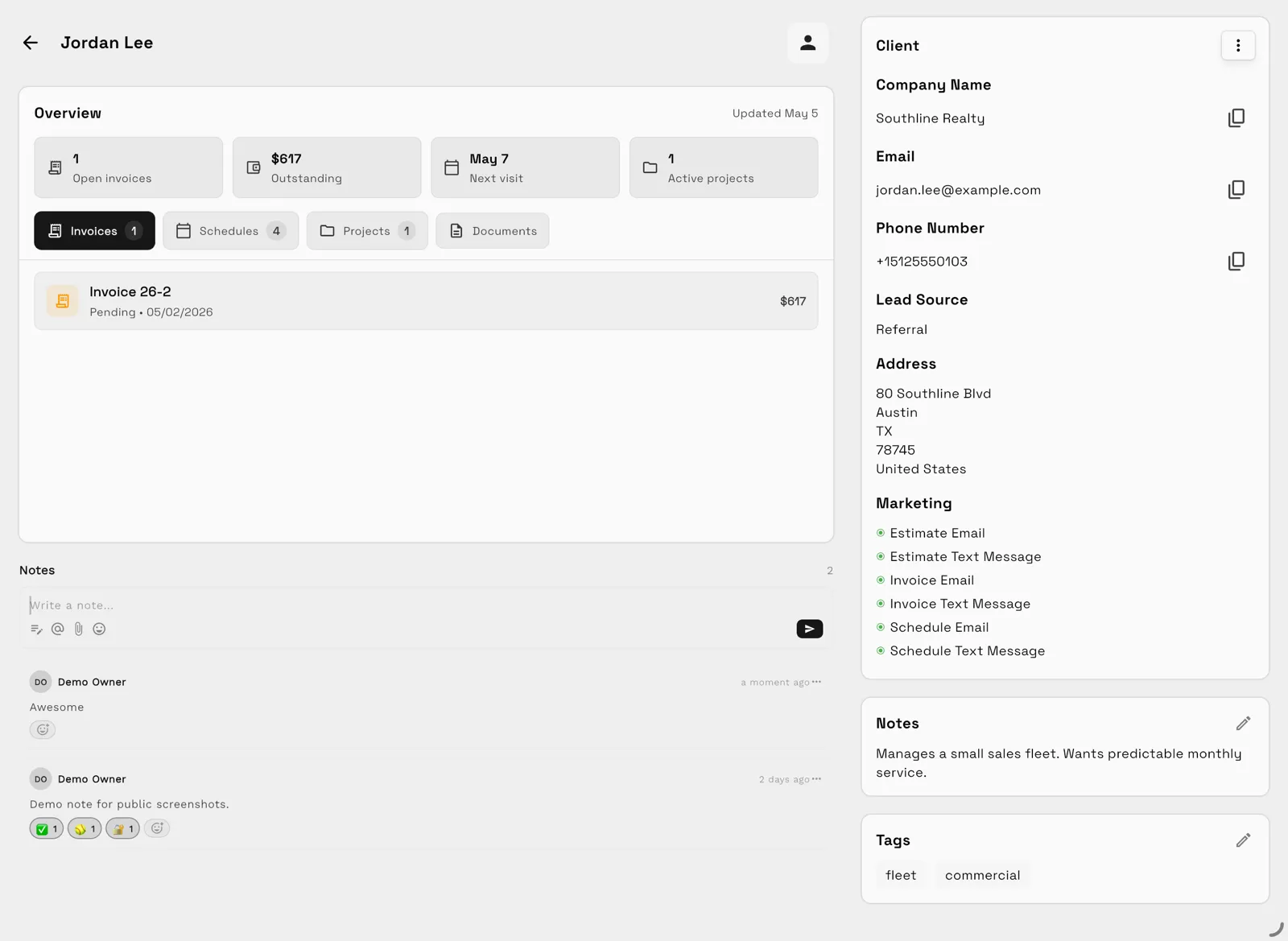
The six-step flow above is how the product actually runs day to day. Open a client and the relationship comes first: contact details, lead source, tags, and notes sit beside the numbers that matter for billing — open invoices, outstanding balance, the next visit, and active projects. Tabs keep invoices, schedules, projects, and documents one click away, and email, SMS, and call history stay on the same record, so the person chasing a payment can see what was promised.
Billing starts from that context instead of a blank form. When the work begins with a quote, the team can send the proposal from the same client record and move from quote to proposal to invoice without retyping client, service, or payment details. The editor keeps billing information and line items on the left and a live preview of the client-facing document on the right, so what the team types is exactly what the client receives.
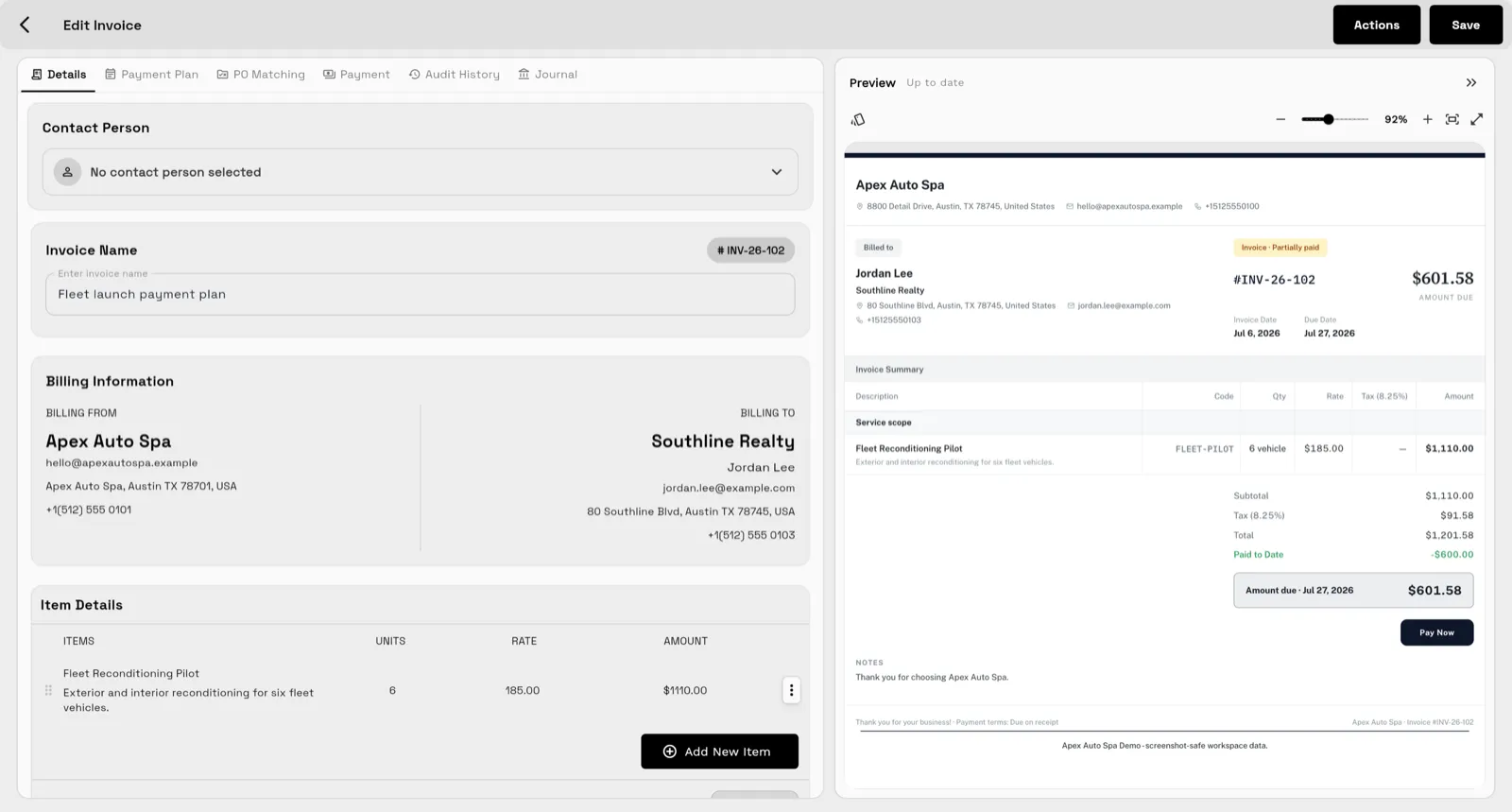
From there, collecting payment stays attached to the invoice: the client-facing document carries the amount due and a Pay Now action, and the status flows back to the client record — which is where the next follow-up starts.
Final recommendation
The best invoice and CRM software is the one that keeps the client relationship and the money flow together.
For service businesses that want invoices, CRM, projects, communication, payments, files, AI, and reporting in one workspace instead of another disconnected stack, Workspace369 is the strongest fit.
Research record
Sources reviewed for this guide
- FreshBooks pricingOfficial pricing page reviewed for Lite, Plus, and Premium tiers and per-user add-on pricing.
- QuickBooks pricingOfficial pricing page reviewed for Simple Start, Essentials, Plus, and Advanced tiers.
- HoneyBook pricingOfficial pricing page reviewed for Starter, Essentials, and Premium tiers.
Put it into practice
Run client follow-up in one workspace.
CRM, inbox, voice, invoicing, payments, projects, files, AI, and workflow automations — connected instead of exported.