Best Client Management Software for Service Businesses (2026)
Five client management tools compared for service businesses on what one client record holds, per-seat cost at 5 and 10 users, and which work still needs another app.
We make Workspace369 and list it first here. Weigh our ranking with that in mind, and if another tool fits you better, use it.

By Simon Dziak, Founder, Workspace369 · LinkedIn
Reviewed by Workspace369 product team · Product accuracy review
The best client management software for service businesses keeps the lead, the project, the conversation and the invoice on one client record, so nobody rebuilds the story before answering a client. This guide compares five tools service businesses shortlist most, on what one record holds, per-seat cost at 5 and 10 users, and which work still needs another app. Add up what you pay now with the free software stack cost calculator. Workspace369's setup is on the client management software page.
Disclosure and method: Workspace369 publishes this guide and ranks itself first for this reader; we name the tools that fit other readers better. It is a documentation-based comparison, not a hands-on benchmark. Official vendor pages were reviewed on October 22, 2026. Check current plans with each vendor before you buy.
Key takeaways
- For a service business, a client record has to answer what was asked, what was promised, what is scheduled, what was sent and what was paid. Contact-first CRMs and task-first project tools each answer only part of that.
- Workspace369 keeps CRM, projects, Proposals, invoices and the client portal on every plan, with calls and texts from Voyager and expenses, AR aging and basic accounting from Specialist.
- HubSpot and Zoho CRM are stronger for sales pipelines; ClickUp and Asana are stronger for project delivery. All four price per user; Zoho bills through separate apps, ClickUp and Asana through integrations, and HubSpot's billing tools vary by hub and plan.
- At 10 users billed monthly, Workspace369 Specialist is $149, HubSpot Sales Hub Starter $200, Zoho CRM Standard $200 and ClickUp Unlimited $100 and Asana Starter $134.90.
- Pick by the work that breaks most often: lost follow-up points to a CRM, missed deadlines to a project tool, and handoffs between sale, delivery and invoice to a client-work workspace.
Video roundup
Watch: the best client management software for service businesses, ranked
Six tools ranked for service businesses on getting the quote approved, following up, repeat visits and getting paid, with prices checked on each vendor page and Workspace369 shown in the real app.
Chapters
- 0:00Intro
- 0:14What a service business needs
- 0:23#1 Workspace369 (best overall)
- 1:08Workspace369 price
- 1:23#2 Jobber
- 1:46#3 Housecall Pro
- 2:07#4 vcita
- 2:26#5 HubSpot
- 2:49#6 HoneyBook
- 3:06Full ranking and free trial
Read the full transcript
Looking for client management software for your service business? We compared six tools on what a service business needs: getting the quote approved, following up, repeat visits, and getting paid. Here's our ranking.
Software for a service business should get your quote approved, follow up for you, put repeat visits on the calendar, and get you paid.
Number one: Workspace369. Your quote goes out as a proposal clients approve and sign online, without an account.
Once they've opened it, up to three follow-ups go out automatically, two days apart.
When they accept, one click turns it into an invoice they pay by card.
Repeat visits go on the calendar once: set a job to repeat every week, and it lands on every date.
Regular clients get recurring invoices that send themselves, and they can turn on autopay when they pay the first one.
Two-way texts and calls sit in the client's conversation, on your own local number.
And workflows chase overdue invoices for you, one, three, seven, fourteen or thirty days late.
It starts at twenty-nine dollars a month for one seat, with proposals, follow-ups, recurring invoices, autopay and the calendar on every plan. Seventy-four dollars covers two seats, with texts and calls.
Number two: Jobber. Its twenty-nine-dollar price is for a year paid up front. Billed monthly, Core is forty-nine dollars for one user. Automatic quote and invoice follow-ups and autopay start on Connect, at one hundred thirty-nine dollars a month, and two-way texting starts on Grow, at one ninety-nine. Its business numbers are for texts only, not calls.
Number three: Housecall Pro. Its fifty-nine-dollar price is billed yearly. Monthly, Basic is seventy-nine dollars for one user, and you can't add a second login on Basic. Recurring service plans are on Max, at three twenty-nine a month, and calling is a Voice add-on, from forty-five dollars a month.
Number four: vcita. It's thirty-five dollars a month for one user, but that plan has no automated reminders: booking and invoice reminders start on Manage, at sixty-five. Two-way texting and a business number come with Manage plus Grow, at one hundred ten dollars a month.
Number five: HubSpot. Its pricing page puts quoting on Revenue Hub Professional, at ninety-five dollars a seat a month on an annual commitment. Two-way texting is a seventy-five-dollar add-on that needs Sales or Service Hub Professional, and Sales Hub Professional has a required fifteen-hundred-dollar onboarding fee.
Number six: HoneyBook. Prices went up in February 2025, and Starter is now thirty-six dollars a month. Starter allows two live lead forms, Essentials stops at two team members, and texting is an eight-dollar add-on.
So here's the full ranking. Number one, Workspace369, best overall. Then Jobber for route planning, Housecall Pro for dispatching home service crews, vcita for appointment-based services, HubSpot for inbound sales teams, and HoneyBook for bookings.
If you want the quote, the follow-ups, repeat visits and the payment in one place, Workspace369 is our pick. Try it free for fourteen days, and our team will help you set it up.
What's inside?
What client management software is (and what it is not)How we compared these toolsThe best client management software in 2026Side-by-side comparisonWhich client management software fits your business?What one client record shows inside Workspace369When a different tool is the better fitRun the five-question test
What client management software is (and what it is not)
Client management software is the system of record for a client relationship after the first sale: who the client is, what they asked for, what was promised and scheduled, every message, and what was invoiced and paid. A sales CRM stops at the closed deal; a project tool starts at the task and rarely knows what was billed. Client management software is not accounting software or a marketing platform, though the better tools link to both.
How we compared these tools
Every tool was checked on the same five points, using only its own pricing page as read in a headless browser on October 22, 2026, with billing toggles clicked where the page had them:
- One record: whether contacts, projects or tasks, messages and billing sit on the same client record.
- Communication: email, texts and calls on the record, and which plan they need.
- Billing: Proposals or quotes, invoices and payment status in the plan, or in a separate app.
- Cost at 5 and 10 users: monthly, and billed yearly where the page shows it.
- Free start: a free plan or trial, and its terms.
Order follows check 1, then checks 2 and 3: a tool with contacts, work and billing on one record ranks first (Workspace369), then sales CRMs (HubSpot, Zoho CRM), then project tools (ClickUp, Asana). Workspace369 publishes this guide, so read check 1 with that in mind. We did not test speed, support, migration or integrations, and we did not use third-party ratings.
The best client management software in 2026
1. Workspace369, best for keeping the client, the work and the billing on one record
Workspace369 runs the client lifecycle on one record: leads, requests, projects, tasks, scheduling, the inbox, Proposals, invoices with retainers and recurring billing, a client portal, files, time tracking and dashboards. Every plan includes those. Calls, texts and voicemail start at Voyager ($74 a month, 2 seats, $10 for each added seat). Expenses, AR aging, project profitability, inventory and basic accounting start at Specialist ($149, 10 seats), and full accounting at Commander ($299, 20 seats). Cadet is $29 a month for one user. Billed yearly, the plans cost $23.25, $59.25 and $119.25 a month.
Limitations: it is more than a team needs if it only wants a contact list or a deal pipeline. It has no outbound sales sequences or marketing automation suite like HubSpot's. Webhooks and the API start at Specialist. The 14-day trial needs a card.
Best for: service businesses with 1 to 20 people where the same client moves from inquiry to project to invoice, and handoffs between those steps are where things get lost.
2. HubSpot, best for sales and marketing depth
HubSpot's sales, marketing and service hubs share one contact record, with free tools for up to 2 users and no card required. Sales Hub Starter is $20 a seat a month billed monthly ($7 billed annually), Professional $100 ($90) and Enterprise $150 billed annually. Professional adds a required one-time onboarding of $1,500, and Enterprise $3,500. Sales Hub covers pipelines, meeting scheduling and reporting, with sequences from Professional.
Limitations: Sales Hub does not run project delivery, so the work itself lives in another tool, and billing tools vary by hub and plan. Per-seat prices add up quickly once the whole team needs a login, and automation depth starts at Professional with the onboarding fee.
Best for: teams whose main problem is pipeline and marketing, with delivery and billing handled somewhere else.
3. Zoho CRM, best for a configurable CRM inside a broad app suite
Zoho CRM has a free edition for up to 3 users. Billed monthly, Standard is $20 a user a month, Professional $35 and Enterprise $50; billed annually they are $14, $23 and $40. It offers deep customization, workflow rules, analytics and AI, and sits inside Zoho's wider family of business apps.
Limitations: the client-work picture is assembled from several Zoho apps: CRM for contacts and deals, plus separate apps for projects, invoices and accounting, each with its own price. Configuration takes time, and someone has to own it.
Best for: businesses already on Zoho, or with an admin who enjoys configuring, that want a full CRM at a low per-user price.
4. ClickUp, best for project-first teams
ClickUp is a flexible project and task platform. Free Forever has unlimited members; Unlimited is $10 a user a month billed monthly ($7 billed yearly) and Business $19 ($12). It covers tasks, docs, goals, dashboards and native time tracking, and can be set up as a lightweight CRM with lists and custom fields. Advanced dashboards and higher automation limits open at Business, and the free plan lets you trial the structure with the whole team before paying.
Limitations: CRM, texting, invoicing, payments and a client portal need setup or integrations, and the team maintains that setup itself. AI features are priced separately.
Best for: teams that think in tasks first and already have strong tools for CRM and billing.
5. Asana, best for structured project execution
Asana is the most structured project tool here, with tasks, timelines and a workflow builder, plus portfolios and goals on Advanced. The free plan covers 2 users; Starter is $13.49 a user a month billed monthly ($10.99 billed annually) and Advanced $30.49 ($24.99), which adds portfolios, goals, time tracking and workload within one portfolio. Unlimited free guests let clients and contractors collaborate without a paid seat. Paid plans include 5 AI requests per user a month, capped per account.
Limitations: there is no CRM, billing, payments or texting; Asana tracks the work, and the relationship and the money live elsewhere. AI requests beyond the plan allowance cost extra.
Best for: delivery teams running repeatable projects that need clean execution and already run sales and billing in other tools.

Side-by-side comparison
| Tool | 5 users, billed monthly | 10 users, billed monthly | One record holds | Billing in the plan | Free start |
|---|---|---|---|---|---|
| Workspace369 | $104 (Voyager plus 3 seats) | $149 (Specialist) | Contacts, projects, messages, Proposals, invoices | Yes, every plan | 14-day trial, card required |
| HubSpot Sales Hub | $100 (Starter) | $200 (Starter) | Contacts, deals, emails | See site | Free tools for 2 users |
| Zoho CRM | $100 (Standard) | $200 (Standard) | Contacts, deals, workflows | Separate Zoho apps | Free for 3 users |
| ClickUp | $50 (Unlimited) | $100 (Unlimited) | Tasks, docs, custom fields | Integrations | Free Forever |
| Asana | $67.45 (Starter) | $134.90 (Starter) | Tasks, projects, goals | No | Free for 2 users |
Which client management software fits your business?
| If the work that breaks most is | Start with | Why |
|---|---|---|
| Handoffs between sale, delivery and invoice | Workspace369 | One client record from inquiry to paid invoice |
| Follow-up on a long sales pipeline | HubSpot | Pipelines and marketing on one contact record, with sequences from Professional |
| A CRM shaped exactly to your process | Zoho CRM | Deep configuration from $14 a user billed annually |
| Missed deadlines on flexible project work | ClickUp | Tasks, docs and dashboards with a free plan |
| Repeatable delivery across many projects | Asana | Timelines, workflow builder and portfolios |
What one client record shows inside Workspace369
In Workspace369, a client record opens on an overview with open invoices, the outstanding balance, the next visit and active projects, with invoices, schedules, projects and documents one tab away, and lead source, notes and tags on the same screen.

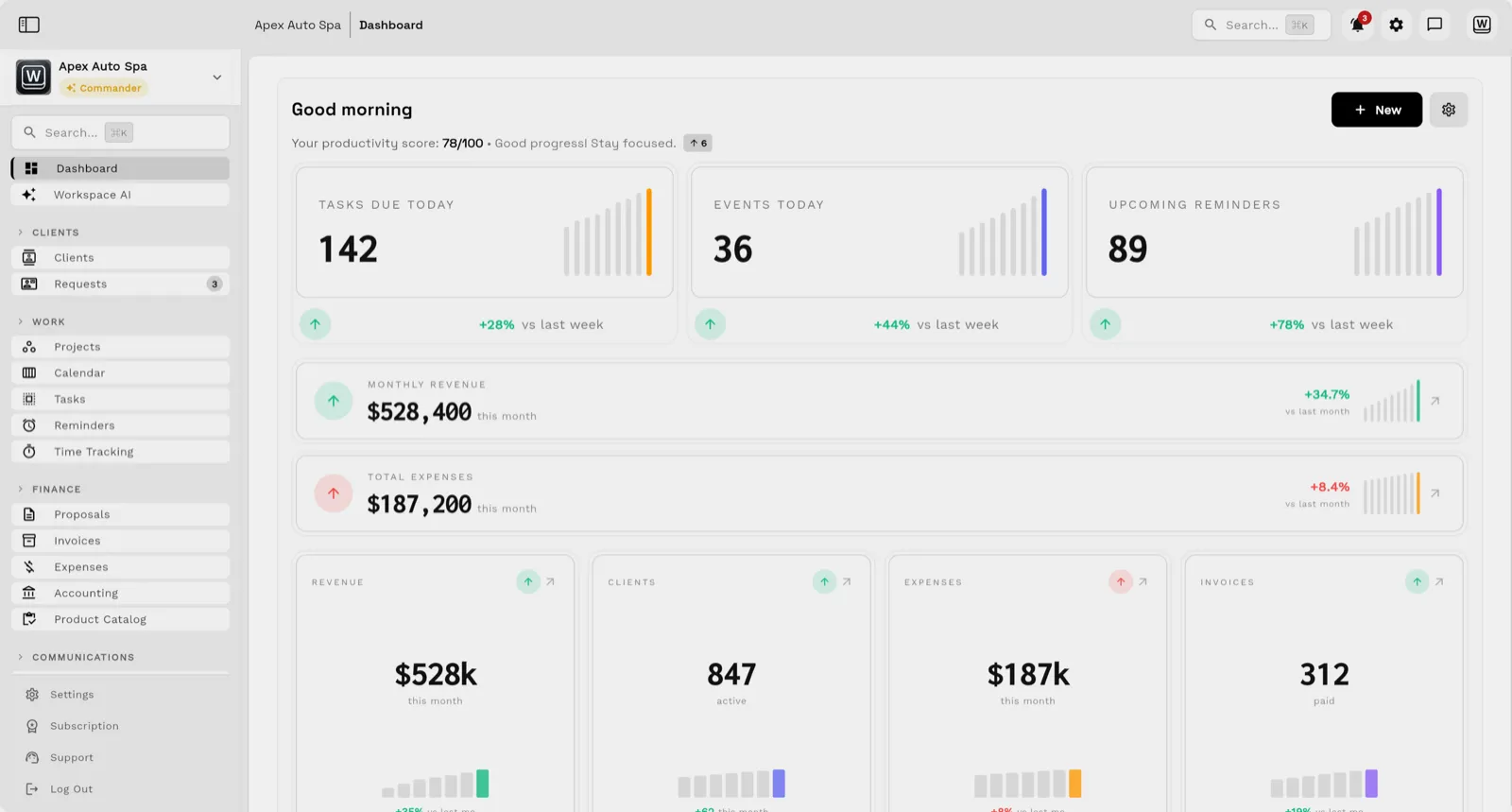
That screen answers "what did we promise, what is scheduled and what was paid" without opening three tools. Follow-up runs from the same record: email and SMS reminders run as Workflow Automations you can simulate before anything sends, and the shared inbox keeps email, texts and calls beside the account. The owner's dashboard rolls the same records up into tasks due, monthly revenue, expenses, active clients and paid invoices.

When a different tool is the better fit
- HubSpot is the better fit when sales pipeline and marketing automation are the priority and delivery happens elsewhere. The Workspace369 vs HubSpot comparison covers that split.
- Zoho CRM is the better fit when the company already runs on Zoho and wants a configurable CRM at a low per-user price. See the Workspace369 vs Zoho CRM comparison.
- ClickUp or Asana is the better fit when the team mostly needs project management and already has CRM and billing covered. The ClickUp and Asana comparisons show where each stops.
- Workspace369 is the wrong choice when you only need a contact database or a deal pipeline; a narrower tool will cost less to learn.
Run the five-question test
Take the last five client questions your team answered, such as "has the deposit cleared?" or "who promised the revised date?", and replay them in each trial with demo data. Count how many screens or tools each answer needs. If an answer means checking a CRM, a project board and an invoicing app, that is the cost this purchase should remove. The service business management software page shows the Workspace369 setup, and the pricing page lists current plans and seats.
Before you migrate real clients, export a sample from your current tools and confirm the fields you rely on map to the new record.
Sources reviewed for this guide
- HubSpot Sales Hub pricingOfficial pricing page reviewed October 22, 2026 for free tools, Starter, Professional and Enterprise per-seat prices and the onboarding fees.
- Zoho CRM pricingOfficial pricing page reviewed October 22, 2026 on both the Monthly and Annually views for the free edition and per-user edition prices.
- ClickUp pricingOfficial pricing page reviewed October 22, 2026 for the Free Forever plan and Unlimited and Business per-user prices, billed yearly and monthly.
- Asana pricingOfficial pricing page reviewed October 22, 2026 on both the annual and monthly views for the free plan and Starter and Advanced per-user prices.
- Workspace369 pricingPlan matrix reviewed October 22, 2026 for seats, SMS and calls, expenses, AR aging, accounting and trial terms.
Workspace369 publishes this documentation-based comparison and ranks itself first for service businesses that want the client, the work and the billing on one record; it names the tools that fit other readers better. It is not an independent ranking or a hands-on benchmark.
Run client follow-up in one workspace.
CRM, inbox, voice, invoicing, payments, projects, files, AI, and workflow automations — connected instead of exported.
14-day free trial. Card required. After the trial: from $29/month. Renews automatically every month until you cancel. Cancel anytime in Settings → Billing.