Best agency project management software in 2026: delivery to billing
Six agency project management tools compared on ten-seat yearly cost, time tracking, client access and billing gaps, with a use-case table and a one-project trial test.

By Simon Dziak, Founder, Workspace369 · LinkedIn
The best agency project management software connects delivery to the client and the money: the task board, the hours worked and the invoice sit together. For agencies that want that in one place, our pick is Workspace369. Teamwork, ClickUp and Asana are deeper on pure project management, and Productive on budgets and resourcing. Planning the team's load first? Try the free agency capacity planner.
Disclosure and method: Workspace369 publishes this guide and is one of the options. It is a documentation-based shortlist, not a hands-on benchmark. Official vendor pages were reviewed on October 15, 2026. Check current plans with each vendor before you buy.
Key takeaways
- Agency project management software should connect a project to the client, the hours worked and the invoice, not just move tasks across a board.
- Workspace369 fits agencies that want task boards, time tracking, a client portal and invoicing together; Specialist at $149 a month includes 10 seats, but it lists no Gantt, portfolio or workload views.
- ClickUp, Asana and Teamwork are deeper on pure project management: views, portfolios, workload and automations, mostly on higher plans.
- For ten seats billed yearly, the plans we checked range from about $90 a month (Productive Essential) to $250 a month (Teamwork Accelerate), before any separate invoicing tool.
- Run one client project from the first task to a sent invoice in each trial and count the steps you do in another app.
What's inside?
What agency project management software is (and what it is not)How we compared these toolsThe best agency project management software in 2026Side-by-side comparisonWhich tool fits your agency?Run a one-project test during the trialWhen a task-first tool is enough
What agency project management software is (and what it is not)
Agency project management software organizes client work across a team: projects, tasks, owners, files, approvals and status. What makes it agency software is the layer around the board: which client a project belongs to, how many hours went into it, and whether it has been billed. It is not a CRM for winning work, and it is not an accounting system. If a tool keeps tasks tidy but leaves hours and invoices in other apps, someone still reconciles the story by hand at month end.
How we compared these tools
We compared each tool on the same five points, using only the vendor's own pricing pages and the Workspace369 plan matrix:
- Cost for ten seats billed yearly on the plan that lists time tracking, as listed on October 15, 2026.
- Time tracking: the cheapest plan that lists it.
- Client access: how clients or guests see work without taking a paid seat.
- Billing gap: whether the pricing page lists invoicing, or leaves it to another tool.
- Trial terms: length, and whether the vendor says a card is needed.
We did not test speed, support, integrations or how well each tool scales past ten people, and we did not use third-party ratings. Order reflects fit for an agency that bills clients for delivery work, not depth of project views.
The best agency project management software in 2026
1. Workspace369, best for agencies that want delivery, hours and invoices on the client record
Workspace369 pairs kanban boards, task lists, subtasks and project stages with a team calendar, time tracking, a private client portal, proposals signed by link and invoices with online card payments through Stripe. Specialist is $149 a month with 10 seats included ($119.25 a month billed yearly); Voyager is $74 for 2 seats, extra seats are $10 each, and Cadet is $29 for one seat. Client portal visitors do not use a team seat. Specialist also lists project and customer profitability and AR aging. If you run the one-project test, expect the task, hours and invoice to share a record.
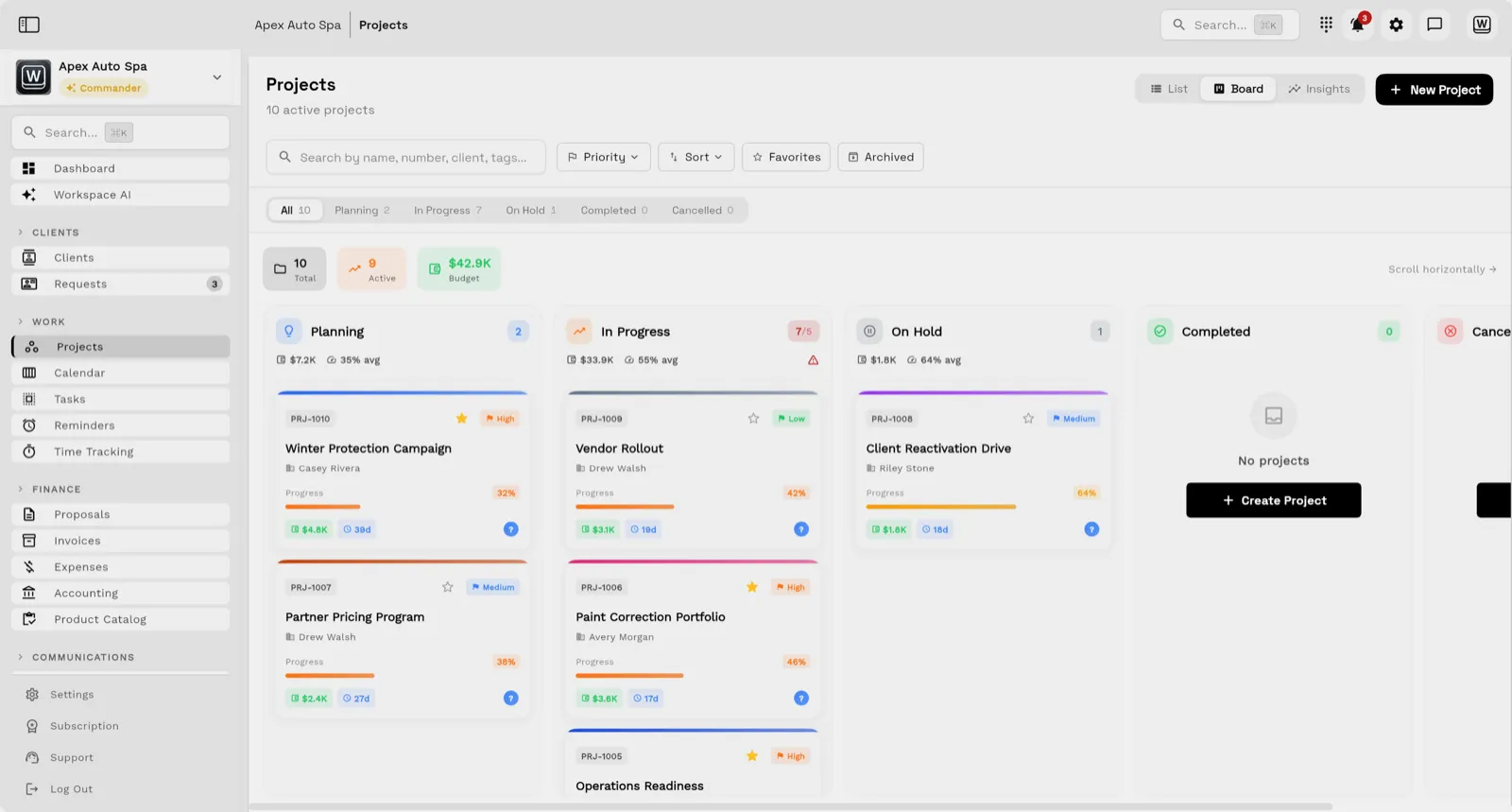
Limitations: the plan matrix lists boards, subtasks, stages and a calendar, but not Gantt charts, portfolios or workload views, so Asana, ClickUp and Teamwork are deeper on pure project management. Cadet caps active projects at 5, and the 14-day trial needs a card.
Best for: agencies of two to ten people whose project data and billing data keep drifting apart.
2. Teamwork, best for delivery-focused agencies that bill from logged time
Teamwork's pricing page lists Free for up to 5 users and 5 projects; Basics at $9.99 per user a month billed yearly (3 users minimum) with billable time tracking; and Accelerate at $24.99 (5 users minimum) with client invoicing from logged time and workload planning. Optimize adds CRM-pipeline-to-projects and is priced through sales. Paid plans offer a 14-day trial with no card. Ten Basics seats come to $99.90 a month billed yearly, and ten Accelerate seats to $249.90. See Workspace369 vs Teamwork for more.
Limitations: invoicing and workload planning need Accelerate, and the pricing page does not describe a client portal for Teamwork.com plans.
Best for: agencies that want strong project delivery with billing from hours.
3. Productive, best for budgets, utilization and resource planning
Productive's pricing page lists Essential with budgeting, resource planning, project and task management, time tracking and expense management, at $9 per user a month billed yearly in its plan comparison. That is $90 a month for ten seats. Professional is $24 and adds recurring budgets, rate cards, billable time approvals and an invoicing integration. The page's toggle shows other figures, so confirm at checkout. The trial is 14 days with no card. If you run the test, expect hours and budgets to be strong, and check how client approvals and invoices are handled for your workflow.
Limitations: invoicing appears as an integration on Professional, not a native feature, and the pricing page does not describe a client portal.
Best for: agencies that run on budgets and utilization targets.
4. ClickUp, best for flexible task management with a free plan
ClickUp's pricing page shows a newer grid with Free, Core at $9 per user a month billed yearly and Business at $17, and an older grid at $7 and $12, so confirm which applies. Free includes 5 Spaces and unlimited guests with edit rights. Time tracking is included on Core and Business, dashboards on Business, and Business allows 10,000 automation actions a month. Ten Business seats at $17 come to $170 a month billed yearly. See Workspace369 vs ClickUp.
Limitations: the pricing page does not list invoicing or a client portal, and the free plan is limited to 500 AI credits and 60MB of storage.
Best for: agencies that want deep, configurable task management and handle billing elsewhere.
5. Asana, best for structured delivery, portfolios and approvals
Asana's pricing page lists Personal free for 2 users, Starter at $10.99 per user a month billed yearly ($13.49 monthly) and Advanced at $24.99 ($30.49 monthly). Advanced lists unlimited portfolios, resource management and approvals and proofing, and Starter lists unlimited free guests. Timesheets and Budgets is a separate add-on. Ten Starter seats come to $109.90 a month billed yearly. The page states no refunds and does not mention a trial. If you run the test, expect task structure and approvals to be strong, and the invoice step to happen in another tool. See Workspace369 vs Asana.
Limitations: the pricing page does not list invoicing or a client portal, and time tracking sits on Advanced or an add-on.
Best for: agencies with several teams that need portfolios and formal approvals.
6. monday.com, best for visual boards and custom workflows
monday.com's pricing page lists Free for up to 2 seats, then Basic at $9, Standard at $12 and Pro at $19 per seat a month billed yearly, with plans starting from 3 users. Guest access starts at Standard and time tracking at Pro, so ten Pro seats come to $190 a month billed yearly. The page mentions a 14-day Pro trial and does not state a card requirement. If you run the test, expect boards to be quick to shape, and hours and invoices to live elsewhere. See Workspace369 vs monday.com.
Limitations: the pricing page does not list invoicing or a client portal, and time tracking needs the most expensive of the three standard plans.
Best for: agencies that want flexible visual boards and have billing handled elsewhere.
Side-by-side comparison
| Tool | Entry price | Ten seats, billed yearly | Time tracking from | Billing on the plan | Trial |
|---|---|---|---|---|---|
| Workspace369 | $29 (Cadet, 1 seat) | $119.25 a month (Specialist) | Every plan | Invoices on every plan | 14 days, card required |
| Teamwork | Free (5 users) | $99.90 (Basics) or $249.90 (Accelerate) | Basics | Invoicing on Accelerate | 14 days, no card |
| Productive | Not stated | $90 (Essential) | Essential | Invoicing integration on Professional | 14 days, no card |
| ClickUp | Free | $170 (Business, newer grid) | Core | Not listed | Not stated |
| Asana | Free (2 users) | $109.90 (Starter) | Advanced or add-on | Not listed | Not stated |
| monday.com | Free (2 seats) | $190 (Pro) | Pro | Not listed | 14 days (Pro), card not stated |
Which tool fits your agency?
| If you mostly need | Start with | Why |
|---|---|---|
| Tasks, hours, portal and invoices on one record | Workspace369 | Time tracking and invoices on every plan |
| Delivery with workload planning and billing from hours | Teamwork | Client invoicing from logged time on Accelerate |
| Budgets, rate cards and utilization | Productive | Budgeting and resource planning on Essential |
| Configurable tasks, docs and dashboards | ClickUp | Time tracking from Core, dashboards on Business |
| Portfolios, approvals and proofing | Asana | Advanced lists all three |
| Visual boards for many workflows | monday.com | Custom boards, guests from Standard |
Run a one-project test during the trial
Feature lists look alike. Take one fictional client project from the first task to a sent invoice in each tool you shortlist:
- Create the client and a project with five tasks and two owners.
- Attach a file and ask the "client" to approve it.
- Log four hours against two of the tasks.
- Send an invoice that includes those hours.
- Check what a manager sees in one view: status, hours and amount billed.
- Count how many times you opened another app.
If you run the test, expect the dedicated project tools to feel stronger on steps 1 and 2 and the tools with billing to pull ahead on steps 4 and 5. That count is a better buying signal than any table, including the ones above.

When a task-first tool is enough
A task-first tool is enough when the agency already has a reliable CRM and billing workflow, client communication is handled outside the delivery team, and leadership only needs project status. If you do need profitability, the project profitability software for agencies page and the project profitability calculation guide show how hours and billing combine. Workspace369 lists project profitability from Specialist.
Whichever tool you trial, finish one full project cycle with demo data before you import real clients, and confirm you can export your records. Compare current plans on the pricing page or start with the agency project management software hub.
Research record
Sources reviewed for this guide
- Workspace369 pricingPlan matrix reviewed October 15, 2026.
- Teamwork pricingOfficial pricing page reviewed October 15, 2026 for plan prices, minimum users and plan gates.
- Productive pricingOfficial pricing page reviewed October 15, 2026 for plan prices, features and trial terms.
- ClickUp pricingOfficial pricing page reviewed October 15, 2026 for plan prices, free plan limits and plan gates.
- Asana pricingOfficial pricing page reviewed October 15, 2026 for plan prices and plan gates.
- monday.com pricingOfficial pricing page reviewed October 15, 2026 for plan prices, seat minimum and plan gates.
Workspace369 publishes this documentation-based comparison and is one of the options. It is not an independent ranking or a hands-on benchmark.
Put it into practice
Run client follow-up in one workspace.
CRM, inbox, voice, invoicing, payments, projects, files, AI, and workflow automations — connected instead of exported.