Best freelance project management software in 2026: tasks to invoice
Best freelance project management software: seven tools compared on entry price, plan limits, time tracking and billing, with a one-project trial test.
We make Workspace369 and list it first here. Weigh our ranking with that in mind, and if another tool fits you better, use it.

By Simon Dziak, Founder, Workspace369 · LinkedIn
The best freelance project management software depends on whether billing is part of your problem. Workspace369 fits freelancers who want projects, time and invoices on one client record, Plutio and Moxie suit solo freelancers who want a similar bundle for less, and Trello, Asana, ClickUp and Notion suit people who only need tasks (see Workspace369 vs Asana).
The best tool keeps each project tied to its client, its deadline, the hours you spent and the invoice you still need to send. Freelance projects fail in quiet ways: a task nobody remembered, a revision that ate a weekend, a finished job that was never billed. Not sure what your tool stack costs yet? Try the free software stack cost calculator.
Disclosure and method: Workspace369 publishes this guide and is one of the options. It is a documentation-based shortlist, not a hands-on benchmark. Official vendor pages were reviewed on October 27, 2026. Free plans and their limits change, so check them with each vendor before you buy.
Key takeaways
- Freelance project management software should carry a project from task list to tracked hours to a sent invoice, not stop at a board.
- Workspace369 fits freelancers who want projects, time tracking, a client portal and invoicing on one client record from $29 a month; Cadet is limited to one seat.
- Plutio and Moxie also put projects, time and invoicing in one tool; Plutio caps its Core plan at 9 active clients and Moxie leaves the client portal to Pro.
- Trello, Asana, ClickUp and Notion are strong general task apps with free plans, but billing and client records sit outside them.
- Run one fictional project from first task to sent invoice in each trial and count the steps you do outside the tool.
What's inside?
What freelance project management software is (and what it is not)How we compared these toolsThe best freelance project management software in 2026Side-by-side comparisonWhich tool fits your freelance business?Workspace369 in action: one client project from proposal to invoiceRun a one-project test during the trialWhen to keep it simple
What freelance project management software is (and what it is not)
For a freelancer, project management software is a place to run one engagement from start to finish: stages, tasks and subtasks with dates, a board you can scan in seconds, and time logged against the work. It is not a programme-management suite for a 40-person team, and Gantt charts and workload balancing matter mainly once you hire or subcontract. A general task app organizes work well but does not know who the client is or what they owe you. If that gap costs you time, the best project management and invoicing software comparison goes deeper on that link.
How we compared these tools
We compared each tool on the same five points, using only the vendor's own pricing and product pages:
- Entry price for one person, monthly and billed yearly, as listed on October 27, 2026.
- Task and project basics on that plan: projects, tasks, boards or lists.
- Time tracking and invoicing on that plan, because "done" should lead to "billed".
- Hard limits on the entry or free plan: clients, projects, users or storage.
- Trial terms: length, and whether the vendor says a card is needed.
We did not test speed, support, mobile apps or reliability, and we did not use third-party ratings. Order reflects fit for a freelancer who wants tasks, time and billing connected.
The best freelance project management software in 2026
1. Workspace369, best for freelancers who want projects, time and invoices on one client record
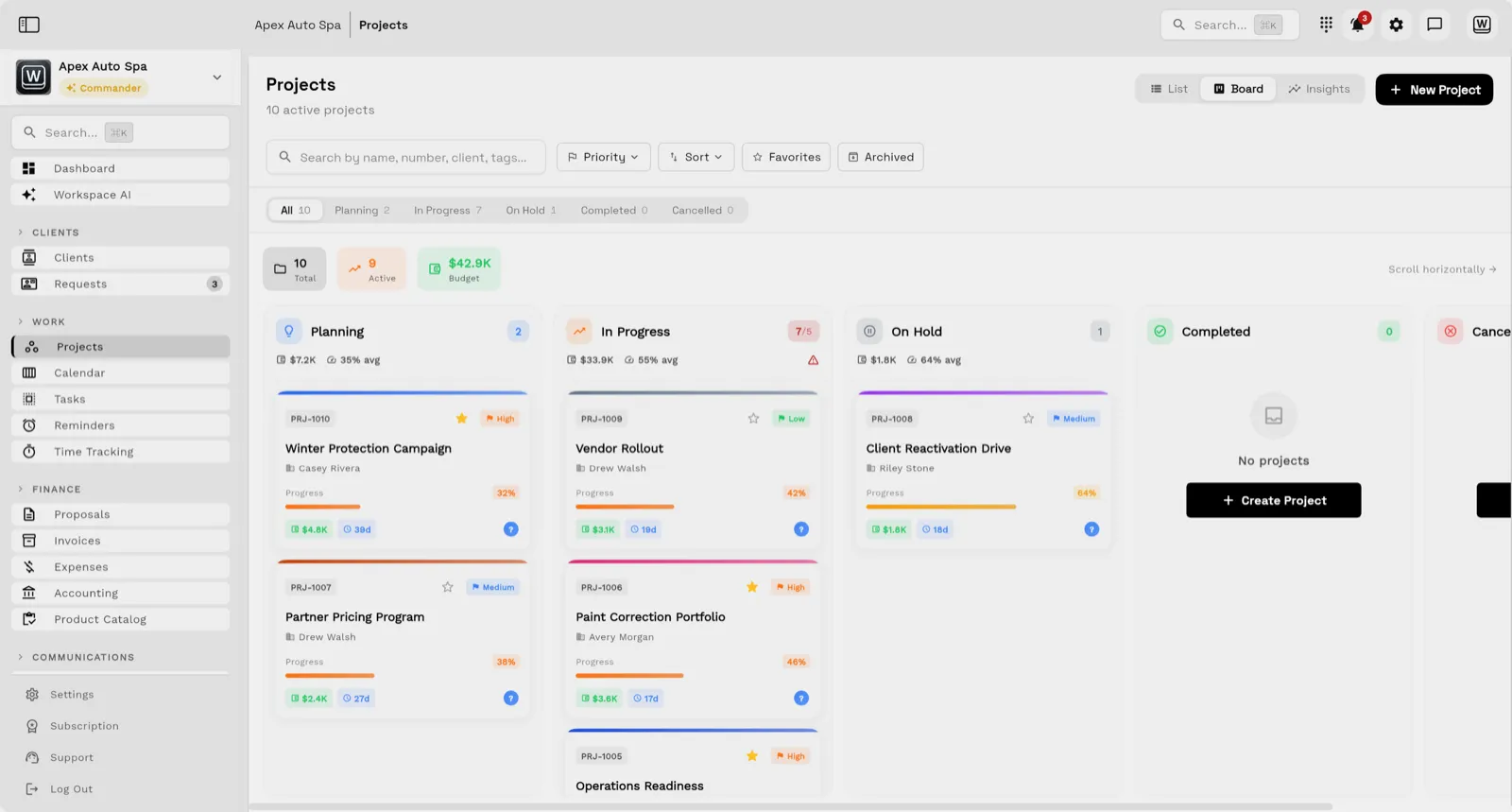
Workspace369 puts projects with stages, kanban boards, task lists and subtasks on every plan, next to the client record, a private client portal, proposals signed by link and online payments. Time tracking with timers, timesheets and billable time turns into invoice line items. Cadet is $29 a month for one person ($23.25 a month billed yearly). The screenshot is a demo board, not a customer result.
Limitations: Cadet is one seat with unlimited projects. Voyager ($74 a month) adds a second seat. Expense tracking and project profitability start at Specialist ($149 a month). The 14-day trial needs a card. It is built around client work, so a team that only needs task boards may prefer the free apps below.
Best for: solo freelancers and small studios whose money leaks between "done" and "invoiced".
2. Plutio, best for an everything-included solo plan with few clients
Plutio's pricing page lists unlimited projects, tasks with Kanban boards, lists, calendars and Gantt charts, time tracking, unlimited invoices and a client portal on every plan. Core is $19 a month ($15.83 a month billed yearly) with a 7-day trial and no card required. If you run the one-project test, every step through the invoice is listed on Core. Count your active clients over the past year before you commit, because the cap is what you will hit first.
Limitations: Core allows 9 active clients and no additional contributors, so a tenth active client or a subcontractor means Pro at $49 a month ($40.83 a month billed yearly). White-label is a $9 a month add-on.
Best for: a solo freelancer with a small, steady client list who wants every module from day one.
3. Moxie, best for a low price with time and invoicing included
Moxie Starter is $12 a month, or $10 billed yearly. Its pricing page lists project management, time tracking, invoicing and payments, proposals and contracts, a sales pipeline and basic accounting from Starter. Moxie's homepage lists a 14-day free trial with no credit card required.
Limitations: the client portal, custom domain and workflow automations start at Pro ($25 a month, $20 billed yearly), so on Starter clients still email you for status. The page does not describe the task features in detail, so check them in the trial. If you run the one-project test, expect the time and invoice steps to be listed on Starter, with status updates staying in email until you add a portal.
Best for: new freelancers who want projects, hours and invoices at a low monthly cost and do not need a portal yet.
4. Asana, best for structured task management with a free plan
Asana's Personal plan is free, limited to 2 users, and lists unlimited tasks and projects with list, board and calendar views. Starter is $10.99 per user a month billed yearly ($13.49 monthly) and Advanced is $24.99 billed yearly. The page lists time tracking of estimated against actual time and a separate Timesheets and Budgets add-on, but it does not show a billable timer that feeds an invoice. The page does not state a trial length or card terms.
Limitations: there are no invoices or client records, so billing lives in another tool. Time tracking is also offered through integrations, so check which tier carries what you need.
Best for: freelancers who coordinate with one or two collaborators and want a polished task tool, with invoicing handled elsewhere.
5. ClickUp, best for customizable views on a free plan
ClickUp's Free Forever plan lists Kanban boards, a calendar, sprint management and time tracking, with no credit card required. Its limits are specific: 60MB of file storage, 5 Spaces and 1 form. Unlimited Gantt charts, forms and custom fields start at Core, shown at $9 per user a month billed yearly. The pricing page also carries older price grids, so confirm the paid price with ClickUp before you buy.
Limitations: there is a lot to configure, so expect to spend setup time before the first project runs; the pricing page lists no invoicing on any plan, and the free plan's 60MB of storage is tight for client files.
Best for: freelancers who enjoy building their own system and mostly need many ways to view tasks.
6. Trello, best for a simple board
Trello's Free plan allows up to 10 boards per Workspace, with 250 Workspace command runs a month and a 10MB per-file limit. Standard is $5 per user a month billed yearly ($6 monthly) with unlimited boards and 1,000 command runs. Built-in automation is on every board. The page does not state a trial length or card terms for Premium.
Limitations: the pricing page does not list time tracking on any plan, and there are no client records or invoices. Table and Calendar Workspace views start at Premium ($10 per user a month billed yearly).
Best for: freelancers who think in cards and columns and want a gentle learning curve. If you run the one-project test, expect steps 1 and 2 to be quick and steps 3 to 5 to need other tools. Weighing other board tools? See our Trello alternatives.
7. Notion, best for notes, docs and light project tracking
Notion's Free plan allows 7 days of page history and 5 MB per uploaded file. Plus is $10 per member a month billed monthly, with a note that yearly billing saves up to 20%. The pricing page does not state a trial length or card terms.
Limitations: it is a flexible workspace rather than a project tool, so you build the task database yourself. It lists no time tracking or invoicing, and Free is limited on file size.
Best for: freelancers who want client notes, briefs and a simple task database in one flexible workspace. If you run the one-project test, expect to build the stages and task fields yourself before step 1. Moving off Notion? Start with how to switch from Notion, including what moves and what doesn't.
Side-by-side comparison
| Tool | Entry price (monthly) | Billed yearly | Time and invoicing on entry plan | Main entry-plan limit | Trial |
|---|---|---|---|---|---|
| Workspace369 | $29 (Cadet) | $23.25 a month | Both | 1 seat, unlimited projects | 14 days, card required |
| Plutio | $19 (Core) | $15.83 a month | Both | 9 active clients, solo | 7 days, no card |
| Moxie | $12 (Starter) | $10 a month | Both; no portal | Portal from Pro | 14 days, no card |
| Asana | $13.49 per user (Starter) | $10.99 per user | Neither listed on Starter | Free: 2 users | Not stated |
| ClickUp | Free Forever | $9 per user (Core) | Time tracking on Free; no invoicing listed | Free: 60MB storage | Not stated for paid |
| Trello | $6 per user (Standard) | $5 per user | Neither listed | Free: 10 boards | Not stated |
| Notion | $10 per member (Plus) | Not stated | Neither listed | Free: 5 MB files | Not stated |
Which tool fits your freelance business?
| If you mostly need | Start with | Why |
|---|---|---|
| Tasks, hours and invoices on one client record | Workspace369 | Projects, time tracking, portal and invoices on every plan |
| Every module for a handful of clients | Plutio | All features on Core, capped at 9 active clients |
| A low price with invoicing | Moxie | $10 a month billed yearly, portal on Pro |
| A polished task tool with a free plan | Asana | Free for 2 users, with list, board and calendar views |
| Custom views and many ways to organize | ClickUp | Boards, calendar, sprints and time tracking on Free Forever |
| A simple board and nothing more | Trello | Free for up to 10 boards |
| Notes, briefs and light tracking | Notion | One flexible workspace with a free plan |
Workspace369 in action: one client project from proposal to invoice
Take a freelancer who builds a brand-refresh project for one client. The work starts with a proposal sent by link and signed there, and the client record keeps it with the project. Each work session is logged with the time tracker, and billable time becomes invoice lines instead of a spreadsheet you retype. The client can follow the project and its invoices in the client portal rather than asking for status by email.
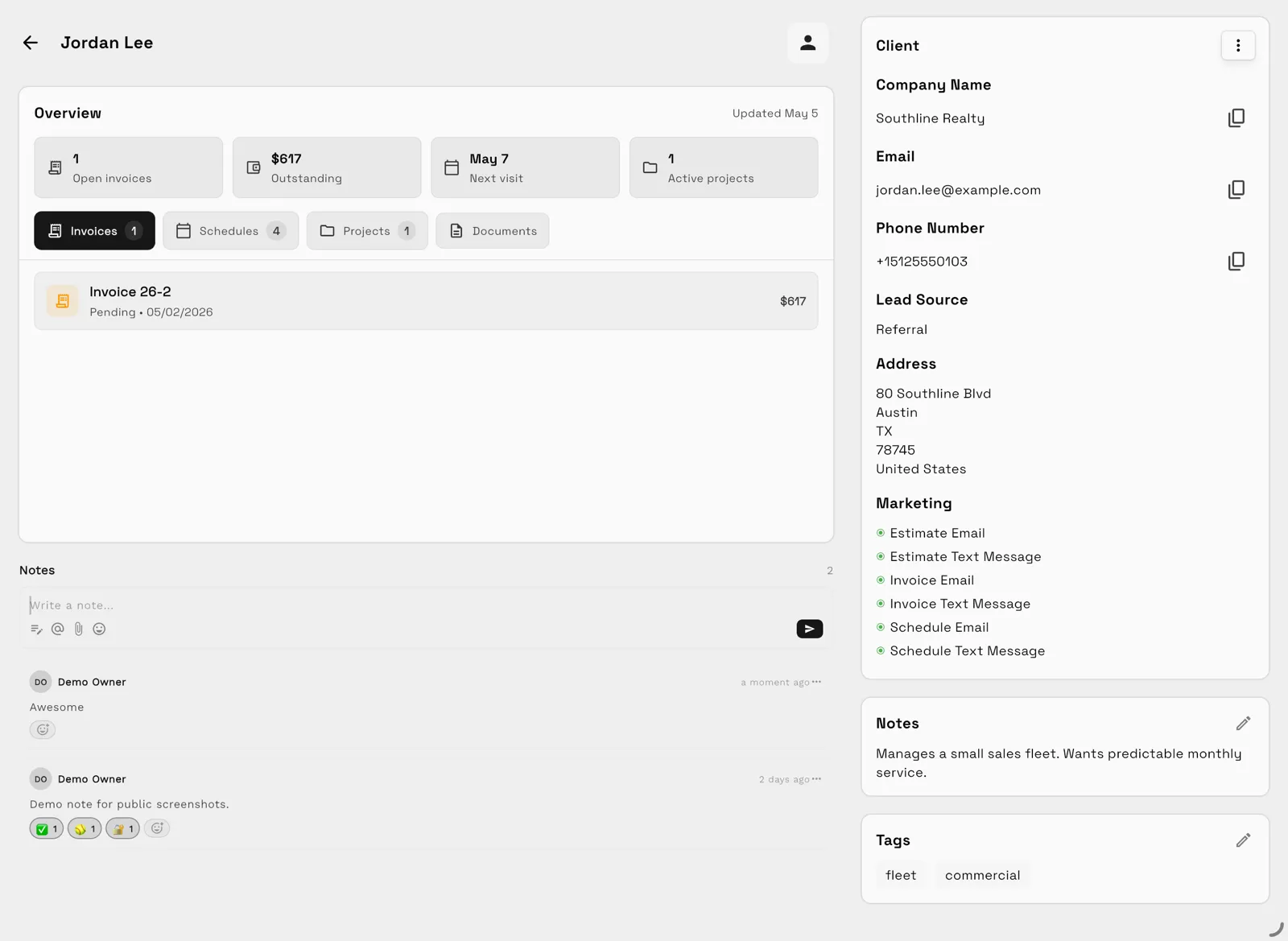
The first screenshot is one client record in a demo workspace with sample data. The overview tiles show open invoices, the amount outstanding and active projects, and the tabs keep that client's invoices, projects and documents together, which is the "one record" the test below checks for.
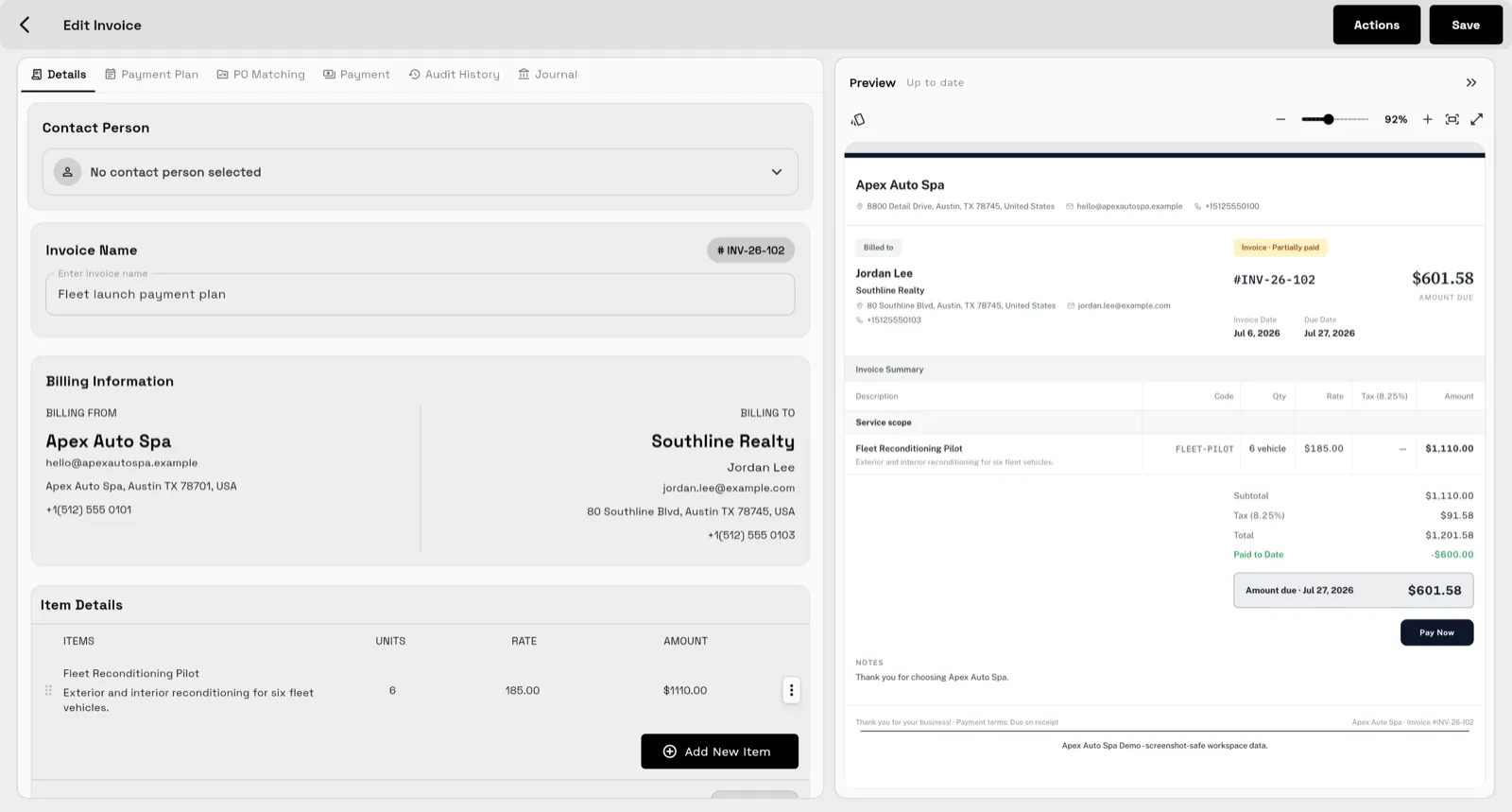
The second screenshot is the invoice editor in the same demo workspace: billing details and line items on the left, and a live preview of what the client receives on the right, including a Pay Now button. Both are sample data, not a customer result.
What it does not do: it is not a task app for large teams, so a studio that only needs boards may be happier with a free tool, and on Cadet you get unlimited projects and one seat.
Run a one-project test during the trial
Set up one realistic project in each tool you are considering:
- Create a project for a fictional client with three stages and six tasks.
- Add two subtasks and a due date to the first task.
- Track 45 minutes against one task.
- Move the project to "done".
- Try to invoice it: how many steps until the client has an invoice for the work and the hours?
If you run the test, expect most tools to pass steps 1 to 4. Step 5 is where they differ, and it is the step that pays you.

When to keep it simple
If you only need a to-do board and your billing already works, a free task app may be all you need. Move to a tool that connects projects, time and invoices when the gap between "done" and "invoiced" is where your money leaks. For a closer look at tracked hours, see the best time tracking with invoicing guide.
Whichever tool you trial, use demo data first, and confirm you can export your projects if you ever leave. Compare current Workspace369 plans on the pricing page.
Sources reviewed for this guide
- Workspace369 pricingPlan matrix reviewed October 27, 2026.
- Trello pricingOfficial pricing page reviewed October 27, 2026 for plan prices, board limits and per-file limits.
- Asana pricingOfficial pricing page reviewed October 27, 2026 for plan prices, free plan limits and time tracking.
- ClickUp pricingOfficial pricing page reviewed October 27, 2026 for Free Forever limits and plan prices.
- Notion pricingOfficial pricing page reviewed October 27, 2026 for plan prices and free plan limits.
- Moxie pricingOfficial pricing page reviewed October 27, 2026 for Starter and Pro features and trial.
- Plutio pricingOfficial pricing page reviewed October 27, 2026 for plan limits, features and trial terms.
Workspace369 publishes this documentation-based comparison and is one of the options. It is not an independent ranking or a hands-on benchmark.
Run client follow-up in one workspace.
CRM, inbox, voice, invoicing, payments, projects, files, AI, and workflow automations — connected instead of exported.
14-day free trial. Card required. After the trial: from $29/month. Renews automatically every month until you cancel. Cancel anytime in Settings → Billing.
See pricing